

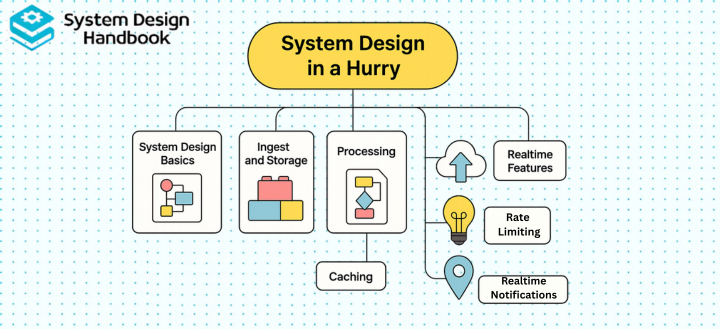
Most engineers feel overwhelmed when preparing for System Design interviews, partly because System Design seems limitless, and partly because interviewers expect clarity under extreme time constraints.
The good news is that you don’t need to master every distributed systems topic or memorize every architecture pattern to perform well. What you do need is a structured, repeatable way to think about problems quickly, even when you’re short on time.
This guide teaches you how to approach System Design in a hurry by focusing on the 20% of concepts that deliver 80% of the interview impact. Instead of drowning in theory, you’ll learn a practical framework for breaking problems down, identifying the right components, and communicating trade-offs effectively. With the right mental templates and preparation strategy, even complex systems become manageable, and you can confidently walk into any System Design interview ready to perform.
The Repeatable System Design Framework for Any Interview
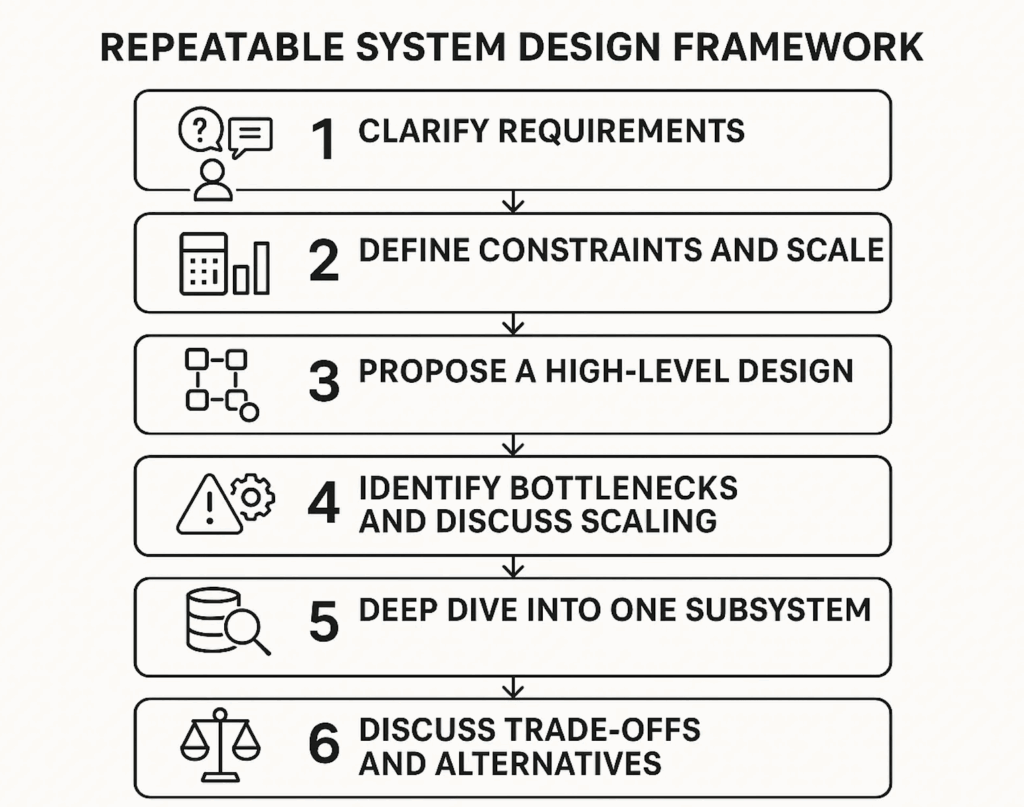
Successful candidates aren’t the ones who know the most technologies; they’re the ones who stay structured. The 10-minute System Design framework gives you a predictable path you can reuse for any problem, especially when you’re pressed for time. This framework helps you clarify ambiguity, define boundaries, and ensure you cover everything interviewers expect.
Step 1: Clarify Requirements (1–2 minutes)
Before designing anything, pause and make sure you understand the problem you are solving. This is where strong candidates slow down just enough to ask the right questions, rather than rushing into architecture prematurely.
Your goal here is to uncover what actually matters for this system and what can be safely deprioritized. Targeted questions help you surface hidden constraints and align expectations early.
Some useful questions to ask include:
- Is this primarily a read-heavy or write-heavy system?
- Do we need real-time guarantees, or is eventual consistency acceptable?
- What are the core metrics of success for this system?
- Who are the users, and what scale should we realistically assume?
Clear requirements act as guardrails. They prevent overengineering and give context to every design decision that follows.
Step 2: Define Constraints and Scale (1–2 minutes)
Once the requirements are clear, the next step is to quantify them. System design is not about perfect numbers; it’s about demonstrating that you understand how systems behave as load increases.
At this stage, rough estimates are more than enough. They show that you are thinking in terms of capacity, growth, and limits.
Typical estimates to call out include:
- Requests per second (RPS)
- Expected storage growth over time
- Read-to-write ratio
- Latency expectations
Even approximate calculations help justify later decisions around caching, sharding, or asynchronous processing.
Step 3: Propose a High-Level Design (2–3 minutes)
With requirements and scale in mind, you can now outline a high-level architecture. This is where you describe the major components and how they interact, without getting lost in implementation details.
Focus on clarity over completeness. Interviewers care far more about why components exist than how polished the diagram looks.
A typical high-level design might include:
- An API gateway or entry point
- A load balancer
- Stateless web or application servers
- Caching layers
- One or more databases
- Object storage for large assets
- A message queue for asynchronous work
- A CDN for static or semi-static content
At this stage, you are setting the mental model for the rest of the discussion.
Step 4: Identify Bottlenecks and Discuss Scaling (1–2 minutes)
After presenting the baseline architecture, shift the conversation toward scale and failure. This is often where strong candidates distinguish themselves from average ones.
Walk through how each layer behaves under increased load and how you would address potential bottlenecks.
Common scaling strategies to discuss include:
- Replication for availability and read scalability
- Sharding or partitioning for data growth
- Cache warming and eviction strategies
- Queueing to absorb traffic spikes
This step demonstrates that you are thinking beyond the “happy path.”
Step 5: Deep Dive Into One Subsystem (1 minute)
At this point, interviewers often ask you to zoom in on a specific part of the system. Choosing a subsystem confidently and explaining it clearly shows maturity and depth.
You might dive into:
- Database schema design
- Cache invalidation strategies
- Consistent hashing for sharding
- Real-time messaging workflows
- Feed ranking or recommendation logic
The goal is not exhaustive detail, but thoughtful reasoning and awareness of tradeoffs..
Step 6: Discuss Trade-Offs and Alternatives (1 minute)
Finally, bring the discussion together by explicitly acknowledging trade-offs. Every system design decision optimizes for something and sacrifices something else.
Common trade-offs to highlight include:
- Latency vs consistency
- Availability vs partition tolerance
- Cost vs performance
- Simplicity vs scalability
This is where you demonstrate engineering judgment. Recognizing trade-offs under time pressure is often more impressive than proposing a complex solution.
Why this framework works
This structured, 10-minute approach immediately separates candidates who can think clearly from those who ramble or panic. More importantly, it mirrors how real system design discussions happen in practice, starting with clarity, building gradually, and ending with thoughtful tradeoffs.
Core Building Blocks You Must Know
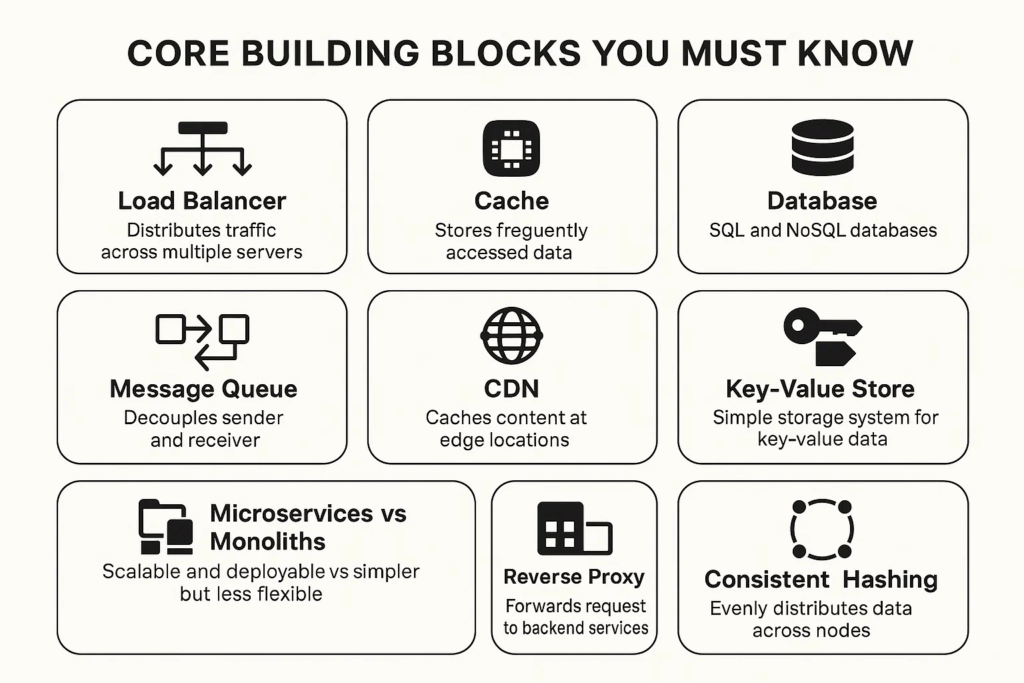
You cannot master System Design in a hurry unless you understand the foundational components used in almost every architecture. The key is to be able to explain each one simply, under pressure, in 10–20 seconds.
Below are the essential building blocks, optimized for interview-ready explanations.
Load Balancer
Distributes traffic across multiple servers to prevent overload and improve availability.
Key value: avoids single points of failure.
Cache (Redis/Memcached)
Stores hot, frequently accessed data in memory for low-latency reads.
Use cases: user profiles, session tokens, feed data.
Trade-offs: stale data, invalidation complexity.
Database (SQL and NoSQL)
SQL: strong consistency, relational schema, perfect for financial or strict data integrity systems.
NoSQL: high scalability, flexible schema, ideal for large reads and distributed writes.
Message Queue (Kafka/RabbitMQ/SQS)
Decouples services and smooths out traffic spikes.
Essential for:
- Background processing
- Retrying failed tasks
- Event-driven architectures
CDN (Content Delivery Network)
Serves static assets from edge locations to reduce latency and backend load.
Great for images, videos, CSS, JS.
Key-Value Store
Simple storage system ideal for session data, counts, and temporary tokens.
Used heavily in high-throughput systems.
Object Storage (S3/GCS)
Stores large binary data like images, videos, backups, and documents.
Highly scalable but slower than databases.
Microservices vs Monoliths
Monolith: simpler, great for small teams and fast iteration.
Microservices: scalable, independently deployable, but more operationally complex.
Reverse Proxy (Nginx/Envoy)
Handles routing, SSL termination, and protection of backend services.
Consistent Hashing
Evenly distributes load across servers when nodes join or leave; crucial for caching, sharding, and distributed systems.
By mastering these core building blocks and being able to explain them clearly and concisely, you gain 70% of what System Design interviews evaluate, without needing to memorize data-center-level details.
High-Level Design Templates for Fast Thinking
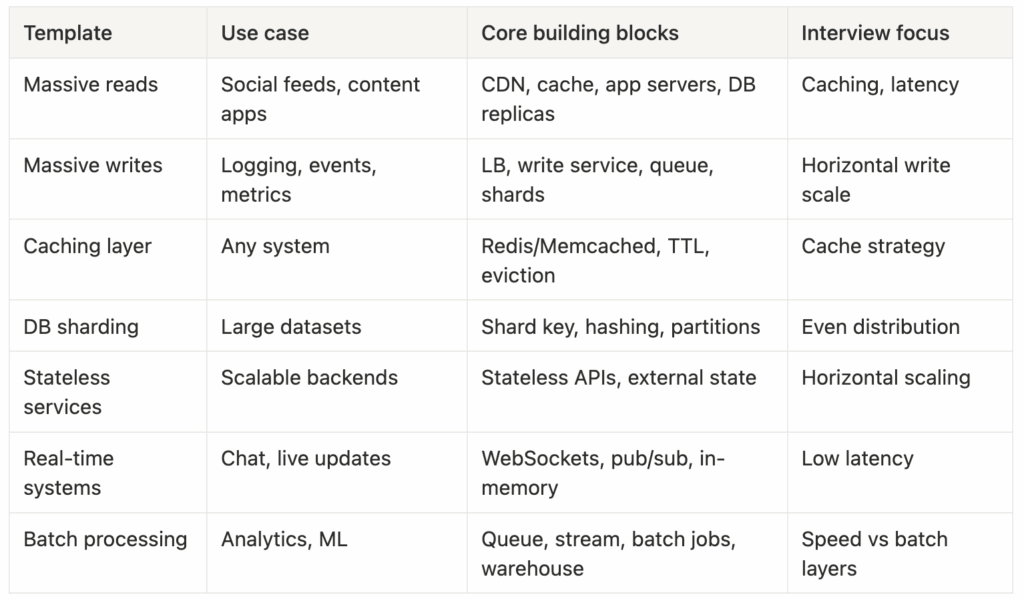
When doing System Design in a hurry, you don’t have time to reinvent a new architecture every interview. Instead, you need reusable templates, high-level patterns you can immediately adapt to any problem. These templates help you avoid blank-page panic and accelerate your thinking under tight time limits.
Below are simple, repeatable architecture patterns you can sketch in under 60 seconds.
Template 1: Systems With Massive Reads
Most social platforms and content delivery systems are read-heavy.
Your skeleton should include:
- CDN → Cache → Application servers → Database
- Read replicas for scaling
- Cache-aside strategy (load into cache when missing)
- Optional denormalization to speed up reads
When time is limited, emphasize:
- Caching strategy
- Database read distribution
- Minimizing latency
Template 2: Systems With Massive Writes
High write workloads stress databases.
Your template should include:
- Load balancer → Write-optimized service
- Message queue (Kafka-level throughput)
- Batched writes to storage
- Sharded or partitioned data
- Append-only storage or log-based architecture
Interviewers love hearing:
“You scale writes horizontally using partitions and separate write paths.”
Template 3: Adding Caching to Anything
Caching is one of the simplest and most impactful performance improvements.
Mention:
- Redis or Memcached
- TTL (time-to-live)
- Eviction policies (LRU, LFU)
- Write-through vs write-around vs write-behind
Interviewers expect you to think in cache layers:
- CDN → Application cache → Database cache
Template 4: Database Sharding for Scalability
When data becomes too big for a single machine, you shard.
Mention the basics quickly:
- Shard keys
- Consistent hashing
- Avoiding hot partitions
- Rebalancing strategies
Key insight (interview gold):
“Choosing the wrong shard key is a common bottleneck; I’d design for even access distribution.”
Template 5: Stateless Microservices for Horizontal Scaling
Many modern designs rely on services that store no internal state.
Benefits:
- Easy horizontal scaling
- Resilience
- Fault isolation
State moves to:
- Databases
- Queues
- Caches
- Object storage
Interviewers love it when candidates connect statelessness to scaling simplicity.
Template 6: Real-Time Processing
Quick architecture:
- WebSocket server
- Pub/sub messaging
- In-memory state
- Distributed coordination (e.g., Redis pub/sub, Kafka streams)
Focus on:
- Low latency
- Event ordering
- Client session management
Template 7: Batch and Offline Processing
Common in ML and big data systems:
- Message queue or event log
- Stream processor
- Batch job (Spark, Flink)
- Data warehouse (Snowflake, BigQuery)
Interview trick:
“Real-time data goes to a speed layer, while deep analytics go to a batch layer.”
These templates allow you to produce a complete architecture in seconds, even when you’re pressed for time.
Latency, Throughput, Traffic Estimation, and Capacity Planning
System Design in a hurry depends heavily on being able to estimate scale, even without exact numbers. Interviewers aren’t testing perfect math; they’re testing whether you can approximate load and make sound design choices.
Below is the quickest, most reusable version of throughput and capacity planning.
1. Latency Basics You Can Mention in Seconds
- Client → CDN: 10–50 ms
- CDN → load balancer: 1–5 ms
- App server processing: 1–20 ms
- Database read: 1–5 ms (cache hit), 5–20 ms (DB)
- Disk access: 5–10 ms (SSD), 10+ ms (HDD)
These numbers don’t need to be perfect—just directionally correct.
2. Throughput and Traffic Estimation (RPS + Read/Write Ratios)
A good quick structure:
- Start with daily active users
- Assume the number of actions per user
- Convert to requests per second
Example:
If 10M users generate 50M actions/day →
50M / 86,400 ≈ 600 RPS.
The ability to convert daily → per-second is critical.
3. Storage Estimation
Easy formula:
Data per request × requests per day × retention period
Example:
1 KB per log entry × 100M logs/day × 30 days →
≈ 3 TB per month.
You don’t need correctness—you need methodology.
4. Bandwidth and Network Cost Calculations
Know one universal truth:
Text is cheap, media is expensive.
Ballpark:
- Image = 200 KB–2 MB
- Video = 1–100 MB
- Thumbnails = 10–50 KB
Useful interview phrase:
“We should use a CDN for static assets to offload traffic from the origin.”
5. Capacity Planning Concepts (Short Versions)
- Vertical vs horizontal scaling
- Upgrading machines vs adding more machines
- Replication
- Improves availability and read throughput
- Sharding/partitioning
- Solves write bottlenecks and storage limits
- Backpressure
- Message queue absorbing bursts of traffic
- Auto-scaling
- Scale based on CPU, RPS, or queue depth
6. Handling Hotspots Quickly
A hotspot occurs when one user or entity receives a disproportionate amount of traffic.
Examples:
- A celebrity profile
- A viral post
- A popular hashtag
Solution patterns:
- Cache aggressively
- Add secondary indexes
- Shard by random UUID instead of user ID
- Precompute feed results
This section gives you the numerical intuition interviewers expect, without requiring deep math.
Quick Deep Dives: The Most Common Real Interview Topics
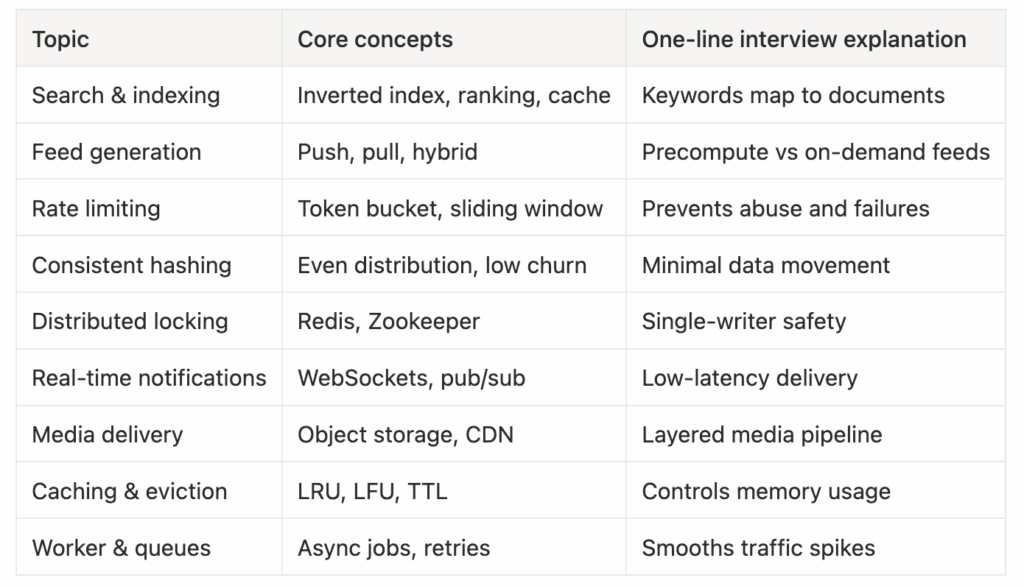
During a System Design interview, you’re often asked to “deep dive” into a component. System Design in a hurry means you should have compact, pre-built mental models for each of the most common subsystems.
Here are the most valuable deep dives to master.
1. Search and indexing
Search systems rely on a small set of core ideas that appear across almost every implementation. At the center is the inverted index, which maps terms to the documents in which they appear. Before indexing, content is tokenized so that text can be broken into searchable units, and results are later ranked based on relevance signals. To keep performance predictable, frequently accessed queries and results are often cached.
A simple way to explain this in an interview is: search uses an inverted index to map keywords to documents, and the index is typically updated asynchronously to improve write throughput without slowing down user queries.
2. Feed generation: push vs pull models
Feed generation is a common system design problem in social platforms such as Twitter, Facebook, and LinkedIn. The core decision revolves around whether feeds are generated ahead of time or computed when a user requests them.
In a push-based model, feeds are precomputed and stored for each user. This makes reads extremely fast, but it comes at the cost of heavy write amplification and increased storage usage. In contrast, a pull-based model generates the feed on demand by querying recent activity. This simplifies writes and storage but results in slower reads and higher computation at request time.
Most real-world systems use a hybrid approach, pushing content for highly active users while pulling dynamically for less frequent interactions.
3. Rate limiting
Rate limiting is a defensive system design mechanism used to protect services from abuse and unexpected traffic spikes. Without rate limits, a single misbehaving client can overwhelm shared infrastructure and trigger cascading failures.
Common implementations include token bucket, leaky bucket, and sliding window algorithms. While the mechanics differ, the goal is the same: enforce fair usage while preserving system stability.
A concise interview-friendly explanation is that rate limiting prevents cascading failures in distributed systems by controlling how much traffic any single client can generate.
4. Consistent hashing
Consistent hashing is widely used in caching, sharding, and load balancing scenarios. It addresses a common problem in distributed systems: how to distribute data evenly across nodes while minimizing disruption when nodes are added or removed.
Unlike naive hashing strategies, consistent hashing ensures that only a small portion of keys need to move when the cluster topology changes. This results in more predictable performance and smoother scaling, especially in large systems.
5. Distributed locking
Distributed locking is used when multiple workers or services must coordinate access to shared resources. The goal is to ensure that only one process performs a critical operation at a time, even when the system is spread across multiple machines.
Tools such as Redis-based locking mechanisms, Zookeeper, or Etcd are commonly used to implement distributed locks. In practice, the concept can be explained simply: a distributed lock ensures that two workers do not process the same job simultaneously.
6. Real-time notifications
Real-time notification systems are designed to deliver updates to users with minimal delay. This is common in messaging apps, collaboration tools, and live feeds.
These systems typically rely on persistent connections such as WebSockets or long-polling, combined with a publish-subscribe broker to fan out messages to interested consumers. Delivery guarantees and retry mechanisms are often layered on top to handle failures gracefully.
An interview-ready way to summarize this is that real-time systems favor WebSockets because they provide persistent, low-latency connections.
7. Media storage and delivery
Media-heavy platforms like Instagram, YouTube, and Dropbox require careful handling of large files. These systems are usually designed in layers to separate concerns and optimize performance.
A typical flow involves uploading media to object storage, processing or transcoding it asynchronously, and serving the final content through a CDN for low-latency delivery. Metadata such as ownership, permissions, and timestamps is stored separately in a database. For large uploads, lazy or background processing helps avoid blocking user requests.
8. Caching and eviction policies
Caching is one of the most effective tools for improving system performance, but it introduces its own complexity. When cache capacity is limited, eviction policies determine which data is removed first.
Common strategies include least recently used (LRU), least frequently used (LFU), and first-in-first-out (FIFO). Time-to-live (TTL) values are often used to ensure automatic expiry of stale data, while cache warming strategies help populate caches proactively during restarts or traffic spikes.
Caching is a popular deep-dive topic in interviews because it naturally leads to discussions about consistency, invalidation, and trade-offs.
9. Worker/Queue Architecture
Used for asynchronous tasks such as sending emails or resizing images.
Explain:
“Workers pull jobs from the queue, process them, and write results back to storage. This smooths traffic spikes and increases reliability.”
With these deep dives prepared, you can answer almost any follow-up question interviewers throw at you, quickly and confidently.
Example Walkthroughs: Solving Real System Design Problems in Under 15 Minutes
When you’re doing System Design in a hurry, the key is to quickly apply the 10-minute framework to real-world problems. Below are fast, interview-ready walkthroughs for common System Design interview questions. Each example emphasizes speed, structure, and clarity, exactly what interviewers reward.
Example 1: Design Twitter (Rapid Version)
1. Requirements
- Post tweets (write-heavy)
- View home feed (read-heavy)
- Follow/unfollow
- Trending topics
2. High-Level Architecture
- API gateway
- Tweet service
- Feed service
- Cache (Redis) for feed
- Fan-out system (hybrid push/pull)
- Object storage for media
- Search index for hashtags
- CDN for images & videos
3. Key Discussion Points
- Hybrid fan-out to handle celebs (push for normal users, pull for high-fanout accounts)
- Timeline caching to improve read performance
- Partitioning tweets by user ID and time
4. Deep Dive Option
Feed generation strategy.
Example 2: Design a URL Shortener
1. Requirements
- Create short links
- Redirect with low latency
- High read/write throughput
2. High-Level Architecture
- Hash ID generator
- Key-value store (Redis/DynamoDB)
- Cache for popular URLs
- Rate limiting
- Analytics pipeline (optional)
3. Key Insights
- Base62 encoding
- Collision avoidance
- TTL for unused URLs
- Horizontal scaling via consistent hashing
Example 3: Design Instagram
1. Requirements
- Upload photos/videos
- News feed
- Discover page
- Comments/likes
2. Architecture Key Components
- Object storage (S3)
- CDN
- Media transcoding pipeline
- Feed ranking
- Cache for hot content
- Sharded database
3. Deep Dive Option
Photo upload pipeline → storage → CDN → async transcoding → feed update.
Example 4: Design a Messaging System (WhatsApp/Slack)
Key Components
- WebSocket connection manager
- Message queue (Kafka)
- Chat service
- Persistence layer
- Push notifications
- Read receipt system
Deep Dive
“How do you guarantee message ordering?”
→ Partition messages by chat room.
Example 5: Design a Real-Time Dashboard
Key Concepts
- Event ingestion
- Stream processing
- WebSocket updates
- In-memory datastore
- Throttling updates to avoid UI overload
This is perfect for showing you can reason about real-time systems fast.
These rapid walkthroughs demonstrate exactly how to think clearly and articulate design choices under pressure, one of the biggest keys to System Design interview success.
Common Mistakes When Doing System Design in a Hurry
In fast-paced System Design interviews, even strong engineers make predictable mistakes. Knowing them and avoiding them gives you a huge advantage.
1. Jumping Into Components Before Clarifying Requirements
Mistake: Starting with “I’ll use Redis…”
Fix: Always ask 3–5 clarifying questions first.
2. Overengineering the System
Mistake: Designing a distributed Kafka pipeline for a low-traffic app.
Fix: Match the design to scale; simplicity wins early.
3. Ignoring Bottlenecks and Hotspots
Mistake: No mention of heavy users, viral content, or data skew.
Fix: Always add:
“We need to avoid hotspots by sharding evenly and caching aggressively.”
4. Not Discussing Trade-Offs
Interviewers expect trade-offs, even if your solution is good.
Fix: Talk about:
- Latency vs consistency
- Cost vs performance
- Simplicity vs scalability
5. Forgetting Caching
Caching solves 60% of performance bottlenecks.
Fix: Include:
- What to cache
- How long to cache
- Eviction strategy
6. No Strategy for Database Growth
Mistake: Designing for one database instance.
Fix: Mention:
- Replication
- Sharding
- Partition strategies
- Schema evolution
7. No Discussion of Failure Handling
Interviewers want to see durability and availability thinking.
Fix: Mention:
- Retries
- DLQs (dead-letter queues)
- Circuit breakers
- Graceful degradation
8. Not Communicating Thought Process
Silence kills interviews.
Fix: Speak as you think; stay structured.
By avoiding these mistakes, you instantly move into the top tier of System Design candidates.
Preparation Strategy and Recommended Resources
To master System Design in a hurry, you need a focused prep strategy, not endless reading. Below are practical prep plans for 1 week, 2 weeks, and 30 days, plus a high-impact resource recommendation.
1-Week Crash Prep Plan
Day 1: Learn the 10-minute framework
Day 2: Caching, load balancing, databases
Day 3: Sharding & indexing
Day 4: Messaging & queues
Day 5: Real-time systems + WebSockets
Day 6: Practice 3 designs (Twitter, URL shortener, chat)
Day 7: Mock interview + feedback
Perfect for urgent interviews.
2-Week Fast Prep Plan
Week 1:
- Core components
- Templates
- Deep dives (feeds, search, rate limiting)
Week 2:
- Practice 4–6 real designs
- Time-boxed 15-minute runs
- Focus on communication
30-Day Deep Prep Plan
Weeks 1–2: Concepts + components
Weeks 3–4:
- 10–12 System Designs
- 4–6 mock interviews
- Revisit failures
- Sharpen diagrams
This plan gets you ready for big tech System Design loops.
Recommended Resource: Grokking the System Design Interview
Grokking the System Design Interview
Why this is the best resource for System Design in a hurry:
- Covers all common design patterns (feeds, queues, sharding, caching)
- Provides diagrams, trade-offs, and structured solutions
- Helps candidates recognize recurring interview patterns
- Breaks down complex systems into easy-to-learn templates
- Great for time-boxed study sessions
This course is widely used by candidates interviewing at FAANG and top-tier companies.
You can also choose the best System Design study material based on your experience:
Final Tips, Trade-Off Frameworks, and Interview Day Strategy
To succeed with System Design in a hurry, you need not just technical skills, but a calm, structured interview presence. This section gives you tactical, last-minute strategies.
1. Use a Template Every Time
Start every answer with the same structure:
- Requirements
- Constraints
- High-level design
- Deep dive
- Trade-offs
Consistency beats improvisation.
2. Speak Simply, Not Technically
Interviewers reward clarity over jargon.
Explain systems like teaching a new engineer.
3. Identify the Bottleneck Early
Every system has a bottleneck.
Say:
“The biggest challenge here is scaling writes.”
or
“The hotspot is the celebrity traffic surge.”
This shows awareness.
4. Always Mention Trade-Offs
Examples:
- SQL vs NoSQL
- Push vs pull
- Cache freshness vs read speed
- Consistency vs availability
- Simplicity vs scalability
Trade-offs demonstrate engineering judgment.
5. Make Your Deep Dive Intentional
Choose one part you can explain well. Examples:
- Feed ranking
- API design
- Cache invalidation
- Database sharding
- Messaging reliability
Control the direction of the interview.
6. Outline Before You Talk
Say:
“I’ll break this into requirements, constraints, design, and trade-offs.”
Interviewers love structured candidates.
7. Practice Under Time Pressure
Simulate 15-minute design challenges.
Speed is a skill, one you can develop quickly.
8. Stay Calm and Think Aloud
Even if you don’t know everything, reasoning aloud buys you trust.
9. Avoid Perfectionism
System Design interviews don’t require perfect architectures.
They require clear, scalable, well-reasoned ones.
Final Encouragement
You can absolutely master System Design in a hurry.
With templates, fast estimation, core building blocks, and the 10-minute framework, you can handle any design question, even under pressure. Speed comes from structure, not memorization. Go in confident; you’re more prepared than you think.
