


When an app has a small number of users, it typically runs smoothly. At that stage, database performance or traffic management is not a primary concern. As the user base grows (or traffic spikes), pages may load slowly, servers can crash, and scaling becomes a significant challenge.
This is where System Design matters. A System Design primer is useful before building a new system or facing a System Design interview.
System Design is about creating blueprints for entire systems that handle growth, failures, and real-world complexity. It is not limited to writing code. A structured primer helps you understand the rationale behind design decisions and prepares you for practical situations, like large-scale projects or System Design interview questions.
This guide covers core principles, common patterns, and real-world examples. After reading it, you should have a clearer understanding of System Design concepts and be able to apply them more effectively to build scalable and reliable systems.


To understand how systems evolve to handle this kind of growth, it helps to start with a clear definition.
What is System Design?
System Design is the process of defining how different parts of a software system work together to meet specific requirements. It involves outlining the architecture, modules, interfaces, and data required to meet the system’s specified goals. This is similar to planning a city before constructing individual buildings, focusing on how infrastructure connects and how traffic flows.
In technology, this means making decisions about architecture, scalability, and reliability. You determine how components, such as databases, APIs, and servers, interact to form a cohesive unit. Planning for scalability ensures that your system grows smoothly as the number of users or data increases. Designing for reliability means implementing mechanisms to keep your system available even when individual parts fail.
A System Design primer encourages you to create a high-level plan that balances trade-offs, such as performance versus cost, complexity versus simplicity, and consistency versus availability. System Design differs from software design. Software design focuses on code structure, such as classes and functions, while System Design addresses the entire ecosystem, including databases, servers, and caching layers.
Understanding this perspective is essential for anticipating growth, user demand, and operational challenges before they become blockers. A System Design primer provides structured preparation for System Design interviews and helps ensure you don’t skip this step.
These high-level decisions are guided by a small set of fundamental metrics.
Core principles every engineer should know
To design complex architectures, it helps to understand the fundamental principles that shape every system. These concepts are the foundation of any System Design primer. Understanding them helps you reason about trade-offs when designing solutions. Like any engineering discipline, System Design depends on a few core metrics.
Key principles include the following:
Scalability: Can your system handle 100,000 users as easily as it handles 100?
Reliability: Will your system continue to function even if one server or database node fails?
Availability: Is your service up and running whenever users need it? (Often measured in “nines,” e.g., 99.999% uptime).
Latency: How fast does your system respond? Milliseconds matter in user experience.
Throughput: How much data can your system handle per second without bottlenecks?
Each of these principles interacts with the others. For example, improving scalability might introduce additional network hops, increasing latency. Increasing reliability may require redundancy, which in turn raises infrastructure costs. System Design involves making the right trade-offs for the specific problem being solved.
A System Design primer helps you recognize these principles early, enabling you to avoid common pitfalls. This helps clarify how decisions about databases, caching, or networking affect the overall system architecture.
With these principles in mind, the next step is to examine the tools and components used to construct these systems.
Understanding system components
Before designing a system, you need to know its building blocks. This part of the System Design primer introduces the core building blocks. Each component has a specific purpose, and understanding how they fit together is a crucial step toward designing scalable and reliable systems. A relational database isn’t always the right tool when a cache fits the use case.

Here are the most common components you will encounter:
Servers: The machines (physical or virtual) that process requests. They handle everything from API calls to rendering pages.
Load balancers: Tools that distribute incoming requests across multiple servers. They keep your system from failing under heavy traffic by preventing any single server from overloading.
Databases: The backbone of your system’s data. Whether relational (SQL) or non-relational (NoSQL), databases store, query, and maintain information.
Caches: Fast, temporary storage layers (like Redis or Memcached) that reduce repeated calls to the database, improving speed and lowering latency.
APIs: The interfaces that let different parts of your system talk to each other. APIs connect your front-end, back-end, and third-party services.
Messaging/event streaming: Tools like Kafka, RabbitMQ, or SQS for asynchronous communication, ensuring tasks don’t pile up and slow down your system.
These components do not exist in isolation but form a web of interactions. A user request might be routed from a load balancer to an API server, then to a cache, and ultimately to a database. Your job is to understand what each component does and when to use it, a skill commonly expected in senior System Design interviews.
Understanding these components helps you arrange them effectively as the system grows, especially when scaling becomes necessary.
Scaling strategies in System Design
One reason engineers consult a System Design primer is to understand how systems scale. Scaling keeps an application usable as it grows from a few hundred users to millions. The process requires architectural changes, not just adding more hardware resources.
The two main strategies are vertical scaling and horizontal scaling:
Vertical scaling: Involves adding more resources to a single machine, such as a faster CPU, additional RAM, or increased storage capacity. It is simple to implement because it doesn’t require changing your code or architecture. However, there is a hard limit. You cannot upgrade hardware forever, and high-end servers can get exponentially expensive.
Horizontal scaling: Involves adding more machines or servers and spreading the workload across them. This approach offers greater growth capacity and better fault tolerance, as the loss of a single server does not take the system offline. However, it is more complex to manage and requires distributed system thinking, including handling data consistency across nodes.
Here are some additional scaling techniques used in real-world systems:
Replication: Duplicating data across multiple machines to improve availability and read speeds.
Sharding: Splitting large datasets into smaller chunks across servers for efficiency.
Service decomposition: Dividing services or responsibilities to prevent one system from being overloaded.
A System Design primer teaches that scaling is a strategic decision. The choice between vertical and horizontal scaling depends on your goals, budget, and expected traffic patterns.
Scaling compute power is one part of the equation; it is also important to consider how data storage scales with demand.
Databases in System Design
Databases are an important part of any System Design primer. Nearly every application relies on data, and how you store, access, and manage that data determines system performance. The choice of database often influences the performance limits of your application.

In practice, this choice usually comes down to understanding the trade-offs between relational and non-relational databases:
Relational databases (SQL): Relational databases use structured schemas with rows and tables. Examples include MySQL and PostgreSQL. They are best suited to systems that require strong consistency and complex relationships, such as banking apps or inventory management systems, where data integrity is a primary concern.
NoSQL databases: NoSQL databases offer flexible schemas and are often based on key-value, document, or graph structures. Examples include MongoDB and Cassandra. They are best suited for systems that need to handle large amounts of unstructured or rapidly changing data, such as social media feeds or real-time analytics.
Key concepts to master
Replication: Keeps copies of your database across servers for reliability.
Sharding: Splits your database into smaller, more manageable pieces based on a shard key.
Consistency models: Decide how quickly data updates propagate across systems (strong consistency vs eventual consistency).
A System Design primer helps you prepare for FAANG System Design interviews. It teaches that database selection involves making informed choices about the right trade-offs. You then decide whether to prioritize consistency, availability, or partition tolerance, which relates to concepts like the CAP theorem.
While databases store persistent data, accessing them can be slow. A temporary storage layer can improve speed.
Caching for performance
Databases form the core of a system, but caching provides a significant performance boost. Without caching, a system may slow down under heavy load. Most System Design primers dedicate time to caching because it is one of the most common ways to improve performance.
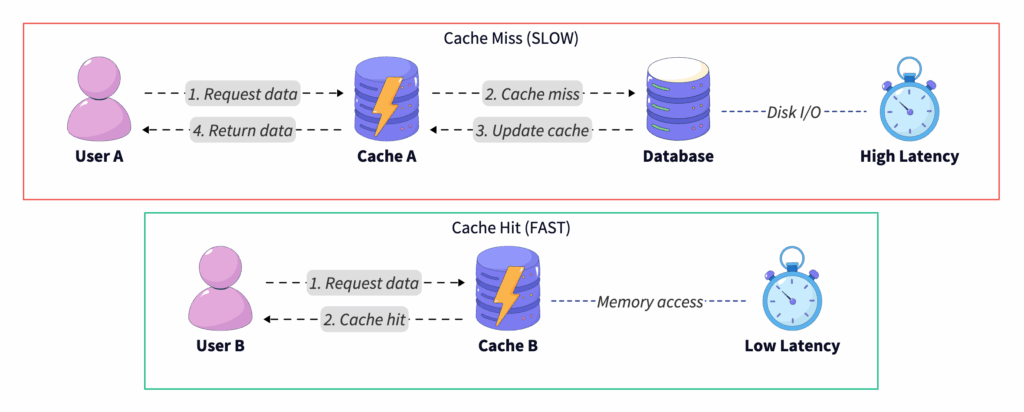
Each time a user requests data, the database performs work to retrieve it. Many requests are for the same data, such as profile information or product details. A cache stores frequently accessed data in faster, temporary storage. This avoids querying the database on every request. This reduces latency and offloads work from your backend. In interviews and real systems, caching typically appears in a few standard layers.
Common caching strategies
Client-side caching: Data stored directly on the user’s device (e.g., browser cache).
Server-side caching: Frequently requested results are stored on your application servers.
Content delivery network (CDN): Cached static content (images, CSS, JS) distributed across global servers for speed.
Distributed cache: Tools like Redis or Memcached that provide high-speed, centralized caching across servers.
Once you introduce caching, the next question is how you keep it correct over time.
Common pitfalls
Cache invalidation: Keeping cached data up to date is a challenging task. When data updates, old cached data may still linger.
Stale data: Serving outdated content can lead to a poor user experience.
Overuse: Caching everything blindly can introduce unnecessary complexity and memory costs.
A System Design primer will remind you that caching requires balance. This approach helps avoid hitting the database for every request and prevents users from seeing outdated data. Effective designs use caching selectively, employing eviction policies such as LRU (least recently used) to manage memory efficiently.
With data retrieval optimized, the next step is to consider how different services within the system communicate.
Communication in distributed systems
Modern systems are often distributed rather than monolithic. Services run on different servers, sometimes in different regions. Communication between these services is a core part of System Design.
In practice, distributed systems rely on two primary communication patterns, each with different trade-offs:
Synchronous communication occurs when services interact in real time. For example, a web app makes an API call via HTTP/REST or gRPC and waits for a response. This approach is straightforward and predictable, but if one service fails or slows down, the entire request chain is affected, creating a bottleneck.
Asynchronous communication involves sending messages that are processed later via queues or brokers. Using tools like RabbitMQ, Kafka, or AWS SQS allows for task handling that decouples services. This can improve scalability and resilience, but it makes the system harder to debug and requires managing eventual consistency.
Why this matters in System Design
Consider building a ride-hailing app. Fetching nearby drivers in real time is a synchronous task because the user is waiting. Logging trip data for analytics or sending an email receipt can be asynchronous. Selecting the wrong communication pattern can result in bottlenecks, downtime, or a suboptimal user experience. This is why a System Design primer emphasizes understanding these trade-offs.
Even with effective communication, failures are expected in distributed environments, so systems must be designed to withstand them.
Reliability and fault tolerance
Systems fail in production over time. Servers crash, networks drop, and hardware malfunctions. A strong System Design primer emphasizes that the goal is to design systems that can survive and recover from them.
In practice, reliability is achieved through a small set of well-established strategies:
Redundancy: Maintain backup servers and databases in a ready state. If one fails, another picks up the load.
Replication: Store data across multiple nodes or regions to prevent data loss.
Failover systems: Automatically redirect traffic to healthy servers in the event of an issue.
Beyond infrastructure-level redundancy, systems rely on fault-tolerance patterns to limit the impact of failures:
Circuit breakers: Stop repeated calls to failing services to prevent cascading failures.
Retries with backoff: Retry requests gradually (exponential backoff) instead of flooding a failing service immediately.
Graceful degradation: Provide a lighter version of your service if full functionality isn’t available. (Example: Netflix still lets you browse recommendations even if playback services are down.)
Users expect applications to be available 24/7, and downtime can damage both revenue and reputation. A System Design primer reinforces the importance of planning for failure. Experienced engineers design for scenarios where components work correctly and for when they inevitably fail.
To manage reliability effectively, you need deep visibility into your system’s internal state.
Monitoring, logging, and observability
Designing a system also means understanding what is happening once it is live. Without the ability to measure, log, and trace system behavior, maintaining system health becomes difficult, which is why observability is a core concept in many System Design primers.
Monitoring helps you detect issues before your users do. It shows performance trends so you can plan for scaling and reduce downtime by speeding up troubleshooting. Without it, teams tend to respond to issues after they occur.
Key practices
In practice, observability is built around three complementary signals:
Monitoring: Collecting metrics like CPU usage, response times, and error rates.
Logging: Recording detailed event data to understand what happened in specific situations.
Tracing: Following a request as it moves across services in a distributed system (distributed tracing).

Imagine running an e-commerce platform where a user reports that checkout is failing. Without logs, you have no visibility. Without monitoring, you cannot determine if the issue is widespread. With tracing, you can pinpoint whether the problem is with the payment service, the database, or a network hiccup.
This highlights that systems will misbehave over time, and that observability enables diagnosis.
While observability helps detect internal failures, systems must also be protected from external threats.
Security in System Design
Security should be integrated from the start of System Design. It involves designing with trust in mind, not just implementing firewalls or passwords. As a result, security is treated as a foundational concern throughout the system.
At a high level, secure systems are built around three core concepts:
Authentication: Verifying user identity (e.g., login systems, OAuth, SSO).
Authorization: Controlling what actions a user can take (RBAC—Role-Based Access Control).
Encryption: Protecting sensitive data in transit (TLS/SSL) and at rest (database encryption).
These principles translate into concrete practices across every layer of the system:
API security: Rate limiting, input validation, and secure endpoints.
Database security: Limiting access, encrypting sensitive fields, and avoiding SQL injection.
Network security: Firewalls, VPNs, and zero-trust models.
A System Design primer treats security as a design choice made at every layer, rather than as an afterthought.
Understanding these foundational components is a prerequisite for mastering advanced architectural patterns.
Advanced architectural patterns
As systems grow in scale and complexity, certain architectural patterns emerge to address challenges that simpler designs cannot. These patterns often appear in high-level engineering discussions and senior-level interviews.
Command query responsibility segregation (CQRS): In traditional systems, the same data model is used for both reading and writing. CQRS splits this into two models, one for updates (Commands) and one for reads (Queries). This allows you to scale reads and writes independently. A social media site often has far more reads than writes, so CQRS lets you optimize the read database for speed while the write database focuses on data integrity.
Event sourcing: Instead of storing only the current state of data, event sourcing stores a sequence of events that led to that state. This is similar to a bank ledger, where every deposit and withdrawal is recorded rather than just the final balance. This approach provides a comprehensive audit trail, allowing you to reconstruct the system state at any point in time.
Gossip protocol and consensus: In distributed systems, servers in a cluster must agree on a common state:
Gossip-based protocol: Nodes randomly share information with their neighbors, eventually spreading data throughout the entire cluster. Systems like Cassandra use this for failure detection.
Consensus algorithms (Paxos/Raft): These ensure all nodes agree on a specific data value, which is crucial for leader election in distributed databases.
With these theoretical concepts covered, the next step is to see how they apply in practical scenarios.
Real-world System Design examples
Applying theoretical concepts to real-world problems solidifies understanding. System Design primers often include practical examples. Here are a few systems often encountered in interview preparation and engineering work.
Example 1: URL shortener
-
-
Goal: Users input a long URL, and the system returns a short, unique link.
-
-
-
Key considerations: Unique ID generation (Base62 encoding), redirection speed, and database scaling.
-
-
-
Design takeaway: This is a read-heavy system. It highlights the need to consider database sharding and caching strategies to handle millions of redirects quickly.
-
Example 2: Social media feed
-
-
Goal: Users expect to see fresh content from friends instantly.
-
-
-
Key considerations: Data consistency, Fan-out (pushing posts to followers), and prioritizing relevant posts.
-
-
-
Design takeaway: Balances latency versus freshness. You might use a Push model for users with few followers and a Pull model for accounts with very large follower counts to save resources.
-
Example 3: E-Commerce checkout system
-
-
Goal: Multiple services (cart, payment, inventory, shipping) must coordinate a purchase.
-
-
-
Key considerations: Fault tolerance, payment reliability, and transaction consistency.
-
-
-
Design takeaway: Illustrates the need for distributed transactions (two-phase commit or Sagas) and graceful degradation if the inventory service is slow.
-
Each example illustrates how concepts from this System Design primer, such as scalability, caching, communication, and reliability, are applied in real systems.
The final step is learning how to apply this knowledge in a technical interview setting.
System Design for interviews
System Design questions are common in technical interviews and can be demanding. They are typically open-ended and time-pressured. Their purpose is to test your thought process, not just your knowledge. Including an interview perspective provides useful context.
Companies use these questions to see how you handle ambiguity. They want to evaluate your ability to reason about trade-offs and think beyond a single feature. The process of arriving at a solution is often as important as the final answer.
Common interview prompts
-
-
Design a chat application (WhatsApp/Slack).
-
-
-
Build a scalable URL shortener (Bit.ly).
-
-
-
Create a recommendation engine (Netflix/YouTube).
-

Each of these prompts requires you to combine concepts like scaling strategies, caching, databases, and fault tolerance. A strong System Design answer doesn’t just list technologies—it explains why you chose each approach.
How to prepare effectively
-
-
Clarify requirements: Do not start drawing immediately. Ask about DAU (Daily Active Users), read/write ratios, and latency constraints.
-
-
-
High-level design: Sketch the overall architecture first (Client → LB → Server → DB).
-
-
-
Deep dive: Pick one component, such as the database schema or caching strategy, and provide more detail.
-
-
-
Discuss trade-offs: Explain your choices, like why you selected SQL over NoSQL or a specific sharding key.
-
For guided, structured practice, Grokking the System Design Interview is one of the best System Design courses. It walks through real interview questions and detailed solutions, which complement the topics covered in this primer.
Your next steps in the System Design primer journey
You have now covered the fundamentals of System Design. From core principles and system components to scaling strategies, databases, caching, and security, you have the foundational knowledge needed.
Here are a few ways to apply these concepts in practice:
-
-
Apply concepts to small projects: You might start by designing a URL shortener, social feed, or e-commerce workflow.
-
-
-
Review trade-offs: Whenever you make a design choice, ask yourself what you gained and what you lost.
-
-
-
Continue learning: Explore in-depth topics such as microservices, distributed systems, and cloud-native architecture.
-
System Design is a skill built through exposure, practice, and reflection. It typically develops over time. With repeated analysis and design practice, decision-making becomes more intuitive. This primer serves as a starting reference. From here, you can start designing, continue learning, and build systems that meet the demands of scale, reliability, and complexity.

One Response
This guide is incredibly helpful for both beginners and those looking to refine their system design skills! The structured approach and practical examples make complex topics more approachable. I especially appreciated the section on trade-offs and real-world scenarios. Keep up the great work!