


Every thirty seconds, billions of six-digit codes silently regenerate across phones worldwide. Users punch them into login screens without a second thought, trusting that a string of numbers can protect their bank accounts, email, and cloud infrastructure. Yet most engineers, even those building authentication systems, struggle to explain the elegant machinery behind this process. The gap between “it works” and “I understand why it works” separates competent developers from architects who can design secure systems from scratch.
This guide dismantles Google Authenticator piece by piece. You will learn exactly how time-based one-time passwords emerge from cryptographic primitives, why the system functions offline, and how the backend validates millions of codes per second without breaking a sweat. More importantly, you will understand the security guarantees this design provides and the attack vectors it neutralizes.
Whether you are preparing for a System Design interview or building production authentication infrastructure, the principles here translate directly. By the end, you will be able to sketch the architecture on a whiteboard, debate implementation trade-offs intelligently, and recognize when something deviates from established security standards like RFC 6238 and RFC 4226.
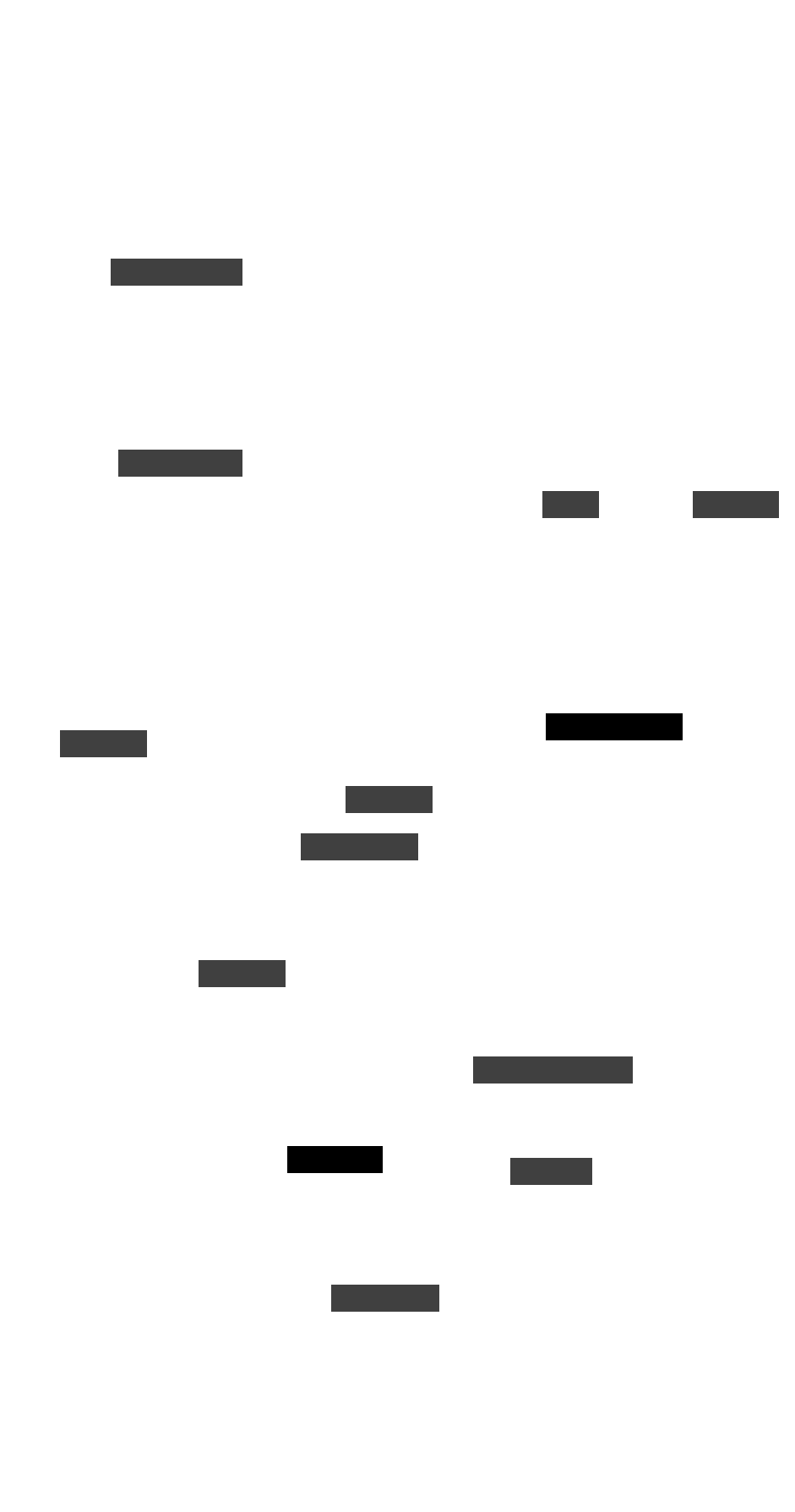
The following diagram illustrates the complete lifecycle of a Google Authenticator interaction, from initial setup through daily authentication.
Understanding the problem space
Before diving into architecture, you need clarity on what this system actually accomplishes. The core goal sounds deceptively simple. Create a secure and scalable method to generate and verify time-based one-time passwords for multi-factor authentication. The implementation details, however, reveal sophisticated engineering decisions at every layer.
The system generates a six-digit code that changes every thirty seconds. This code emerges entirely on the user’s device without any network communication. When the user enters the code during login, the server independently computes what the code should be and compares the values. If they match within an acceptable time window, authentication succeeds.
This means the system must function even when the user has no internet connectivity, as long as both sides share the same secret key and maintain reasonably synchronized clocks.
Functional requirements define what the system must do. The client needs to generate TOTPs every thirty seconds using a shared secret, producing codes between six and eight digits that remain time-sensitive. The server must validate user-submitted OTPs against its own computed values within acceptable time windows, supporting minor clock differences between client and server.
During setup, the system must securely transmit the shared secret from server to client, typically via QR code encoding the otpauth:// URI scheme. Users should be able to link multiple accounts to the same authenticator app, requiring the system to manage multiple secrets per user. Most critically, the entire generation process must work offline with no real-time synchronization required.
Non-functional requirements determine how well the system performs these tasks. Security demands that shared secrets remain encrypted both at rest and in transit, that OTPs stay short-lived and tamper-proof, and that brute force or replay attacks fail. Scalability requires handling millions of concurrent authentication requests globally. Low latency means OTP validation should complete in under one hundred milliseconds.
Reliability and fault tolerance ensure that if one data center fails, another seamlessly takes over with 99.99% uptime targets. Maintainability allows the architecture to support modular updates, algorithm changes, and third-party integrations without significant rework.
Real-world context: Companies like GitHub, AWS, and Dropbox all rely on TOTP-based authentication compatible with Google Authenticator. The protocol’s standardization means users can protect dozens of accounts with a single app, and services can implement two-factor authentication without building proprietary mobile applications.
When discussing this system in interviews or design reviews, these requirements serve as your blueprint. Start with what the system must accomplish functionally, then layer on how well it must perform these functions. This structured approach immediately signals design maturity and helps you avoid the common trap of jumping straight into database schemas without establishing context.
The TOTP algorithm and cryptographic foundations
Understanding how Google Authenticator works requires grasping the mathematics that make it possible. The Time-based One-Time Password algorithm, formalized in RFC 6238, builds upon an earlier specification called HOTP (HMAC-based One-Time Password) defined in RFC 4226. Together, these standards provide the cryptographic backbone for modern authenticator applications.
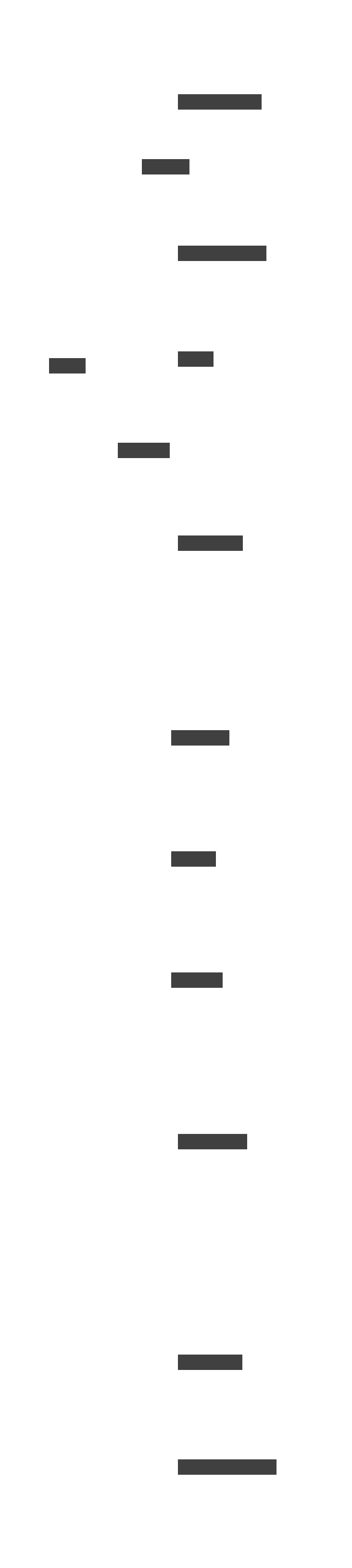
The algorithm operates through a precise sequence of operations. During initial setup, the server generates a secret key with at least 160 bits of entropy, typically encoded as a Base32 string of sixteen to thirty-two characters. This secret travels to the client device through a QR code containing a specially formatted URI. Once stored, the secret never transmits again.
Every thirty seconds, the authenticator app takes the current UNIX timestamp and divides it by the time step interval, producing a counter value. This counter, formatted as a big-endian 64-bit integer, combines with the secret key through the HMAC-SHA1 function. The resulting twenty-byte hash then undergoes dynamic truncation. The algorithm extracts four bytes at an offset determined by the hash’s final nibble, converts them to a 31-bit integer, and applies modular arithmetic to produce the familiar six-digit code.
The mathematical representation helps clarify this process. The counter value $T$ derives from the current time: $T = \lfloor \frac{CurrentTime – T_0}{TimeStep} \rfloor$ where $T_0$ represents the epoch (typically zero for UNIX time) and $TimeStep$ equals thirty seconds. The TOTP value then emerges as: $TOTP = HMAC\text{-}SHA1(Secret, T) \mod 10^{digits}$ with the modular operation applied after dynamic truncation to produce codes of the desired length.
Why this design succeeds becomes clear when examining its properties. Offline capability emerges because the client needs only the current time and the stored secret to generate valid codes. Security through symmetry means both sides can independently produce identical codes without communication. The short validity window ensures each code expires within thirty seconds, minimizing replay attack opportunities.
Perhaps most importantly for System Design, the algorithm is entirely deterministic. The same inputs always produce the same outputs. This means validation requires no state synchronization between servers.
Historical note: TOTP descended from hardware token systems like RSA SecurID, which required expensive physical devices. The genius of RFC 6238 was recognizing that smartphones could replace dedicated hardware by implementing the same algorithm in software, democratizing two-factor authentication for millions of users who would never purchase a hardware token.
The distinction between TOTP and its predecessor HOTP matters for architectural decisions. HOTP uses a simple incrementing counter rather than time, requiring the server to track how many codes each user has generated. This creates synchronization headaches. If a user generates several codes without submitting them, the server’s counter falls out of sync.
TOTP eliminates this problem entirely by deriving the counter from the clock, making it stateless and dramatically more scalable. The trade-off is dependency on time synchronization, but Network Time Protocol makes this manageable in practice.
| Feature | HOTP (Counter-based) | TOTP (Time-based) |
|---|---|---|
| Counter source | Incrementing integer stored on both sides | Derived from current UNIX timestamp |
| State requirements | Server must track per-user counter | Stateless verification possible |
| Synchronization risk | Counter drift if codes generated but unused | Clock drift between client and server |
| Primary use case | Hardware tokens, legacy systems | Mobile authenticator apps |
| Replay window | Valid until counter advances | Expires after time step passes |
For System Design interviews, emphasizing that TOTP’s statelessness enables horizontal scaling without coordination overhead demonstrates understanding of distributed systems principles. Any server with access to the user’s secret can validate any code independently, which fundamentally changes how you architect the backend.
System architecture from setup to verification
The elegance of Google Authenticator lies in its architectural simplicity. The system comprises two primary components that operate independently yet must agree on outputs. These are the client application running on the user’s mobile device and the authentication service running on the server infrastructure. Between them sits a database holding encrypted secrets, and surrounding everything is a time synchronization layer ensuring both sides share a common temporal reference.
The client application stores the shared secret in the device’s secure enclave or encrypted application storage, depending on platform capabilities. It reads the system clock, performs the TOTP calculation, and displays a new six-digit code every thirty seconds. No network communication occurs during code generation.
The server maintains a database mapping user identifiers to their encrypted secret keys. It retrieves the appropriate secret when a user attempts authentication, performs the same TOTP calculation, and compares results. The synchronization layer, typically relying on NTP servers, keeps both client and server clocks within acceptable drift tolerances.
Registration flow
When a user enables two-factor authentication, the server generates a cryptographically secure random secret of at least 160 bits using a CSPRNG (Cryptographically Secure Pseudo-Random Number Generator). This secret encodes as a Base32 string and embeds into a QR code following the otpauth:// URI specification.
A typical URI looks like: otpauth://totp/ServiceName:username?secret=JBSWY3DPEHPK3PXP&issuer=ServiceName&algorithm=SHA1&digits=6&period=30. The user scans this code with their authenticator app, which parses the URI, extracts the secret and metadata, and stores everything locally. From this moment forward, the secret exists in two places. It is encrypted in the server’s database and protected within the mobile device’s secure storage.
Watch out: The QR code setup process represents the single most vulnerable moment in the entire system. If an attacker can intercept or photograph the QR code, they gain permanent ability to generate valid codes. Always ensure setup occurs over HTTPS, ideally with the user physically present, and consider implementing code confirmation steps before fully enabling 2FA.
Authentication flow
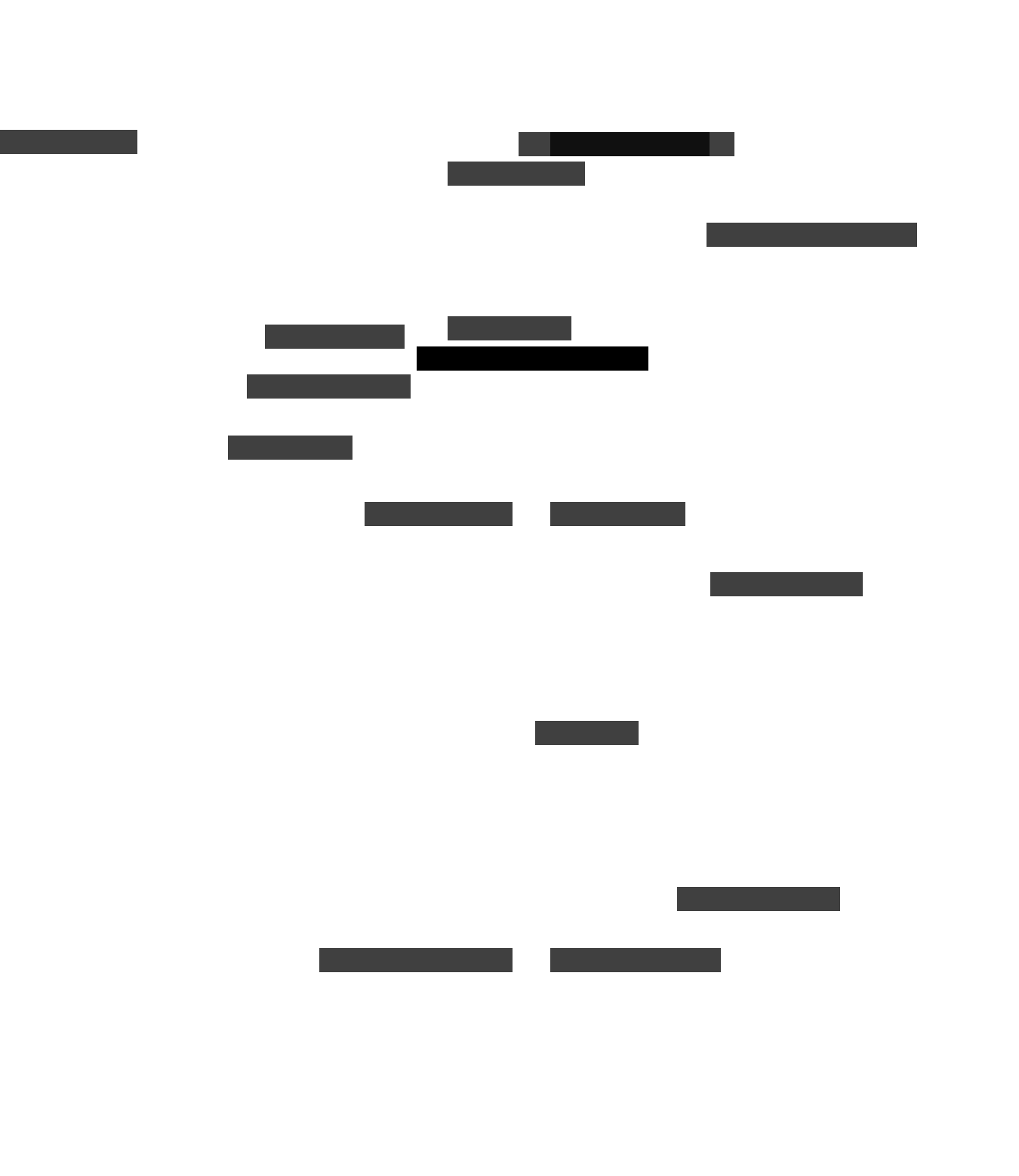
During login, the authenticator app silently performs its TOTP calculation every thirty seconds regardless of whether the user needs a code. When the user opens the app, they see the current code with a visual indicator showing remaining validity time. They enter this code on the login page alongside their password.
The server receives the submission, retrieves the user’s encrypted secret from the database, decrypts it in memory, and computes the expected TOTP for the current time window. Because clock drift can cause slight timing mismatches, the server also computes codes for the immediately preceding and following time windows, creating a validation range of approximately plus or minus thirty seconds.
If any computed code matches the user’s submission, authentication succeeds. The server logs the event, potentially noting which time window matched to track drift patterns, and grants access. If no match occurs, the server returns an authentication failure, increments a counter for rate-limiting purposes, and may trigger additional security measures after repeated failures.
The beauty of this architecture appears in what it avoids. No session state persists between authentication attempts. No coordination occurs between server instances. No communication happens between client and server during code generation. These absences translate directly into scalability properties. Any server can handle any authentication request, load balancers can distribute traffic arbitrarily, and the system tolerates individual server failures gracefully.
Secret key management and threat modeling
The shared secret key forms the foundation of trust between client and server. Compromise this key, and an attacker can generate valid codes indefinitely without detection. Every design decision in the system ultimately serves one purpose. That purpose is keeping this secret confidential while enabling its use for authentication.
Generation requirements demand that secrets emerge from cryptographically secure random number generators. The minimum recommended length is 160 bits (20 bytes), matching the output size of SHA-1 and providing adequate security margins. Some implementations use longer secrets for additional protection against future cryptographic advances.
The secret must exhibit no patterns, predictability, or correlation with user identifiers. Base32 encoding produces the familiar string of letters and numbers, chosen because it avoids ambiguous characters and works reliably across QR code implementations.
Storage architecture differs significantly between client and server. On mobile devices, modern platforms provide hardware-backed secure storage. iOS uses the Secure Enclave and Android offers the KeyStore system. Both provide encryption keys that never leave dedicated security processors. The authenticator app stores secrets within these protected environments, making extraction difficult even on rooted or jailbroken devices.
On servers, secrets encrypt at rest using AES-256 or equivalent algorithms. Encryption keys are managed through Hardware Security Modules or cloud key management services like AWS KMS or Google Cloud KMS. Access controls restrict which services can request decryption, and audit logs track every access attempt.
Pro tip: When implementing server-side secret storage, never store the encryption key in the same database as the encrypted secrets. Use envelope encryption. Encrypt each secret with a unique data encryption key, then encrypt that key with a master key stored in an HSM. This limits blast radius if any single component is compromised.
Threat modeling reveals several attack vectors that the system must neutralize. Man-in-the-middle attacks during setup could intercept the QR code contents. Mitigation requires HTTPS for all setup communications and visual confirmation that the displayed account name matches expectations. Replay attacks attempt to reuse captured codes. The thirty-second validity window and server-side tracking of recently used codes prevent this.
Brute force attacks try random six-digit codes. Rate limiting and account lockout after repeated failures make this impractical. Device compromise could expose stored secrets. Hardware-backed storage and remote revocation capabilities address this risk.
A 2023 security analysis published at ICDF2C examined multiple authenticator applications and found concerning variations in implementation quality. Some applications stored secrets in plaintext files accessible to other apps on rooted devices. Others failed to use hardware-backed storage even when available. Google Authenticator itself has evolved significantly, adding encrypted cloud backup capabilities while navigating the trade-off between convenience and security exposure.
The research underscores that algorithmic security means nothing if implementation fails to protect the secret key at every stage of its lifecycle.
Key rotation and recovery present operational challenges. Unlike passwords, TOTP secrets cannot be changed without re-enrolling the user’s device. Organizations must provide recovery paths for users who lose devices. These paths include backup codes generated during setup, secondary authentication methods, or identity verification processes.
Recent versions of Google Authenticator support cloud synchronization of secrets to Google accounts, enabling recovery but also creating new attack surfaces if the Google account itself becomes compromised. Each organization must evaluate this trade-off based on their threat model and user population.
Time synchronization and validation logic
Time is the shared reference that allows client and server to generate identical codes without communication. Get this wrong, and legitimate users face authentication failures despite entering correct codes. The system’s usability depends on managing clock differences gracefully while maintaining security properties.
Both client devices and servers rely on Network Time Protocol to maintain accurate clocks. Smartphones synchronize automatically with carrier or operating system time servers, typically achieving accuracy within a few hundred milliseconds of true time. Servers in data centers use dedicated NTP infrastructure, often with GPS-disciplined reference clocks, achieving even higher precision. Under normal conditions, both sides operate within the same thirty-second window without issue.
Validation windows accommodate the reality that perfect synchronization is impossible. Standard implementations accept codes for the current time step plus one step before and one step after, creating an effective validity window of approximately ninety seconds. If the user’s phone runs thirty seconds slow, the server’s “previous window” calculation produces the same code the phone currently displays. This tolerance handles typical drift while remaining short enough to limit replay attack opportunities.
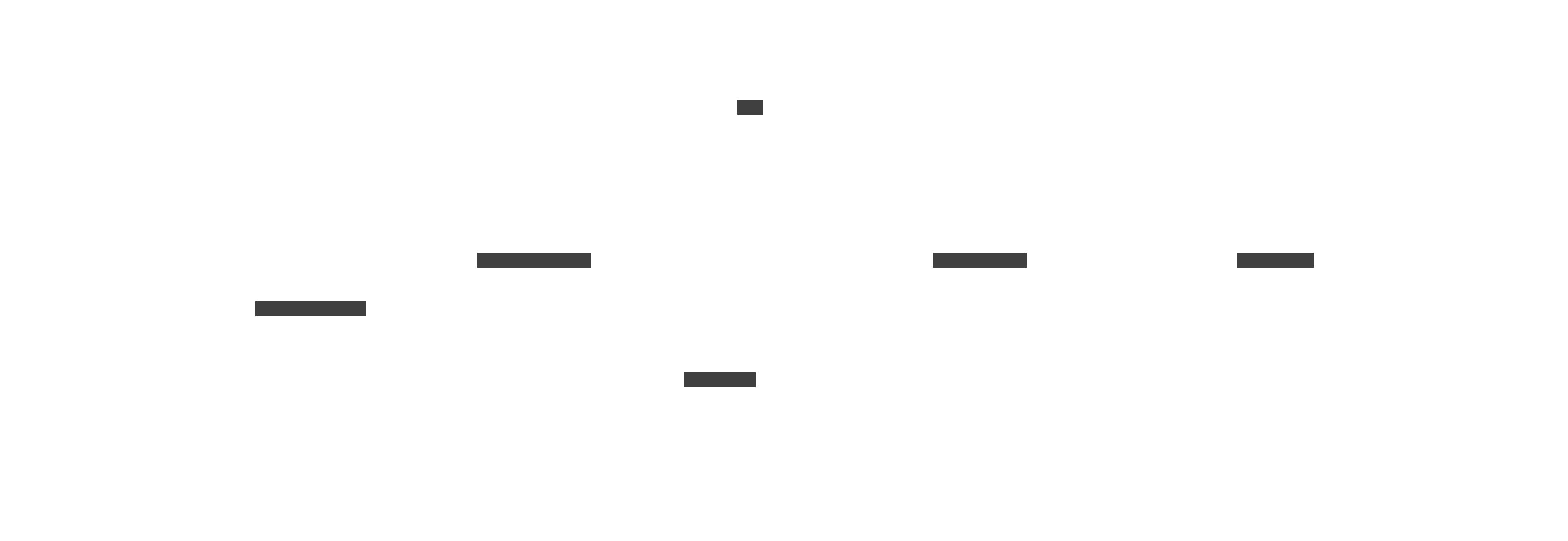
Drift detection and correction can improve user experience for devices with persistent time errors. When validation succeeds on an offset time step rather than the current step, the server can record this drift and adjust future validations accordingly. If a particular user’s codes consistently match the previous window, the server might expand validation to include two previous windows for that user specifically. This per-user drift tracking adds statefulness but remains optional and can degrade gracefully if the stored drift data becomes unavailable.
Watch out: Some embedded devices and older phones lack reliable NTP synchronization, causing persistent authentication failures. Consider implementing a “time sync check” during enrollment that verifies the device’s clock is reasonably accurate before completing setup. This prevents support tickets from users whose devices will never generate valid codes.
The validation process itself follows a specific sequence. Upon receiving an OTP submission, the server retrieves the user’s secret and computes the current time step counter. It generates the TOTP for that counter and checks for a match. It then repeats for adjacent counters if needed. Each computation involves HMAC-SHA1 and truncation operations that complete in microseconds on modern hardware. The entire validation process, including database lookup and cryptographic operations, should complete well under the hundred-millisecond target latency.
Preventing code reuse adds a security layer beyond time windows. Even within a valid window, allowing the same code twice enables attackers who observe a code to use it themselves. Servers maintain a short-term cache of recently accepted codes per user, rejecting duplicates. This cache need only survive for the duration of the validation window (ninety seconds typically), making it suitable for in-memory storage without persistence requirements.
Scaling for global authentication
Google Authenticator compatibility spans services with user bases ranging from thousands to billions. The System Design principles that enable this scale emerge directly from the architectural choices discussed earlier, particularly statelessness and the absence of client-server communication during code generation.
Horizontal scaling through statelessness represents the primary scalability mechanism. Because any server with access to the user’s secret can validate any code independently, authentication services can scale by simply adding more server instances behind load balancers. No session affinity is required. No inter-server coordination occurs.
Load balancers can use simple round-robin or least-connections algorithms without concern for routing specific users to specific servers. During traffic spikes, auto-scaling policies can launch additional instances that immediately begin handling requests without warm-up or synchronization delays.
Database architecture must support both the read-heavy validation workload and the security requirements of secret storage. Most implementations use a primary database for writes (new enrollments, secret updates) with read replicas distributed across regions for validation lookups. Since secrets change rarely after initial enrollment, aggressive caching at the application layer further reduces database load. Redis or Memcached instances can store recently-accessed secrets with TTLs measured in minutes, hitting the database only on cache misses or expirations.
Real-world context: At companies like Google and Microsoft, authentication services handle tens of thousands of requests per second during peak periods. Their architectures typically involve global load balancing directing traffic to the nearest regional cluster, with each cluster containing multiple availability zones for redundancy. The stateless nature of TOTP validation makes this distributed deployment straightforward compared to session-based authentication systems.
Geographic distribution improves both latency and reliability. Deploying authentication clusters across multiple continents ensures users experience low-latency validation regardless of location. DNS-based routing or anycast networking directs requests to the nearest healthy cluster. If a regional cluster fails, traffic automatically redirects to remaining clusters with only modest latency increases. Database replication across regions ensures secrets remain available even during regional outages, though strong consistency requirements may introduce trade-offs during network partitions.
Caching strategies require careful consideration of security implications. Caching the encrypted secret for a user reduces database load but means the secret persists in more locations. Caching validation results (this user successfully authenticated with this code at this timestamp) enables quick rejection of replay attempts but requires cache invalidation when secrets rotate. The caching layer itself must be secured against unauthorized access, typically through network isolation and authentication requirements for cache connections.
| Scaling dimension | Approach | Trade-offs |
|---|---|---|
| Compute capacity | Horizontal scaling with stateless servers | Requires robust load balancing and health checking |
| Database throughput | Read replicas with application-layer caching | Cache invalidation complexity, slight staleness risk |
| Geographic latency | Multi-region deployment with DNS routing | Data replication costs, consistency trade-offs |
| Availability | Redundancy across availability zones and regions | Increased infrastructure cost and operational complexity |
Performance targets for production systems typically specify sub-hundred-millisecond latency at the 99th percentile under normal load. This budget must accommodate network round-trips, database or cache lookups, cryptographic operations, and response serialization. Profiling often reveals that database access dominates latency, making caching effectiveness the primary optimization lever. The HMAC-SHA1 and truncation operations themselves complete in microseconds and rarely bottleneck modern systems.
Monitoring, reliability, and operational excellence
Building a system that works is only half the challenge. Keeping it working requires comprehensive monitoring, proactive alerting, and battle-tested recovery procedures. For authentication systems specifically, failures directly impact user access to protected resources, making reliability a first-class concern rather than an afterthought.
Essential metrics fall into several categories. Latency metrics track authentication response times across percentiles, alerting when the 95th or 99th percentile exceeds thresholds. Error rate metrics monitor failed validations, distinguishing between expected failures (user entered wrong code) and unexpected failures (database unavailable, cryptographic errors). Clock drift metrics track the distribution of time offsets observed during successful validations, alerting if significant drift suggests NTP problems. Security metrics monitor brute force patterns, unusual geographic access patterns, and replay attempt rates.
Failure modes and mitigations deserve explicit planning. Database unavailability should trigger automatic failover to replicas. If all replicas fail, the system might gracefully degrade to cached secrets with extended TTLs while alerting operations teams. NTP synchronization failures could cause widespread validation failures. Monitoring should detect NTP service health and alert before user impact occurs. Individual server failures should be invisible to users through health checking and automatic removal from load balancer pools.
Pro tip: Implement synthetic monitoring that continuously performs end-to-end authentication flows against production infrastructure. These synthetic users generate predictable codes from known secrets, allowing you to detect validation failures before real users report them. The synthetic tests should run from multiple geographic locations to catch region-specific issues.
Disaster recovery for authentication systems centers on secret key availability. Encrypted backups of all secrets should exist in geographically separate storage, ideally in cold storage that attackers cannot access through the normal infrastructure. Recovery procedures should be documented and tested regularly, including the process for restoring from backups to a completely new infrastructure deployment. The recovery time objective for authentication systems is typically measured in minutes, not hours, given the impact of extended outages.
Operational dashboards should present real-time visibility into system health without requiring deep technical knowledge to interpret. Key indicators include authentication success rate (target above 99%), validation latency (target below 100ms p99), active servers and their health status, database replication lag, and cache hit rates. Historical trends help identify gradual degradation before it becomes acute. Alert routing should ensure the right team receives notifications based on severity and affected components.
The stateless nature of TOTP validation provides inherent resilience that simplifies operational concerns. Unlike systems requiring session state, there is no session data to lose during server restarts. Unlike counter-based systems, there is no synchronization state to corrupt. The primary operational focus remains on protecting secret key availability and maintaining time synchronization, both well-understood problems with established solutions.
Interview strategies and common pitfalls
System Design interviews frequently feature authentication systems because they combine security, scalability, and reliability challenges in a compact problem space. Google Authenticator specifically tests whether candidates understand cryptographic primitives, distributed systems principles, and practical engineering trade-offs simultaneously.
Structuring your response should follow a logical progression. Begin by clarifying requirements. Ask what authentication factors are involved, what scale must be supported, what latency targets exist, and what security threats concern the interviewer most. This clarification demonstrates that you approach problems systematically rather than diving into implementation details prematurely.
Next, establish the core algorithm (TOTP based on RFC 6238), explaining how it enables offline generation and stateless verification. Then sketch the high-level architecture with client app, authentication service, secret database, and time synchronization. Finally, address specific concerns like security, scaling, and failure handling based on remaining interview time and interviewer interests.
Demonstrating depth requires going beyond surface explanations. Mentioning RFC 6238 and RFC 4226 signals familiarity with standards. Explaining dynamic truncation and why it produces uniform distributions shows algorithmic understanding. Discussing HSM usage for key protection demonstrates security awareness. Quantifying targets (sub-100ms latency, 160-bit secrets) shows you understand production requirements rather than just theoretical concepts.
Historical note: The OTP concept dates back to the 1980s with S/Key and one-time pads. HOTP (RFC 4226) standardized HMAC-based generation in 2005, and TOTP (RFC 6238) added time-based triggers in 2011. Understanding this evolution helps you explain why certain design choices were made and what alternatives exist.
Common mistakes to avoid can sink otherwise competent answers. Forgetting to explain how the secret key is securely shared during setup misses a critical security component. Proposing stateful validation where the server tracks counters ignores the scalability benefits that make TOTP preferable to HOTP. Overlooking clock drift handling suggests you have not considered real-world failure modes.
Overcomplicating the architecture with unnecessary components obscures the elegant simplicity that makes the system work. Finally, focusing solely on the happy path without discussing error handling and security threats presents an incomplete picture.
Trade-off discussions elevate good answers to excellent ones. TOTP versus HOTP involves statelessness versus counter synchronization complexity. Longer validation windows improve user experience but extend replay attack opportunities. Cloud backup of secrets enables recovery but creates new attack surfaces. Stronger algorithms like HMAC-SHA256 provide larger security margins but may not be universally supported. Interviewers want to see that you recognize these trade-offs exist, can articulate both sides, and can make reasoned recommendations based on specific requirements.
Preparation resources like structured System Design courses help develop the frameworks needed to approach these problems systematically. The goal is not memorizing Google Authenticator specifically but developing the analytical skills to decompose any authentication system into its component challenges and address each appropriately.
Conclusion
Google Authenticator exemplifies how mathematical elegance translates into practical security. The TOTP algorithm, standardized in RFC 6238, enables millions of devices to generate valid authentication codes without any network communication, using only a shared secret and synchronized time. This offline capability, combined with stateless server-side validation, creates a system that scales horizontally without coordination overhead while remaining resilient to individual component failures.
The security model concentrates trust in the shared secret key, making its protection the paramount concern throughout the system lifecycle. From cryptographically secure generation through encrypted storage in hardware-backed enclaves and HSMs, every architectural decision serves the goal of keeping this secret confidential. Threat modeling reveals that the QR code setup phase, not the algorithm itself, represents the primary attack surface requiring careful protection.
Looking forward, authentication continues evolving beyond shared secrets entirely. FIDO2 and WebAuthn standards enable passwordless authentication using public-key cryptography, eliminating the shared secret that TOTP must protect. Passkeys stored in platform authenticators may eventually replace TOTP for many consumer applications. Yet TOTP’s simplicity, standardization, and universal compatibility ensure it will remain relevant for years, particularly in enterprise environments and for services requiring broad authenticator app support.
Whether you are implementing production authentication infrastructure or preparing for your next System Design interview, the principles embedded in Google Authenticator transfer broadly. Stateless design enables scale. Defense in depth protects critical assets. Graceful tolerance of real-world imperfections like clock drift maintains usability. These lessons extend far beyond six-digit codes appearing on phone screens every thirty seconds.
