

You are typing a sentence in a shared document. Halfway across the world, your colleague deletes the paragraph you are working in. Somehow, when you both look at the screen a moment later, the document makes sense. Your words appear, their deletion is reflected, and neither of you lost work. This seamless experience hides one of the most sophisticated engineering challenges in modern software: real-time collaborative editing at global scale.
Google Docs handles millions of concurrent users editing documents simultaneously, yet the interface feels as simple as a local text file. Behind that simplicity lies a distributed system managing operational transformations, multi-region replication across infrastructure like Bigtable and Spanner, and conflict resolution algorithms that run in milliseconds. Understanding how this works goes beyond academic curiosity. It is one of the most revealing System Design interview questions because it forces you to reason about consistency, latency, fault tolerance, and user experience all at once.
This guide breaks down the complete architecture of a Google Docs-like system. You will learn how to structure your answer in interviews, understand the trade-offs between operational transformation and CRDTs, and grasp why offline-first design is harder than it sounds. By the end, you will have a mental model for designing any real-time collaborative system, not just document editors.
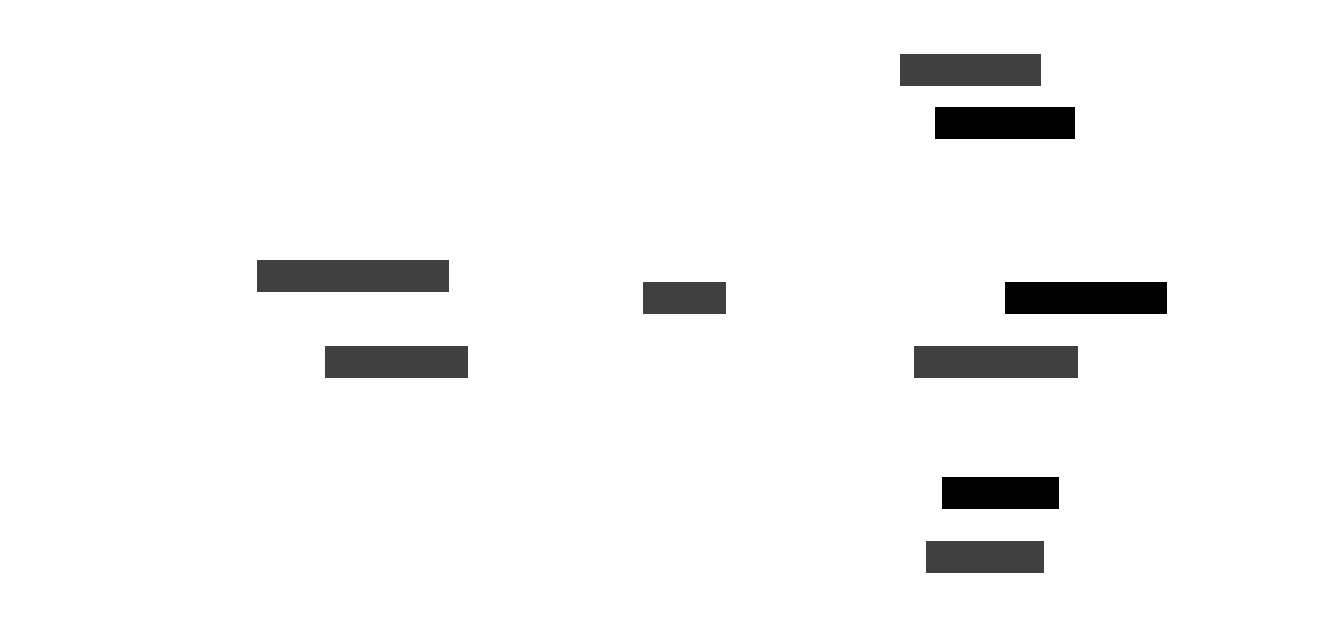
The following diagram illustrates the high-level architecture connecting clients, collaboration servers, and the storage layer that powers real-time document editing.
What makes Google Docs unique
Before diving into architecture, it helps to understand why Google Docs is fundamentally different from a simple text editor. A local word processor saves files to disk and handles one user at a time. Google Docs must handle multiple users typing in the same sentence at the same moment, synchronize their changes across unreliable networks, and ensure everyone sees the same final result. This requirement for real-time, multi-user collaboration shapes every architectural decision.
The system must deliver updates with latency under 200 milliseconds to feel responsive. It must scale horizontally to support millions of concurrent users across documents. Cross-platform support means the same synchronization logic works in browsers, mobile apps, and desktop clients.
Offline editing adds another layer. Users expect to keep working on airplanes or in areas with spotty connectivity, with their changes merging cleanly once they reconnect. These features create a unique combination of challenges around consistency, availability, and partition tolerance that makes Google Docs an ideal case study for distributed systems thinking.
Real-world context: Google Docs reportedly uses operational transformation as its core synchronization algorithm, a technique originally developed for collaborative systems in the 1980s. The same principles now power tools like Figma, Notion, and countless collaborative coding environments.
Understanding these unique constraints helps you frame your interview answer properly. When you lead with the specific challenges of real-time collaboration, you demonstrate that you are thinking about the actual problem being solved rather than reciting architecture patterns.
Core requirements of Google Docs System Design
Every strong System Design answer begins with requirements gathering. Jumping straight into architecture without clarifying what the system must do is a common interview mistake. Requirements give your answer structure and show interviewers you approach problems methodically rather than diving into solutions prematurely.
Functional requirements
The functional requirements define what users can do with the system. Real-time editing is the foundation. When one user types, every other collaborator must see that change appear almost instantly.
Version history must capture every change with timestamps and author information so users can roll back to earlier states or review who modified what. Document sharing requires a permissions model where users can be owners, editors, commenters, or viewers, with access controlled at both the document and link level. Offline editing allows users to continue working without internet connectivity, with changes queued locally and synchronized when the connection returns.
Non-functional requirements
Non-functional requirements define how well the system performs its functions. Low latency is critical because edits must propagate to all clients within 100 to 200 milliseconds for the collaboration to feel natural. High availability means the system should target 99.9% uptime or better since users expect Google Docs to simply work whenever they need it.
Fault tolerance ensures the system continues operating even when individual servers crash or network partitions occur. Data durability guarantees that documents are never lost, even during outages, through replication across multiple storage nodes and geographic regions.
Key trade-offs
Real-world systems cannot optimize everything simultaneously, and articulating trade-offs demonstrates engineering maturity. The tension between consistency and latency is central. You can apply edits instantly and resolve conflicts afterward, or delay updates to guarantee ordering, but not both.
Simplicity versus accuracy appears in offline synchronization, where supporting disconnected editing introduces complex edge cases around conflict resolution. Cost versus scalability surfaces in version history, where storing every keystroke provides precise rollback capability but increases storage and processing overhead significantly.
By clarifying requirements upfront, you set the foundation for a well-structured design. It signals to interviewers that you think about what systems need to deliver before deciding how to build them. With requirements established, we can now examine the major architectural components.
High-level architecture overview
The high-level architecture of a Google Docs-like system divides into several major components, each handling distinct responsibilities. This modular approach allows teams to scale, optimize, and debug each layer independently. Understanding these components and their interactions is essential for both interviews and real-world System Design.
The client application is what users interact with directly, whether in a browser or mobile app. It captures user input, renders document changes in real-time, and maintains a local representation of the document state. The client also handles optimistic updates, showing users their own changes immediately while waiting for server confirmation.
Collaboration servers act as traffic controllers for real-time editing. They receive operations from clients, apply transformation algorithms to resolve conflicts, and broadcast the resulting changes to all connected users viewing the same document. These servers maintain the authoritative document state and coordinate ordering across clients.
The storage layer persists documents, metadata, and version history durably. In Google’s infrastructure, this likely involves Bigtable for storing document content and operation logs, Spanner for strongly consistent metadata like permissions and sharing settings, and Colossus for large file attachments and blobs.
The synchronization service manages the real-time communication channels between clients and servers. WebSocket connections maintain persistent bidirectional channels so updates can push to clients instantly rather than requiring polling. Load balancers distribute incoming traffic across collaboration servers to prevent any single server from becoming a bottleneck during peak usage.
Historical note: Google’s storage infrastructure evolved from the original Google File System and Bigtable papers published in the mid-2000s. Spanner, which provides globally distributed strong consistency, was developed later to solve exactly the kinds of coordination problems that collaborative editing requires.
This modular design enables independent scaling. The collaboration servers handling real-time synchronization can scale separately from the storage layer optimized for durability. It also isolates failures. A problem in the versioning system does not bring down real-time editing. In interviews, walking through each component and explaining its role demonstrates you can think about systems at the right level of abstraction before diving into implementation details.
Real-time collaboration as the heart of the system
Real-time collaboration is what distinguishes Google Docs from traditional document editors. Multiple people typing, deleting, and formatting text simultaneously, with all changes appearing instantly for everyone, creates profound technical challenges. The core problem is deceptively simple to state. If two users edit the same position in a document at the same moment, how does the system decide what the final result should be?
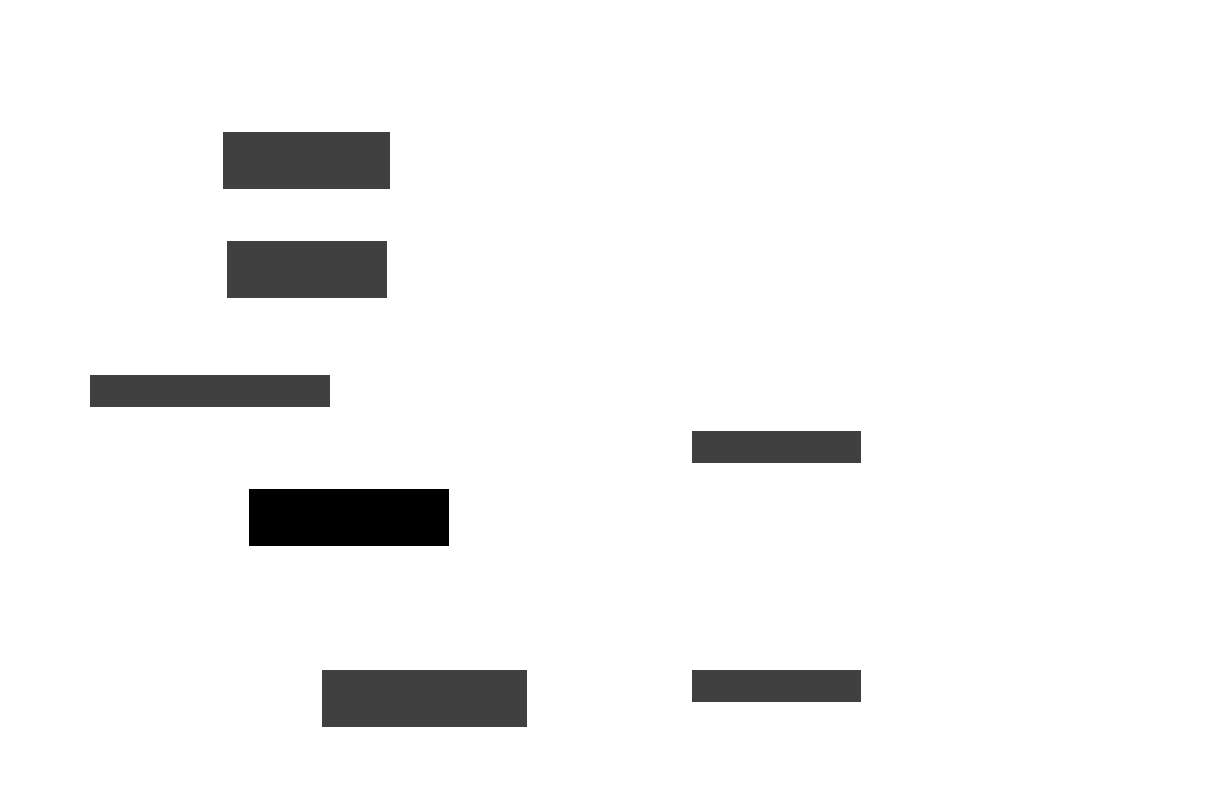
Consider a concrete scenario. User A types the letter “X” at position 10 in a document. At the same instant, User B deletes the character at position 10. Without coordination, different clients might apply these operations in different orders, leading to divergent document states. User A might see “X” appear then disappear, while User B sees position 10 become empty with “X” never appearing. The system must ensure all clients converge to identical final states despite network delays causing operations to arrive in different orders.
The following diagram shows how two concurrent operations transform to produce a consistent result across clients.
Operational transformation
Operational transformation, commonly called OT, is the algorithm Google Docs has historically used to solve this problem. The core idea is that every operation carries metadata about the document state it was created against. When operations arrive at the server, they are transformed relative to any operations that have been applied since the original state. This transformation adjusts positions and effects so the operation applies correctly to the current document state.
In the example above, OT would transform User A’s insert operation. Since User B’s delete removed a character at position 10, User A’s insert at position 10 might need to shift to position 9. Alternatively, the system might determine the insert should still happen at position 10 in the new document context.
The transformation rules ensure deterministic outcomes. Every client applying the same set of operations in any order will arrive at the same final document. OT has proven effective at scale but comes with complexity. The transformation functions must handle every possible combination of operations (insert-insert, insert-delete, delete-delete, formatting changes, and more), and proving correctness across all combinations is notoriously difficult.
Conflict-free replicated data types
CRDTs offer an alternative approach that has gained popularity in newer collaborative systems. Instead of transforming operations after the fact, CRDTs structure the underlying data so that concurrent modifications merge automatically without conflicts. Each character in a CRDT-based document might carry a unique identifier and position metadata that allows insertions to interleave correctly regardless of when they arrive. The mathematical properties of CRDTs guarantee eventual consistency without requiring a central coordination point.
CRDTs are conceptually simpler than OT because the merge logic is embedded in the data structure itself rather than requiring complex transformation functions. However, they can introduce storage overhead since each character needs additional metadata, and certain operations like moving text ranges can be harder to express efficiently. Modern systems like Figma use hybrid approaches, combining CRDT-like data structures with operational semantics for specific actions.
Pro tip: In interviews, demonstrating knowledge of both OT and CRDTs shows depth. Explain that OT is proven at Google-scale but complex to implement correctly, while CRDTs offer cleaner semantics but may require more storage. Discussing when you would choose one over the other demonstrates real engineering judgment.
Low latency is non-negotiable for real-time collaboration to feel natural. Studies show users perceive delays above 100 to 200 milliseconds as lag, breaking the illusion of simultaneous editing. This constraint drives architectural decisions from protocol choice (WebSockets over HTTP polling) to geographic server distribution. With the synchronization algorithm understood, we can examine how concurrent operations are handled in practice.
Handling concurrent editing
Concurrency is where theory meets reality. Multiple users might type in the same paragraph, sentence, or even character position. Without careful handling, edits overwrite each other, work gets lost, and documents become inconsistent across clients. The strategies for managing concurrent edits build on the transformation algorithms but involve additional coordination mechanisms.
Optimistic concurrency control is the dominant pattern. Rather than locking documents or sections when a user starts editing, the system allows everyone to edit simultaneously and reconciles changes afterward. Locks would introduce unacceptable latency and create poor user experiences when someone forgets to release a lock. Optimistic control keeps the interface responsive while the transformation layer handles conflicts transparently.
Each operation carries a version vector or sequence number indicating the document state it was based on. When operations arrive at the server, the version information determines how to transform them relative to other concurrent operations.
Conflict resolution rules ensure deterministic outcomes when transformation alone is insufficient. If two users type different characters at exactly the same position and time, the system needs a tiebreaker. Common approaches include using client identifiers (lower ID wins) or timestamps (earlier timestamp wins). The specific rule matters less than consistency. All clients must apply the same rule so they converge to identical states. Some systems preserve both changes by inserting them in a deterministic order rather than discarding either.
The combination of optimistic control, version vectors, and deterministic conflict resolution creates a system where users experience fluid, lock-free editing while the backend maintains consistency. Explaining this in interviews shows you understand both the user experience requirements and the distributed systems mechanisms that enable them. Next, we will explore how documents are stored and versioned to support this real-time collaboration.
Document storage and versioning
Real-time synchronization gets edits to all clients quickly, but those edits must also be stored durably. The storage layer in a Google Docs-like system does far more than save text files. It maintains complete version history, enables fast document loading, and ensures data survives hardware failures and regional outages. The design choices here directly impact performance, cost, and reliability.
Storage architecture
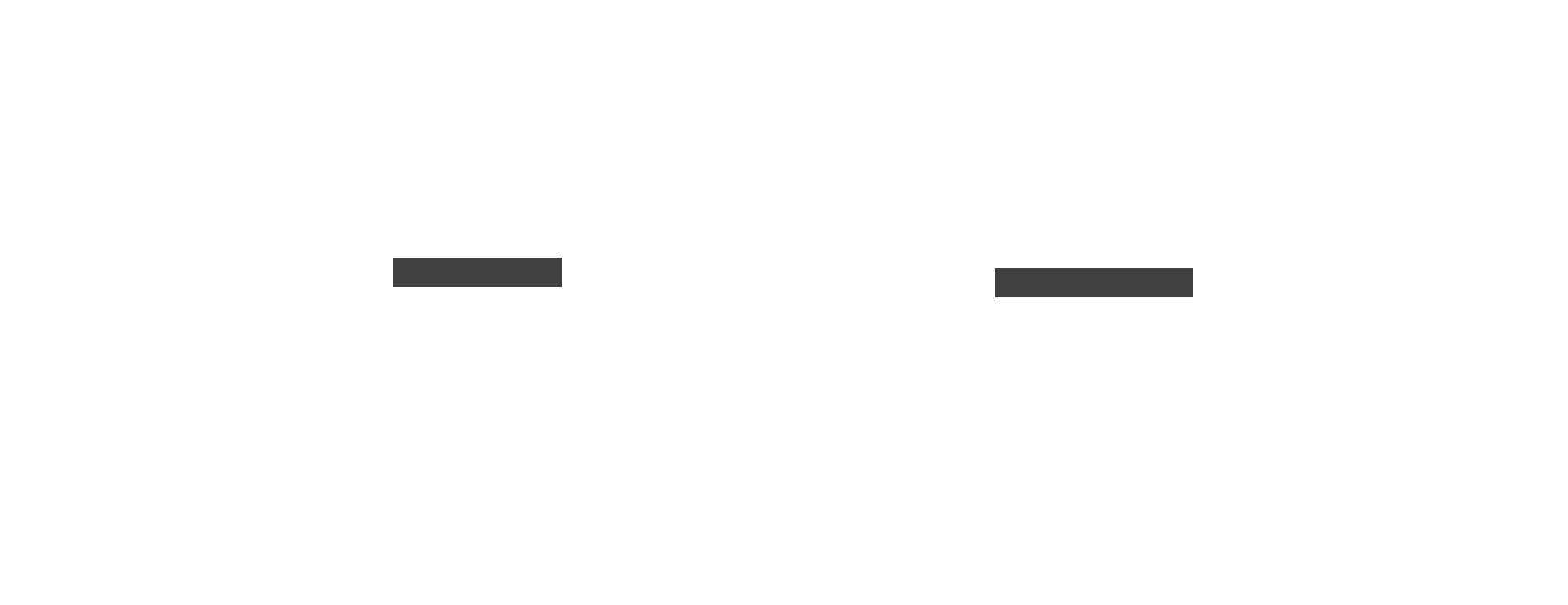
Rather than rewriting entire documents on every keystroke, the system stores an append-only log of operations. Each edit becomes a record in this log with metadata including the operation type, position, content, timestamp, and author. Append-only writes are fast and naturally preserve history. To reconstruct a document, the system replays operations from the beginning of the log. This approach works well for synchronization since new clients can receive just the operations they have missed.
However, replaying thousands of operations every time someone opens a document would be prohibitively slow. Periodic snapshots solve this problem. The system periodically saves complete document states as checkpoints. When a client loads a document, it fetches the most recent snapshot and then applies only the operations that occurred after that snapshot.
This hybrid of snapshots and operation logs balances write efficiency with read performance. Tuning the snapshot frequency involves trade-offs. More frequent snapshots speed up document loading but increase storage costs and write amplification.
Google’s infrastructure likely distributes this storage across specialized systems. Bigtable provides high-throughput storage for document content and operation logs, with its column-family model suited to append-heavy workloads. Spanner offers globally consistent storage for metadata like document ownership, sharing settings, and access permissions where strong consistency matters more than raw throughput. Colossus, Google’s distributed file system, handles large binary attachments like embedded images.
The following diagram shows how snapshots and operation logs work together to enable efficient document loading.
Version history implementation
Every change is recorded with a timestamp and author, enabling users to browse version history and restore earlier states. This audit trail also helps the system debug synchronization issues by replaying exactly what happened. The granularity of version history involves trade-offs. Capturing every keystroke provides precise rollback but requires substantial storage. Some systems batch small edits into larger version checkpoints that are more storage-efficient while still useful for recovery.
Log compaction and pruning manage storage growth over time. Once a snapshot is created, the operations before it are needed only for historical browsing, not for normal document loading. Systems can archive older operation logs to cheaper storage tiers or compress them more aggressively. The key insight is that recent history needs fast access while older history can tolerate higher latency.
Watch out: A common interview mistake is proposing to store complete document copies for every version. This approach works for small documents but becomes prohibitively expensive at scale. Always mention delta-based storage with periodic snapshots as the more practical approach.
The storage layer must also handle multi-region replication for both availability and latency. Users in Tokyo should load documents quickly from nearby servers, while the system ensures their edits propagate globally. This replication introduces consistency questions that we will explore further in later sections. With storage architecture established, we can examine how updates flow through the system in real time.
Real-time synchronization and messaging
Synchronization is the connective tissue that makes collaboration feel instantaneous. When you type a character, it must appear on your collaborators’ screens within milliseconds. This requires a communication architecture optimized for speed, reliability, and scale. The choices here determine whether the system feels seamless or laggy.
WebSockets provide the foundation for real-time communication. Unlike HTTP request-response patterns where clients must poll for updates, WebSockets establish persistent bidirectional connections. Once connected, either the client or server can push data instantly without the overhead of connection establishment. This low-latency channel is essential for collaborative editing where every keystroke needs immediate propagation.
The collaboration servers implement a publish-subscribe model for document updates. When a client connects to edit a document, it subscribes to that document’s update channel. Every operation the server receives is validated, transformed if necessary, and then published to all subscribers. This fan-out pattern ensures all connected clients receive updates with minimal delay. Message queues like Kafka or Google’s Pub/Sub can help buffer and distribute these updates reliably, especially when some clients experience temporary connectivity issues.
Edge servers and geographic distribution reduce latency for global users. A user in Singapore should not have to wait for round trips to servers in the United States. By deploying WebSocket servers and caching layers across multiple regions, the system can route users to nearby infrastructure. Updates are then replicated between regions in the background. This architecture accepts that users in different regions might see slightly different document states for brief moments (tens of milliseconds) in exchange for dramatically improved perceived performance.
Consistency considerations
The system aims for immediate consistency where all views match as quickly as network physics allows. In practice, eventual consistency is the realistic guarantee. During network partitions or high load, clients may temporarily diverge but will converge once conditions normalize. The OT or CRDT algorithms ensure that convergence happens correctly regardless of the order operations arrive.
The challenge compounds when considering failure scenarios. What happens when a WebSocket connection drops mid-operation? The client must buffer unsent operations and retry on reconnection. What if the retry succeeds but the original operation also went through? Operations must be idempotent or carry unique identifiers so duplicates can be detected and ignored. These edge cases are where robust real-time systems distinguish themselves from fragile prototypes.
Real-world context: Slack, Discord, and other real-time applications face similar synchronization challenges. The patterns used in Google Docs, including WebSockets, pub-sub, and geographic distribution, appear across the industry wherever low-latency updates are required.
Balancing speed and correctness is what makes synchronization design fascinating. Users expect instant feedback, but the system cannot sacrifice consistency for speed. The engineering art lies in making the complex machinery invisible so collaboration feels effortless. Beyond synchronization, collaborative documents require careful attention to who can do what, which brings us to security and permissions.
Security and permissions
When multiple people edit shared documents, access control becomes critical infrastructure rather than an afterthought. The system must ensure that viewers cannot edit, that private documents stay private, and that permission checks happen fast enough not to bottleneck collaboration. At Google’s scale, this means handling millions of documents with complex sharing relationships efficiently.
Access control model
Google Docs implements role-based permissions with four primary levels. Viewers can read document content but cannot modify it. Commenters can add comments and suggestions but cannot change the actual text. Editors can modify content freely. Owners have full control including the ability to change sharing settings and delete the document. Each document maintains an access control list (ACL) mapping user identities to their roles.
Documents can be shared through direct user invitations or through shareable links. Link-based sharing adds complexity because the permission level is encoded in the link itself rather than being tied to a specific user identity. The system must validate every view or edit request against the ACL, checking both user-specific grants and link-based permissions. This validation must happen on every operation without adding perceptible latency.
Authorization at scale
Google developed Zanzibar, a global authorization system, to handle permission checks across their products at massive scale. Zanzibar uses a relationship-based model where permissions are expressed as relationships between users and resources. Rather than storing flat ACLs, it represents permission graphs that can express complex inheritance and group membership. Checking if a user can edit a document becomes a graph traversal problem that Zanzibar optimizes through caching and precomputation.
Fine-grained permissions add another dimension of complexity. Some collaborative systems allow per-section or per-paragraph access control, where different users can edit different parts of the same document. This granularity is useful for sensitive documents but dramatically increases the complexity of permission checking and conflict resolution. Most implementations, including Google Docs, keep permissions at the document level to maintain manageable complexity.
All communication uses TLS encryption in transit, and documents are encrypted at rest on storage servers. Access logs track who viewed or edited each document, enabling security audits and unauthorized access detection. Privacy compliance requirements like GDPR add constraints around data retention, deletion, and portability that influence storage architecture decisions.
Pro tip: In interviews, mentioning Zanzibar or relationship-based access control shows you understand how authorization scales beyond simple ACL lookups. Even if you do not know Zanzibar’s details, discussing how you would cache permission checks and handle group membership demonstrates systems thinking.
Security considerations must balance with usability. Making sharing too difficult defeats the purpose of collaborative editing. The system must make granting access easy while preventing accidental exposure of sensitive documents. With access control established, we need to consider what happens when parts of the system fail.
Fault tolerance and reliability
Users trust Google Docs with important work because they expect it to be available whenever needed and to never lose data. Meeting this expectation requires engineering for failure at every level. Servers crash, disks fail, networks partition, and data centers occasionally go offline. A reliable system survives all of these scenarios with minimal user impact.
Common failure scenarios include collaboration server crashes while users are actively editing, network partitions that isolate users or servers from each other, storage node failures that could cause data loss, and software bugs that corrupt document state. Each scenario requires specific mitigation strategies while the overall architecture must assume that anything can fail at any time.
Reliability mechanisms
Replication is the foundation of durability. Documents are stored in multiple locations, typically across different servers, racks, and geographic regions. If one copy becomes unavailable, others can serve requests. The replication factor (how many copies exist) trades storage cost against durability guarantees. Critical data like document content might be replicated more aggressively than less important metadata.
Collaboration servers often use a leader-follower architecture where one server coordinates updates for a particular document while followers stand ready to take over. When the leader fails, one of the followers is promoted through a leader election process. This failover should happen quickly enough that users experience at most a brief pause rather than losing their connection entirely. Automatic failover systems monitor server health and reroute traffic without human intervention.
Idempotency ensures that operations can be safely retried. If a network glitch causes a client to resend an operation, the server must recognize it as a duplicate and not apply it twice. This is typically implemented through unique operation identifiers that the server tracks. Idempotent operations make the system resilient to the retry storms that occur during partial failures.
The following table summarizes key reliability mechanisms and their purposes:
| Mechanism | Purpose | Trade-off |
|---|---|---|
| Multi-region replication | Survive regional outages | Increased storage cost and replication latency |
| Leader-follower servers | Fast failover on server crash | Coordination complexity and potential split-brain |
| Idempotent operations | Safe retries during network issues | Additional server-side state tracking |
| Periodic snapshots | Faster recovery and reduced log replay | Write amplification and storage overhead |
Reliability is ultimately about trust. Users will not adopt a collaborative tool if they fear losing work to a server crash. Google Docs has built this trust through years of engineering investment in fault tolerance. In interviews, discussing specific failure scenarios and your mitigation strategies demonstrates that you think about systems realistically rather than assuming ideal conditions. Beyond server failures, we must consider a different kind of disconnection. Users working offline.
Offline editing and synchronization challenges
Offline editing transforms Google Docs from a web application into something more powerful. Users can continue working on airplanes, in subway tunnels, or anywhere with unreliable connectivity. When they reconnect, their changes merge seamlessly with updates from other collaborators. This capability dramatically improves usability but introduces the hardest synchronization challenges in the entire system.
How offline editing works
When a device loses connectivity, the client application does not stop functioning. Instead, it switches to a local-first mode where edits are captured in the browser’s IndexedDB, localStorage, or a mobile app’s local database. Each operation is queued with full metadata including timestamps, version information, and operation details. The user interface continues updating locally, providing immediate feedback even though changes are not reaching the server.
Upon reconnection, the client sends its queued operations to the server for reconciliation. The server must merge these offline edits with any changes that occurred while the user was disconnected. This is where operational transformation or CRDTs earn their keep. The transformation algorithms must handle potentially large divergences between the local and server states, applying all offline operations in a way that produces consistent results across clients.
Conflict resolution complexity
Offline conflicts are more severe than real-time conflicts because more divergence can accumulate. Consider a scenario where one user deletes an entire paragraph while offline, while another user (also offline or online) heavily edits that same paragraph. When both reconnect, the system must decide how to resolve this. Should the deletion win, discarding the other user’s edits? Should both changes be preserved somehow? There is no universally correct answer, and different systems make different choices based on their use cases.
Most systems apply a last-writer-wins or deterministic merge strategy that may not perfectly reflect user intent but at least produces consistent results. Some systems notify users of conflicts and let them manually resolve, though this adds friction to the experience. The goal is ensuring users never lose work silently while keeping the normal case frictionless.
Order of operations matters even with conflict resolution algorithms. Offline edits must be applied in the correct causal order relative to online edits. Version vectors track these dependencies, ensuring that an edit based on document state A is transformed correctly even if many other edits occurred between A and the current state.
Watch out: Many candidates oversimplify offline mode in interviews, treating it as “just queue operations and send them later.” The complexity lies in conflict resolution when offline changes interact with concurrent online changes. Always address how you would handle cases where offline and online users edited the same content.
Supporting offline editing significantly increases system complexity but provides substantial usability benefits. It also demonstrates a mature understanding of distributed systems. Every client is essentially a node in a distributed system that can partition from the others at any time. With offline editing understood, we can examine how the system scales to support millions of concurrent users.
Scalability in Google Docs System Design
Google Docs serves millions of users worldwide, with thousands of documents being edited concurrently at any moment. Designing for this scale requires careful architecture across every layer. A system that works perfectly for ten users can completely fall apart at ten thousand without the right scaling strategies.
Scaling collaboration servers
Horizontal scaling distributes load across many servers rather than relying on increasingly powerful individual machines. Adding more collaboration servers linearly increases the system’s capacity to handle concurrent editing sessions. This approach requires that servers be stateless or that state be externalized to shared storage, allowing any server to handle requests for any document.
Document-based sharding assigns each document to a specific collaboration server or server group. This localization means that all operations for a given document flow through the same server, simplifying transformation ordering and reducing coordination overhead. Consistent hashing algorithms can map document identifiers to servers while handling server additions and removals gracefully.
Load balancers distribute incoming WebSocket connections across available servers. They monitor server health and route around failures. For WebSocket connections, load balancers must maintain session affinity so that a client’s connection stays with the same backend server, or the architecture must support seamless handoff between servers.
Global distribution and data partitioning
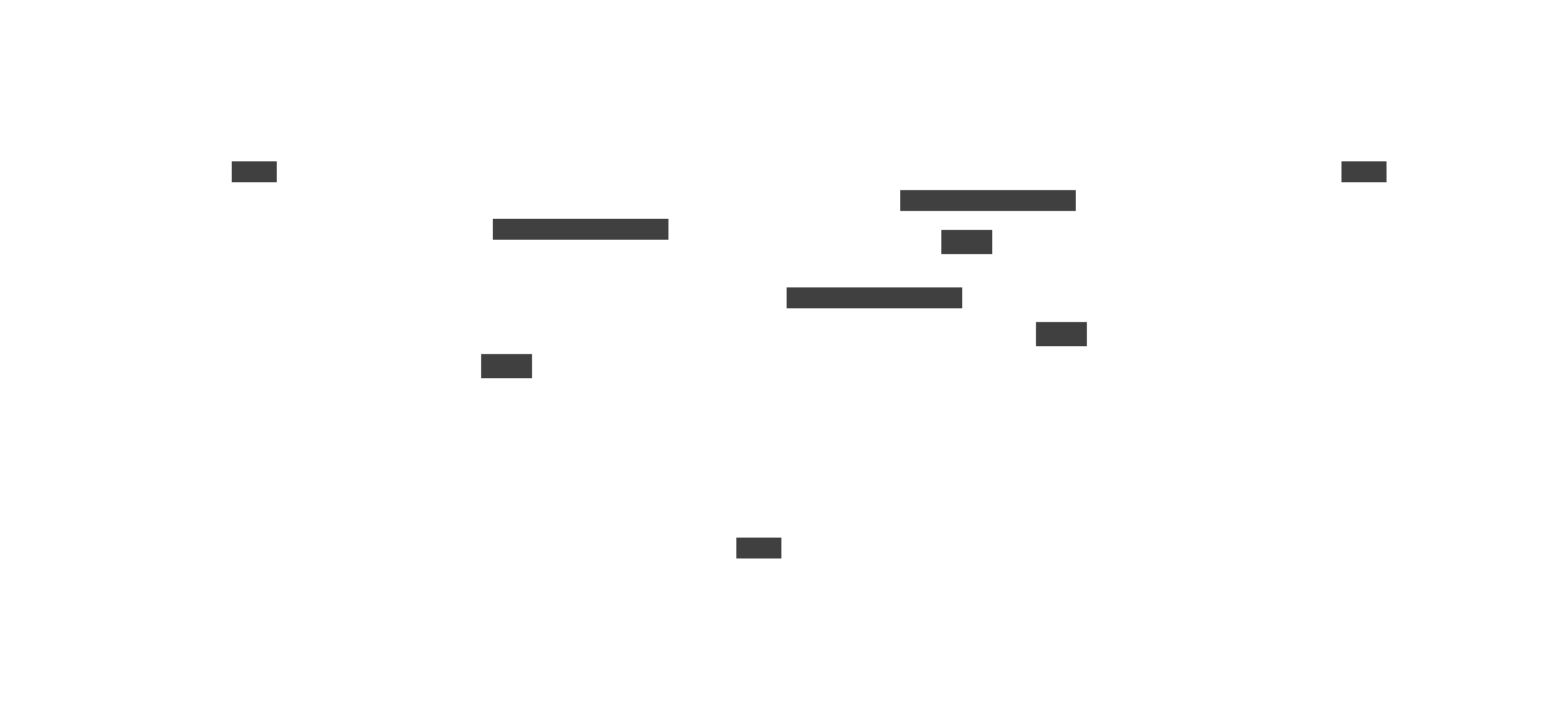
Geo-distribution places servers and data replicas in multiple regions worldwide. A user in Europe connects to European servers and reads from European data replicas, experiencing low latency regardless of where the document was created. This distribution requires replication mechanisms to keep data synchronized across regions, introducing the latency versus consistency trade-offs discussed earlier.
Large datasets are broken into partitions (sometimes called shards) that can be stored and processed independently. Partitioning strategies must balance even data distribution against access patterns. Hot documents being edited by many users need more resources than dormant documents, so the system may dynamically reallocate based on load.
The following diagram illustrates how global users connect to regional servers with data replicating between regions.
Handling peak load
Caching layers reduce load on backend storage and improve response times. Frequently accessed documents are cached in memory, serving reads without hitting the persistent storage layer. Cache invalidation must be handled carefully to ensure users see fresh data, especially when documents are being actively edited.
Autoscaling adjusts capacity based on demand. During work hours when editing activity peaks, the system automatically provisions additional servers. During off-peak hours, it scales down to reduce costs. Effective autoscaling requires monitoring systems that detect load changes quickly and provisioning systems that can bring new servers online within seconds.
Scalability is often the differentiator between good designs and great ones in interviews. Explaining how your architecture handles growth from thousands to millions of users demonstrates that you think about systems at the scale that top companies operate. With the architecture fully explored, we can turn to practical interview preparation.
Common interview questions and how to approach them
Google Docs appears frequently in System Design interviews because it combines real-time collaboration, scalability, and fault tolerance into a single problem. Practicing these questions prepares you for variations involving any collaborative system. The key is having a framework that you can adapt to different interviewers and time constraints.
Typical questions include designing a system like Google Docs from scratch, ensuring consistency when multiple users edit simultaneously, choosing storage strategies for real-time versioning, handling conflicts when two users type in the same location, and achieving global latency under 200 milliseconds. Each question might emphasize different aspects, but the underlying architecture remains similar.
Approach framework
Start by clarifying requirements before drawing anything. Ask about scale (how many concurrent users, documents, edits per second), features (offline support, version history depth, permission complexity), and constraints (latency targets, consistency requirements). This conversation demonstrates that you think about the problem space before jumping to solutions.
Lay out the high-level architecture early, identifying major components and their interactions. Explain clients, collaboration servers, storage, and synchronization as distinct layers. This gives you and the interviewer a shared vocabulary for the rest of the discussion and shows you can think at the appropriate level of abstraction.
Dive into the hard parts that distinguish Google Docs from simpler systems. Concurrent editing with OT or CRDTs, offline synchronization, and global scale are the areas where you can demonstrate depth. Do not spend equal time on every component. Focus on what makes this problem interesting.
Explain trade-offs explicitly throughout your answer. OT versus CRDTs, strong versus eventual consistency, snapshot frequency, storage efficiency versus retrieval speed. Interviewers value candidates who recognize that engineering involves choices rather than optimal solutions.
Do not forget failure handling and security. Mentioning replication, failover, idempotency, and permission checking shows you think about production systems rather than idealized designs. These concerns distinguish senior engineers from those who only consider happy paths.
Pro tip: Practice explaining your design out loud with a timer. Most System Design interviews are 45 to 60 minutes, and you need to cover requirements, architecture, deep dives, and trade-offs within that window. Recording yourself helps identify where you spend too much time or skip important points.
The goal is demonstrating systematic thinking and clear communication rather than producing a perfect design. Interviewers evaluate your reasoning process as much as your conclusions. With interview approach covered, let us examine common mistakes to avoid.
Mistakes to avoid when designing Google Docs
Even strong candidates make predictable mistakes in Google Docs System Design interviews. Recognizing these pitfalls helps you avoid them and present a more polished answer. Most mistakes stem from either skipping important considerations or overcomplicating solutions.
Skipping requirements gathering is perhaps the most common error. Jumping directly into architecture without clarifying what the system needs to do makes your solution feel ungrounded. Even if the interviewer has a standard problem in mind, asking clarifying questions shows methodical thinking and gives you information to guide your design choices.
Ignoring concurrency misses the core challenge. Real-time collaboration is what distinguishes Google Docs from a simple cloud file storage. If you spend most of your time on storage architecture without explaining how concurrent edits are handled, you have missed the point. Always address operational transformation, CRDTs, or your chosen conflict resolution approach.
Overlooking offline capabilities is another gap. Many candidates treat Google Docs as purely online, ignoring that offline editing is a key feature. Mentioning local storage, operation queuing, and reconnection synchronization demonstrates awareness of the full user experience.
Neglecting fault tolerance leaves your design incomplete. Production systems must handle server crashes, network partitions, and data corruption. Explaining replication strategies, failover mechanisms, and idempotent operations shows you think about real-world operational concerns.
Overcomplicating the solution is the opposite problem. Adding unnecessary components, obscure algorithms, or theoretical constructs without clear justification makes your design harder to follow and raises questions about your judgment. Start with the simplest design that meets requirements, then add complexity only where justified.
Poor communication undermines even good technical thinking. Silently sketching diagrams without explaining your reasoning leaves interviewers guessing. Narrate your thought process, explain why you are making each choice, and check in with the interviewer periodically to ensure you are addressing their interests.
Interviewers value clarity and trade-off analysis more than theoretical elegance. A simple, well-explained design that acknowledges limitations is stronger than a complex design you cannot clearly articulate. With mistakes identified, here is a structured preparation strategy.
Preparation strategy for Google Docs System Design interviews
Preparing for Google Docs System Design interviews requires practice rather than memorization. You need to internalize the architecture well enough to adapt it to different problem framings and interviewer questions. The following roadmap builds this capability systematically.
Step 1: master distributed systems fundamentals
Before tackling Google Docs specifically, ensure you understand the building blocks. Study load balancing strategies and when to use different approaches. Learn sharding and partitioning patterns for distributing data across servers. Understand caching layers and cache invalidation challenges. Review consistency models including strong, eventual, and causal consistency, knowing when each is appropriate.
Step 2: study real-time collaboration specifically
Deep dive into the algorithms that make collaborative editing possible. Understand operational transformation well enough to explain how two concurrent operations are transformed. Read about CRDTs and their mathematical properties. Study how WebSocket connections differ from HTTP and why they matter for real-time systems. The more deeply you understand these concepts, the more confidently you can discuss trade-offs.
Step 3: practice related design problems
Work through design prompts for collaborative text editors, shared whiteboards, real-time messaging apps, and multiplayer games. Each problem exercises similar muscles in concurrency control, state synchronization, and conflict resolution. The variety helps you recognize patterns and adapt your knowledge to novel situations.
Step 4: build mock interview habits
Time yourself for 45 to 60 minutes per problem to simulate interview conditions. Use a whiteboard, drawing tablet, or online diagramming tool to practice visual communication. Most importantly, practice explaining trade-offs out loud. Your ability to articulate why you made each choice matters as much as the choices themselves.
Step 5: learn from structured resources
Courses like Grokking the System Design Interview provide frameworks and walkthroughs for problems exactly like Google Docs. These resources help you see how experts structure answers and what level of detail interviewers expect. They are particularly valuable if you are new to System Design interviews or returning after a long break.
Step 6: refine your communication
Record yourself explaining solutions and review the recordings critically. Notice where you ramble, skip important points, or fail to explain your reasoning. Focus on being clear, concise, and structured. In interviews, how you explain matters as much as what you explain. Consistent practice builds the confidence to stay calm and organized under interview pressure.
Conclusion
Google Docs represents one of the most complete case studies for understanding modern distributed systems. Building a real-time collaborative editor requires solving problems across the entire stack. Synchronization algorithms resolve concurrent edits. Storage systems balance versioning with performance. Messaging infrastructure delivers updates in milliseconds. Permission systems scale to millions of documents. Fault tolerance mechanisms keep the system reliable despite inevitable failures. Each component involves trade-offs that have no universally correct answers, only choices appropriate to specific requirements and constraints.
The patterns you learn from Google Docs extend far beyond document editing. The same synchronization challenges appear in collaborative design tools like Figma, multiplayer games, real-time dashboards, and any system where multiple users interact with shared state. Understanding operational transformation and CRDTs gives you vocabulary to discuss these problems precisely. Grasping the interplay between consistency and latency helps you reason about distributed systems generally. These skills transfer directly to building and scaling production systems.
Real-time collaboration at global scale will only become more important as remote work continues expanding and users expect seamless multiplayer experiences in every application. The architectural patterns are evolving too. Local-first software, edge computing, and new CRDT implementations are pushing the boundaries of what collaborative systems can do. Engineers who understand these foundations will be well-positioned to build the next generation of tools.
Approach your Google Docs System Design interview with structure, clarity, and confidence. Lead with requirements, explain your architecture at the right level of abstraction, dive deep on synchronization and conflict resolution, and articulate trade-offs explicitly. With practice, the complexity becomes manageable and the conversation becomes an opportunity to demonstrate genuine engineering depth.
