


At its core, system design is the practice of deciding how different parts of a software system fit together to solve a problem. It is not about writing code line by line. It is about understanding how requests move through a system, where data is stored, and how responsibilities are divided.
For beginners, system design often feels intimidating because it is associated with complex diagrams and large-scale systems. In reality, system design starts with very simple questions: where does a request come from, where does it go, and what happens if something goes wrong.
System design is not about drawing complicated diagrams
A common misconception is that system design means drawing large architecture diagrams filled with boxes and arrows. While diagrams can help, they are not the goal. The goal is clarity.
If you can explain a system clearly in words, the diagram becomes almost optional. Interviewers and experienced engineers care more about whether your explanation makes sense than whether your diagram looks impressive.
How beginners should think about system design
For beginners, system design is best thought of as structured problem-solving. You are learning to break a problem into parts, assign responsibilities, and reason about interactions. This skill applies whether the system is small or large.
System design grows in complexity over time, but the way you think about it remains consistent.
Why system design matters even for beginners
Even if you are not preparing for interviews, system design skills improve everyday coding. Understanding system boundaries helps you write cleaner APIs. Thinking about data flow helps you avoid tightly coupled logic. Awareness of failure cases makes your code more robust.
Beginners who learn basic system design concepts early often develop better engineering instincts overall.
System design builds confidence in technical discussions
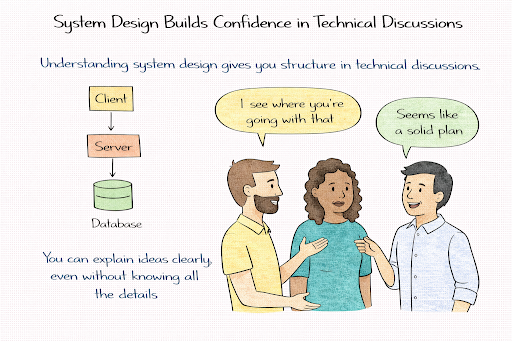
Many beginners struggle in technical discussions, not because they lack knowledge, but because they lack structure. System design provides a framework for explaining ideas clearly and confidently.
When you understand how a system fits together, you can participate in design discussions without feeling lost, even if you are still learning details.
Why interviews introduce system design early
Some beginners are surprised to see system design questions in junior interviews. Interviewers are not expecting large-scale architectures at this stage. They are evaluating clarity of thought, communication, and fundamentals.
Interviewers know that advanced skills can be taught on the job. Clear thinking is harder to teach.
| Beginner skill | Why it matters |
| Clear explanation | Shows understanding |
| Structured thinking | Indicates growth potential |
| Comfort with basics | Builds interview confidence |
System design questions at the beginner level are about potential, not mastery.
How system design interviews work at a beginner level
Beginner system design interviews are usually structured as conversations. Interviewers ask open-ended questions and guide the discussion with follow-ups. They are not trying to trick you or test obscure knowledge.
The interviewer wants to see how you approach a problem, not whether you already know the “right” answer.
What interviewers expect from beginners
At the beginner level, interviewers expect you to explain your thinking clearly, ask clarifying questions, and avoid jumping into unnecessary complexity. They do not expect you to design globally distributed systems or handle extreme scale.
What matters is whether you can reason step by step and explain why you make certain choices.
| Interview focus | What interviewers are checking |
| Understanding the problem | Listening and comprehension |
| Explaining ideas | Communication skills |
| Using fundamentals | Conceptual clarity |
| Handling guidance | Coachability |
Why mistakes are not deal-breakers
Beginners often worry about making mistakes during system design interviews. Interviewers are usually forgiving at this level. What matters more is how you respond when corrected or guided.
Adjusting your approach calmly is often seen as a positive signal rather than a weakness.
Core mental models every beginner should learn first
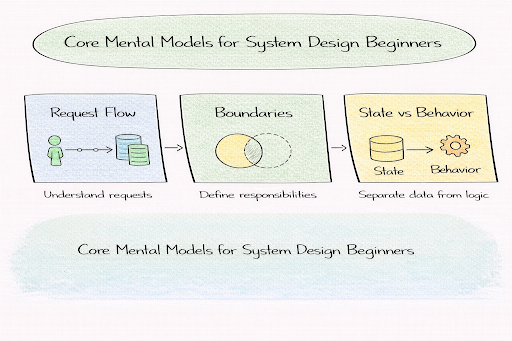
One of the most important mental models for beginners is request flow. This means understanding what happens when a user interacts with a system, step by step. Where does the request start, which components handle it, and where does it end.
If you can explain the request flow clearly, you already understand a large part of the system design.
Understanding system boundaries
System boundaries define responsibility. Beginners often try to design everything at once, which leads to confusion. Learning where one part of the system ends and another begins makes designs easier to reason about.
Boundaries also help explain failures. When something breaks, boundaries help you understand what is affected and what is not.
Separating state from behavior
Another key mental model is separating state from behavior. State is data that needs to be stored and remembered. Behavior is logic that processes requests.
Beginners who understand this separation quickly grasp why some components scale easily while others do not.
| Mental model | Why it matters for beginners |
| Request flow | Enables clear explanations |
| Boundaries | Prevents tangled designs |
| State vs behavior | Simplifies scaling logic |
Why interviewers care about mental models
Interviewers use mental models as an early signal. If you struggle to explain request flow or boundaries, deeper discussions become difficult. Strong mental models make learning advanced topics much easier later.
For beginners, mastering these basics is far more important than learning advanced tools or architectures.
Understanding request flow from user to database
Request flow describes what happens when a user interacts with a system. For example, when a user clicks a button in an application, a sequence of steps begins. The request travels from the user’s device to servers, logic is executed, data may be read or written, and a response is returned.
For beginners, request flow is the most important system design concept to master. If you can explain how a request moves through a system from start to finish, you already understand the backbone of system design.
Breaking down a simple request
A typical request begins at the client, such as a browser or mobile app. It then reaches a backend service, where business logic runs. If the request requires data, the service interacts with a database or another storage system. Once processing is complete, the response flows back to the user.
This flow may look simple, but interviewers listen carefully to how clearly you explain each step. Confusion here usually signals weak fundamentals.
Why request flow matters in interviews
Interviewers often ask beginners to “walk through a request” because it reveals how well you understand systems end to end. They are not looking for advanced optimizations. They want to see whether you can describe what happens in a logical, sequential way.
Strong explanations focus on clarity rather than detail. You do not need to mention every possible component. You need to show that you understand the journey of the request.
| Part of the flow | What interviewers evaluate |
| Client interaction | Understanding of the entry point |
| Backend handling | Logical processing |
| Data access | Awareness of persistence |
| Response path | End-to-end reasoning |
Stateless vs stateful systems explained simply
What stateless systems mean
A stateless system does not remember anything about previous requests. Each request contains all the information needed to process it. Any server instance can handle any request because no long-term memory is required.
For beginners, this idea is important because stateless systems are easier to scale and recover. If one server fails, another can take its place without losing information.
What stateful systems mean
A stateful system remembers information across requests. This could include user sessions, counters, or in-progress workflows. State makes systems more powerful, but it also introduces complexity.
When a state exists, it must be stored, synchronized, and recovered after failures. This is why the state requires careful handling.
Where state usually lives
Modern systems try to keep application servers stateless and move state into specialized systems such as databases or caches. These systems are designed to handle persistence and consistency more reliably.
Understanding where the state belongs helps beginners reason about scalability without needing advanced knowledge.
| Design choice | Key benefit | Key challenge |
| Stateless services | Easy scaling | External dependencies |
| Stateful services | Faster local access | Recovery complexity |
Why interviewers care about this distinction
Interviewers expect even beginners to understand why stateless designs are preferred when possible. You do not need to know advanced consistency models. You need to show that you recognize where complexity comes from.
Being able to explain this distinction clearly is often a strong positive signal.
Basic building blocks of systems
Most systems are composed of a small set of recurring components. Beginners often feel overwhelmed because they think each system is unique. In reality, many systems reuse the same building blocks in different ways.
Understanding what these components do is more important than knowing how they are implemented.
Common system components at a conceptual level
Application servers handle logic and coordinate requests. Databases store persistent data. Caches store frequently accessed data to improve performance. Queues help systems handle work asynchronously.
You do not need to know internal algorithms to understand their role in the system. Interviewers care about whether you know why a component exists.
How building blocks fit into the request flow
Each building block plays a role in the request lifecycle. For example, a cache may serve data before the database is accessed. A queue may delay processing until later. Understanding this interaction helps beginners reason about system behavior.
| Component | Problem it solves |
| Application server | Business logic |
| Database | Persistent storage |
| Cache | Performance improvement |
| Queue | Asynchronous processing |
Avoiding the trap of listing components
A common beginner mistake is listing many components without explaining their purpose. Interviewers prefer a small number of components that are well justified.
Clarity matters more than completeness.
Performance basics: latency, throughput, and bottlenecks
Understanding latency in simple terms
Latency measures how long a single request takes from start to finish. From a user’s perspective, latency is how fast the system feels. High latency leads to slow experiences, even if the system can handle many users.
Beginners do not need exact measurements. They need intuition about where delays come from.
Understanding throughput without math
Throughput measures how many requests a system can handle over time. A system can have low latency but low throughput, or high throughput but high latency. These concepts are related but not the same.
Interviewers want beginners to understand that improving one can sometimes hurt the other.
What bottlenecks are and why they matter
A bottleneck is the slowest part of a system. No matter how fast other components are, the bottleneck determines overall performance. Adding resources elsewhere does not help if the bottleneck remains.
Recognizing bottlenecks is more important than proposing optimizations.
| Performance concept | What beginners should understand |
| Latency | User-perceived speed |
| Throughput | Capacity under load |
| Bottleneck | Limiting factor |
Why interviewers value performance intuition
Interviewers do not expect beginners to calculate performance numbers. They expect logical reasoning. If you can explain why a database becomes slow under load or why caching helps, you are meeting expectations.
Performance intuition grows with experience, but the foundation can be learned early.
Beginner-friendly system design examples
System design examples help beginners turn abstract ideas into something concrete. Reading about request flow or stateless services can feel theoretical until you see how those ideas apply to a real system. Examples create that bridge.
Interviewers also rely on simple examples because they quickly reveal whether a candidate understands fundamentals. These examples are not about scale or advanced patterns. They are about clarity and reasoning.
What makes an example beginner-friendly
Beginner-friendly system design examples usually involve a small number of features and modest assumptions. The goal is to explain how the system works end to end, not to optimize it heavily.
Examples such as a URL shortener, a simple file storage service, or a basic rate limiter allow beginners to focus on request flow, boundaries, and data without being overwhelmed.
| Example type | What it helps you practice |
| URL shortener | Request flow and data storage |
| File storage | Upload/download flow |
| Rate limiter | Simple state handling |
How interviewers use these examples
Interviewers listen to whether you can explain what happens when a user interacts with the system. They care less about the diagram and more about whether your explanation makes sense.
A beginner who explains a simple system clearly often leaves a stronger impression than someone who attempts a complex system and struggles to explain it.
How to approach a system design question step by step
Beginners often feel nervous during system design questions because the problem feels open-ended. A simple, repeatable process reduces that anxiety. It gives you something to fall back on when you are unsure what to say next.
Interviewers expect beginners to follow a logical flow, even if the details are simple.
Starting with understanding the problem
Every system design question begins with understanding what is being asked. Before designing anything, take a moment to clarify what the system must do. This shows that you are listening carefully and thinking deliberately.
Restating the problem in your own words also helps ensure you and the interviewer are aligned.
Moving from high-level ideas to details
After clarifying the problem, beginners should describe the system at a high level. This includes identifying the main components and explaining how a request flows through them.
Only after this high-level view is established should you add details. This mirrors how real systems are designed and helps interviewers follow your thinking.
Treating the question as a conversation
System design interviews are collaborative. Interviewers often guide you with hints or follow-up questions. Beginners should treat this guidance as help, not criticism.
Adjusting your approach based on feedback is a positive signal.
| Step in the approach | Why it helps beginners |
| Clarify requirements | Prevents confusion |
| High-level design | Builds structure |
| Add details gradually | Avoids overwhelm |
| Respond to guidance | Shows coachability |
Common beginner mistakes and how to avoid them
Jumping into complexity too early
One of the most common beginner mistakes is trying to design an advanced system right away. Beginners sometimes think complexity equals correctness. Interviewers usually interpret this as a lack of judgment.
Starting simple and building up only when needed is almost always the better approach.
Using buzzwords without understanding
Beginners sometimes mention technologies or patterns they have heard about without being able to explain them. Interviewers quickly notice this and may ask follow-up questions that expose gaps in understanding.
It is always better to explain a simple idea clearly than to mention an advanced concept vaguely.
Skipping clarification
Some beginners feel pressured to start designing immediately. Skipping clarification often leads to misaligned designs and unnecessary confusion. Interviewers prefer candidates who take a moment to understand the problem fully.
Asking clarifying questions shows confidence, not weakness.
| Common mistake | How interviewers see it |
| Over-complicating | Poor judgment |
| Buzzword usage | Shallow understanding |
| Skipping questions | Rushed thinking |
Why mistakes are part of learning
Interviewers expect beginners to make mistakes. What matters is how you respond. Staying calm, adjusting your explanation, and learning during the conversation often leaves a positive impression.
How to practice system design effectively as a beginner
System design is a skill that improves with practice. Beginners should practice in low-pressure environments before worrying about interviews. The goal is to build comfort and confidence, not perfection.
Practicing small systems repeatedly is more effective than attempting large systems once.
Practicing explanation, not just diagrams
Beginners often focus on drawing diagrams. While diagrams can help, system design interviews are mostly verbal. Practicing explaining your design out loud is essential.
If you can explain a system clearly without a diagram, you are building the right skill.
Learning through repetition
Repeating the same example multiple times helps you notice gaps in your understanding. Each repetition should feel clearer and smoother than the last.
Interviewers recognize this clarity immediately.
| Practice focus | What it builds |
| Repeating examples | Confidence |
| Explaining aloud | Communication |
| Reviewing mistakes | Learning speed |
When beginners know they are improving
Improvement shows up when system design questions feel less intimidating. You start to know what to say first, how to structure your answer, and how to recover if you get stuck.
That sense of control is the real goal of practice.
Using structured prep resources effectively
Use Grokking the System Design Interview on Educative to learn curated patterns and practice full System Design problems step by step. It’s one of the most effective resources for building repeatable System Design intuition.
You can also choose the best System Design study material based on your experience:
Final thoughts
System design can feel overwhelming at first, especially for beginners. The key is to remember that system design is not about knowing everything. It is about learning how to think clearly, explain ideas, and break problems into manageable parts.
By focusing on fundamentals, practicing simple examples, and developing a structured approach, beginners can build confidence steadily. Over time, complex systems will start to feel less mysterious because they are built on the same basic ideas.
System design is a long-term skill. Every clear explanation, every practiced example, and every thoughtful question moves you closer to confidence. If you stay patient and consistent, system design will become not just manageable, but enjoyable.
