

When preparing for System Design interviews, most candidates focus heavily on modern database systems, distributed storage engines, and scalable data platforms. While this focus is important, interviewers often test whether candidates understand the historical and practical reasons behind architectural choices. This is where the advantages of the file system in DBMS become relevant.
Although DBMS platforms were created to overcome the limitations of file systems, file-based storage is not obsolete. In fact, file systems still play an important role in many real-world systems, especially where simplicity, performance, or cost efficiency is prioritized over advanced database features.
In interviews, demonstrating awareness of when a file system is sufficient and even preferable shows strong engineering judgment. This article explores the advantages of file system in DBMS from a System Design interview perspective, explaining where file systems excel and how to articulate these advantages clearly.
What Does File System Mean In DBMS Context?
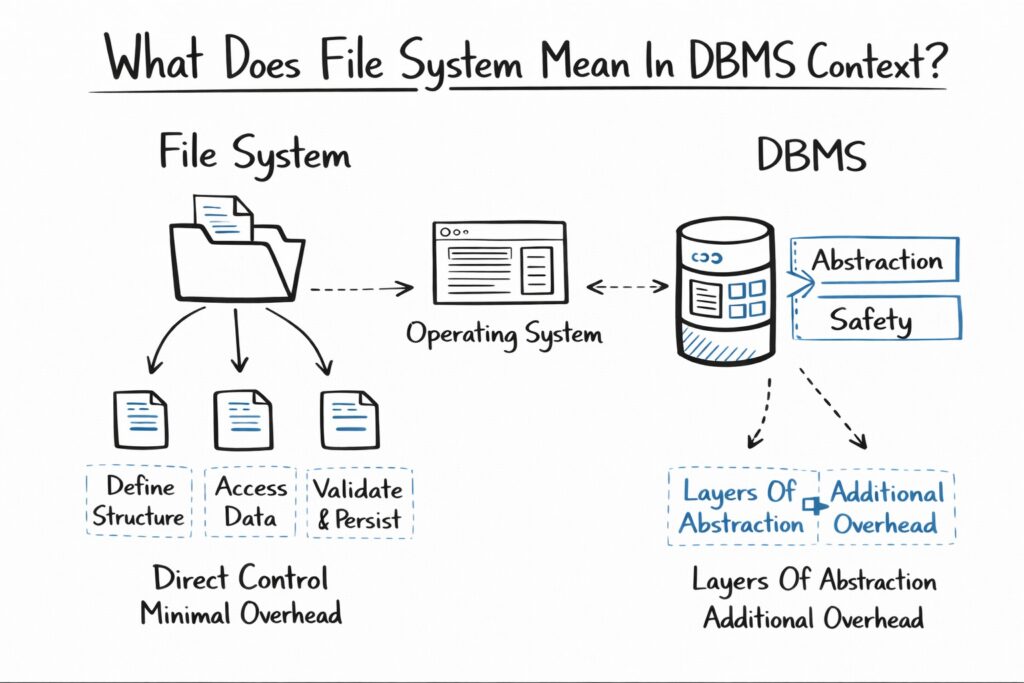
In the context of DBMS discussions, a file system refers to storing data directly in files managed by the operating system rather than through a database engine. Applications define how data is structured, accessed, validated, and persisted.
While DBMS platforms add layers of abstraction and safety, file systems offer direct control and minimal overhead. Understanding this trade-off is critical in System Design interviews, where not every problem requires the full power of a database.
1. Simplicity Of Design And Implementation
One of the strongest advantages of a file system in DBMS is its simplicity. File-based storage has a minimal learning curve and requires far less setup compared to a database system.
For small applications, scripts, or prototypes, file systems allow developers to focus on business logic without worrying about schema design, query optimization, or transaction configuration. This simplicity reduces development time and operational complexity.
In interviews, this advantage is useful when discussing early-stage systems or internal tools where over-engineering would be unnecessary.
| Aspect | File System Characteristic |
|---|---|
| Setup Complexity | Very low |
| Learning Curve | Minimal |
| Infrastructure Overhead | Almost none |
| Time To First Use | Immediate |
2. Low Resource Overhead
File systems consume fewer system resources compared to DBMS platforms. There is no database engine running in the background, no query planner, and no transaction manager.
This makes file systems especially suitable for environments with limited CPU, memory, or storage resources. Embedded systems, edge devices, and lightweight services often rely on file-based storage for this reason.
In System Design interviews, this advantage can justify using file systems for constrained environments or read-heavy workloads where performance predictability matters.
3. Faster Access For Simple Workloads
For straightforward read and write operations, file systems can outperform DBMS solutions because they avoid abstraction layers. Direct file access can be faster than executing database queries, especially when data formats are simple and access patterns are predictable.
This advantage is particularly relevant for sequential access patterns such as log files, configuration files, and static datasets.
Interviewers appreciate candidates who recognize that databases are not always the fastest option and that file systems can be more efficient in specific scenarios.
4. No Dependency On Database Software
Another key advantage of a file system in DBMS discussions is the lack of dependency on specialized database software. File systems rely only on the operating system, which is already present in most environments.
This reduces licensing costs, simplifies deployment, and avoids compatibility issues associated with database upgrades or vendor lock-in.
In interviews, this advantage is often relevant when discussing cost-sensitive systems, temporary solutions, or environments where introducing a DBMS is impractical.
| Consideration | File System Benefit |
|---|---|
| Licensing Cost | None |
| Vendor Lock-In | None |
| Deployment Complexity | Minimal |
| Portability | High |
5. Greater Control Over Data Format
File systems give developers complete control over how data is structured and stored. Data can be written in binary, text, JSON, CSV, or any custom format optimized for the application’s needs.
This flexibility allows systems to store data in ways that are not easily supported by relational or even NoSQL databases. For example, large binary objects, media files, and machine learning model artifacts are often stored directly in file systems.
In System Design interviews, this advantage supports discussions around object storage, blob storage, and hybrid architectures.
6. Ease Of Integration With Operating System Tools
File systems integrate naturally with operating system utilities such as backup tools, file permissions, scripting languages, and monitoring utilities.
This tight integration simplifies operational workflows. Tasks such as copying data, archiving logs, or scanning files can be performed using standard OS tools without specialized database knowledge.
Interviewers value candidates who understand how system components interact at the operating system level, not just at the application layer.
7. High Transparency And Debuggability
File-based systems are highly transparent. Data stored in files can be inspected, modified, or analyzed directly using text editors or command-line tools.
This transparency simplifies debugging and troubleshooting, especially during development and testing. When something goes wrong, engineers can directly inspect the data without relying on database tooling.
In interviews, this advantage can be used to justify file systems for debugging-heavy workflows, internal tooling, or data pipelines in early development stages.
8. Suitable For Read-Only Or Append-Only Workloads
Many systems operate on data that is either read-only or append-only. Examples include logs, audit trails, static datasets, and configuration snapshots.
File systems are particularly well-suited for these workloads because they avoid the overhead of transaction management and concurrency control. Appending to files is simple, fast, and reliable.
This advantage is useful in interviews when discussing logging systems, event storage, or batch processing pipelines.
| Workload Type | File System Suitability |
|---|---|
| Read-Only Data | Excellent |
| Append-Only Data | Excellent |
| Random Updates | Limited |
| Concurrent Writes | Limited |
9. Lower Operational Complexity
Operating a DBMS requires ongoing maintenance, including backups, indexing strategies, performance tuning, and monitoring. File systems, by contrast, are much simpler to operate.
For small teams or internal systems, reducing operational burden can be more valuable than advanced features. File systems allow teams to avoid dedicated database administration effort.
In System Design interviews, this advantage supports trade-off discussions where operational simplicity is prioritized over scalability.
10. Ideal For Prototyping And Early-Stage Systems
File systems are an excellent choice for prototypes and early-stage systems. They allow rapid experimentation without committing to a rigid schema or database architecture.
As requirements evolve, systems can later migrate to a DBMS when scalability, concurrency, or consistency demands increase.
Interviewers often look for this evolutionary thinking, where designs start simple and grow in complexity only when needed.
Comparing File System Advantages With DBMS Strengths
Understanding the advantages of the file system in DBMS discussions requires contextual comparison rather than absolute judgment.
| Dimension | File System | DBMS |
|---|---|---|
| Simplicity | High | Moderate |
| Scalability | Low | High |
| Transaction Support | None | Strong |
| Operational Overhead | Low | Higher |
| Flexibility | High | Structured |
This comparison helps frame interview answers around trade-offs rather than right or wrong choices.
How Interviewers Expect You To Discuss File System Advantages
Interviewers are not looking for candidates to argue that file systems are better than databases. Instead, they want to see whether you understand when file systems are appropriate and why DBMS solutions exist.
Strong candidates mention file systems naturally when discussing alternatives, early-stage architectures, or specialized workloads. They then explain why and when a transition to a DBMS would be necessary.
This balanced perspective demonstrates engineering maturity and practical judgment.
Using File System Advantages To Justify Hybrid Architectures
Many modern systems use hybrid architectures that combine file systems and databases. Databases handle structured metadata, while file systems store large blobs or immutable data.
Understanding the advantages of file system in DBMS contexts makes it easier to justify these designs during interviews.
For example, object storage systems often rely on file-based storage while indexing metadata in a database.
Conclusion
The advantages of a file system in DBMS are often overlooked during interview preparation, yet they play a critical role in understanding architectural trade-offs.
By knowing where file systems excel, you can explain why databases are necessary without dismissing simpler approaches outright. This ability to reason about trade-offs rather than defaulting to complex solutions is exactly what interviewers look for.
As you prepare for System Design interviews, treat file systems not as outdated technology, but as a valuable baseline. Understanding their advantages will make your design explanations more grounded, practical, and convincing.
