
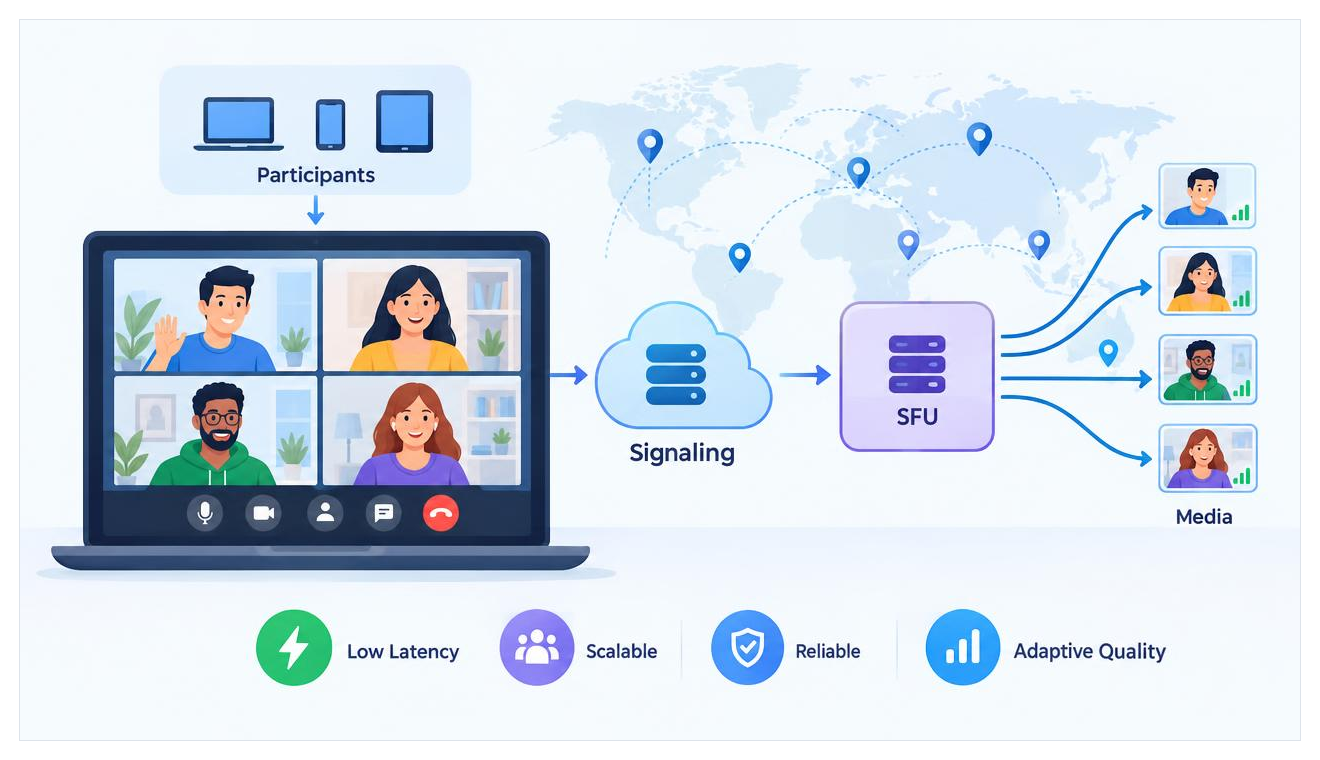
TL;DR: The zoom system design interview is usually not a CRUD interview in disguise. It tests whether you can separate signaling from media, reason about SFU-based fan-out, and explain how calls degrade under packet loss and overload. Strong answers name latency targets, adaptation strategy, failure handling, and observability instead of stopping at boxes and arrows. The best answers also show why video conferencing architecture behaves differently from a standard backend system.
Most candidates prepare for distributed systems interviews by studying APIs, databases, and queues. The zoom system design interview changes the center of gravity: low-latency media, session fan-out, and quality under unstable networks matter more than perfect request-response behavior.
For a broader preparation structure before going deep into meeting systems, start with Grokking System Design Interview. That framework helps turn a messy prompt into a sequence of requirements, architecture, bottlenecks, and trade-offs.
Why Designing a Video Call Is Harder Than It Looks
A meeting system has a different failure model from a standard web app. If a catalog page loads 500 ms late, users notice and often continue; if audio breaks for 500 ms, the conversation falls apart. That difference changes what interviewers care about, and it is why video conferencing system design interview questions focus on real-time behavior.
In real-time communication, latency budgets are tight and visible to users. Audio often needs end-to-end delay near 150 ms to feel natural, while video usually needs to stay well under 500 ms to avoid obvious conversational lag. Throughput still matters, but continuity matters more.
The basic scaling unit also changes. Instead of rows, requests, and transactions, the system scales on participants, streams, bitrate layers, and active sessions. A candidate who sounds strong in backend design can still struggle here.
Before scoring, it helps to contrast standard web assumptions with RTC constraints directly. That comparison makes familiar distributed-systems ideas easier to map to media-system decisions.
A compact comparison makes that shift easier to see.
| Standard web system | Video conferencing architecture |
|---|---|
| Requests can be retried without obvious user pain | Loss and jitter are visible in the moment |
| Correctness and throughput often come first | Continuity and latency usually come first |
| State is often centralized in databases | Session state, media routing, and adaptation are split |
| Scaling is usually about request volume | Scaling is about participants, streams, and fan-out |
That contrast explains why a Zoom-style video call architecture is evaluated differently from a typical app design. It leads into what interviewers are scoring.
What Interviewers Really Want to Hear in Your Answer
In a meeting-focused design round, interviewers often check whether requirements are framed in RTC terms. That means naming participant count, meeting type, target regions, recording needs, and acceptable delay before proposing architecture.
They also check decomposition. Strong candidates separate signaling, session state, media routing, recording, and analytics instead of collapsing everything into one backend. They usually compare mesh, MCU, and SFU, then explain why SFU is the practical default for most group calls.
Quality-of-experience thinking is another strong signal. Good answers state a degradation order, usually preserving audio first, then video continuity, then frame rate or resolution. They also mention metrics such as packet loss, jitter, freeze rate, reconnect rate, and Mean Opinion Score concepts without claiming one metric explains the whole experience.
The table below works as a compact scoring rubric tied to observable interview behavior.
| What interviewers listen for | Why it matters |
|---|---|
| RTC-specific requirements | Prevents the answer from staying generic |
| Signaling vs media separation | Shows the right architectural boundary |
| SFU-based scaling choice | Demonstrates practical media routing knowledge |
| Quality and degradation plan | Proves the candidate understands user experience |
| Metrics and observability | Shows the system can be operated in production |
Those expectations map the discussion to concrete signals that an interviewer can score. With that frame in place, the next step is the join path that a strong answer should describe.
What Actually Happens When You Join a Zoom Call?
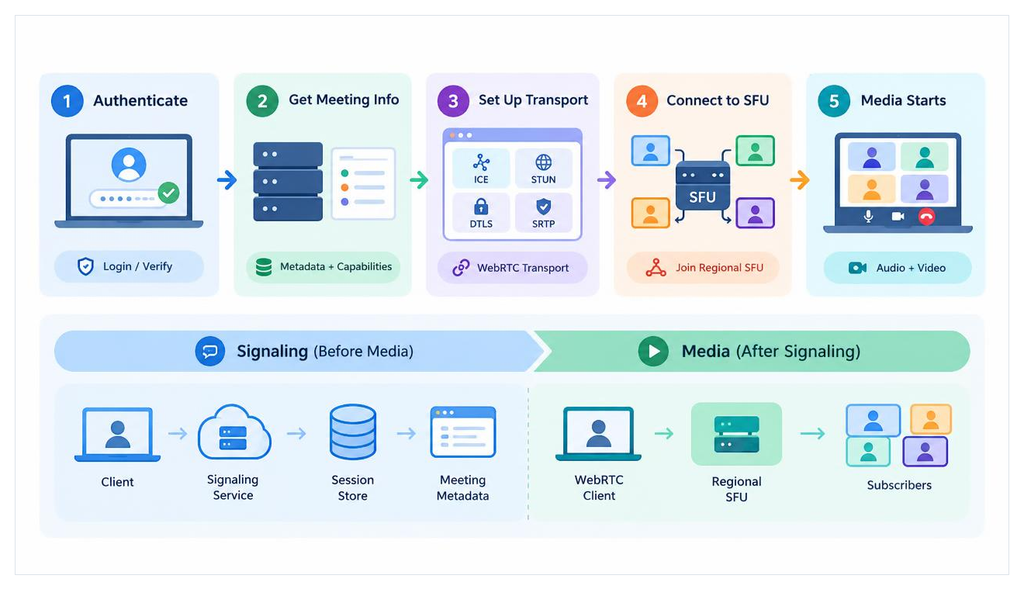
When a user clicks join, the first path is not media. The client usually authenticates, contacts signaling, gets meeting metadata, exchanges capabilities, and negotiates transport details before steady media begins. That separation matters because signaling can tolerate retries and stronger consistency more than media can.
After signaling, the client sets up WebRTC transport using WebRTC standards from W3C and IETF patterns such as ICE, STUN, DTLS, and SRTP. In production, a TURN relay may be needed when direct connectivity fails, but relay use should be minimized because it raises cost and latency. Group calls almost never use full mesh beyond small rooms.
Media is usually published to a regional SFU, which forwards selected streams to subscribers. That design avoids the CPU cost of full decoding and re-encoding common in MCU-heavy systems, while keeping uplink demands on clients manageable. The trade-off is that downstream adaptation and bandwidth policy become central design concerns.
Modern systems often use cascaded edges and regional SFUs. A participant joins the nearest edge for control and transport efficiency, while media may stay within a region or traverse inter-region paths when meetings span geographies. That reduces cross-ocean latency for many users, but introduces capacity planning and failover complexity.
Simulcast or scalable video coding helps the SFU choose different layers per subscriber. Feedback such as RTCP reports and transport-wide congestion control, described in TWCC-related transport feedback work, allows per-subscriber adaptation under asymmetric network conditions. That is the mechanical core of smooth meetings.
This table summarizes the join path by mapping each stage to its role, protocol choices, and scaling trade-offs.
| Join step | Control path | Media path |
|---|---|---|
| Authentication | Client verifies identity and access | None yet |
| Signaling | Meeting metadata and capabilities are exchanged | None yet |
| Transport setup | ICE, STUN, DTLS, and SRTP are negotiated | Media starts flowing after negotiation |
| Ongoing session | Membership and roles are tracked | Audio and video move through the regional SFU |
A visual join path helps anchor those moving pieces before the discussion shifts to the trade-offs that keep the call stable under real network conditions.
How Do You Keep a Video Call Running Smoothly?
A lot of generic system design content stops at “use WebRTC and a media server.” That is not enough here. Smooth calls depend on subscriber-level adaptation, congestion feedback, reconnect logic, and clear consistency boundaries for meeting state.
UDP-first transport is the usual choice because retransmission-heavy behavior can destroy conversational latency. Reliability still exists, but it is selective and layered: some loss is tolerated in video, while audio protection, FEC, NACK behavior, and jitter buffering are tuned to preserve intelligibility. Fallback behavior must be explicit.
Session state also needs nuance. Roster membership, mute state, raised hands, and chat are important, but they do not all require the same consistency model. In practice, most developers handle it by using stronger consistency for meeting admission and role changes, while allowing chat ordering and presence updates to be eventually consistent across regions.
Keyframe timing and layer switching matter more than many candidates expect. If a subscriber drops from high to low quality, the system may need a fresh keyframe before recovery looks clean. That is why adaptive bitrate simulcast belongs in the design, not as an afterthought.
The table below is a compact map from each concept to the design choice behind it and the user effect it protects.
| Concept | Design choice | User-visible effect |
|---|---|---|
| UDP-first transport | Avoid heavy retransmission | Lower conversational delay |
| Simulcast layers | Forward the right stream per subscriber | Better quality under varying bandwidth |
| Jitter buffering | Smooth short network spikes | Fewer audio/video stutters |
| Eventual consistency for some state | Relax ordering where safe | Faster global propagation |
The recurring choices are easier to remember when condensed into interview language. With those concepts in place, it becomes much easier to recognize the prompt family being asked.
Six Video Conferencing Questions You Should Be Ready For
The common prompt families are usually variants of one core theme. Design a video conferencing system tests signaling, media routing, adaptation, and session life cycle. Design in-meeting chat tests metadata consistency boundaries and fan-out without overengineering it into a global ordered log.
Webinars shift the pressure point from many publishers to one or a few publishers with massive subscriber fan-out. Recording and transcription add pipeline design, storage backpressure, and asynchronous processing. Scheduling integration tests calendar sync, idempotency, and external API constraints.
Presence notifications look simple but often expose weak thinking around event freshness and connection churn. If you have reviewed adjacent prompt sets such as Amazon system design interview questions, the difference is that meeting systems force tighter latency and richer degradation planning.
| Prompt family | Main design pressure | What to emphasize |
|---|---|---|
| Video conferencing | Media routing and adaptation | SFU, signaling, latency, and failure handling |
| Chat | State propagation | Ordering, fan-out, and consistency boundaries |
| Webinar | One-to-many distribution | Subscriber scale and moderation |
| Recording/transcription | Async pipelines | Queues, storage, and backpressure |
| Scheduling | External integration | Idempotency and retries |
| Presence | Event freshness | Connection churn and state staleness |
The prompt-to-skill mapping helps identify where candidates usually slip. The most complete answer, though, is still the end-to-end meeting system, because it reveals the trade-offs in one continuous walkthrough.
Let’s Build the Video Conferencing System
Start by clarifying requirements. Ask for meeting size, whether the focus is small team calls or large sessions, whether recording is required, target regions, and expected device mix. Then estimate rough stream counts and bandwidth so the design does not float free of scale.
A simple capacity model helps. If each participant publishes one audio stream and one simulcast video stream with three quality layers, the aggregate forwarding work grows with subscribers and publishers together. At a high level, bitrate demand is closer to $n \times m$ forwarding relationships than plain request counts, even though SFU forwarding is cheaper than transcoding.
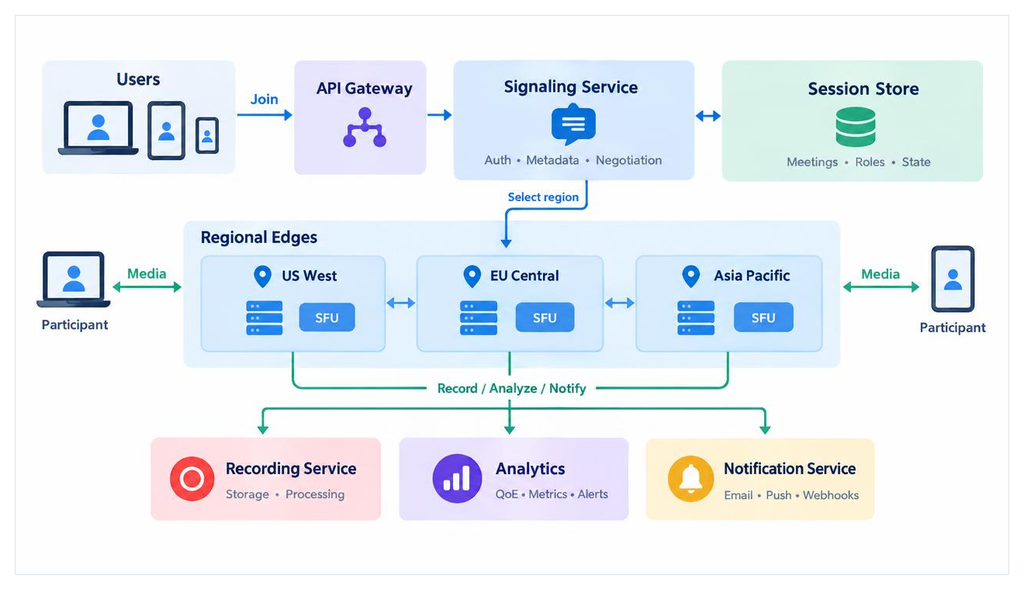
A practical architecture includes an API gateway, signaling service, session store, regional SFUs, recording workers, notification services, and observability pipelines. The session store tracks meeting metadata and roles, while media stays off the transactional path. Recording workers subscribe to media paths or mixed outputs depending on product needs.
Server selection matters. Clients should be assigned to the nearest healthy region with enough SFU headroom, using load balancing informed by latency and capacity rather than round robin alone. Session affinity can help control-plane simplicity, but media routing must still adapt when a region degrades.
The most dangerous production failure mode is SFU overload. When that happens, active participants see freeze, audio dropouts, and reconnect storms at once. Good designs combine admission control, room rebalancing, cascaded SFUs, and subscriber-specific layer drops triggered by RTCP and TWCC feedback before the box tips into collapse. Degradation should follow a clear order: preserve audio first, then reduce video quality layers, then resolution.
Recording and analytics should be off the critical media path. Durable pipelines often rely on message queues for post-processing, while session metadata may benefit from selective caching and edge controls such as rate limiting. Security and access control matter, but they should not overwhelm the core media walkthrough.
The component table below summarizes the job of each service in the meeting stack.
| Component | Role in the system | Why it is separated |
|---|---|---|
| API gateway | Front door for control traffic | Keeps auth and routing simple |
| Signaling service | Negotiates session setup | Needs different reliability than media |
| Regional SFU | Forwards selected streams | Balances latency and scale |
| Recording workers | Persist meeting output | Prevents media-path blocking |
| Observability pipeline | Tracks packet loss and freezes | Makes failures diagnosable |
A join-flow visual makes the sample answer easier to narrate in interview order. The next step is to show that flow clearly, then connect it back to the way interviewers expect you to think.
If you want a broader set of worked examples after this walk-through, Grokking System Design Interview: Patterns & Mock Interviews is a natural next step. It is especially useful for practicing how to speak through trade-offs under time pressure.
Your Usual System Design Framework Needs a Few Adjustments
A generic structure still works if it is adapted to RTC. A framework like the RESHADED framework helps organize the answer, but the timing should change: spend more effort on requirements, media architecture, bottlenecks, and degradation than on generic database detail.
Security, access control, and encryption should be raised when they affect design shape, not as a detached checklist. It is reasonable to mention transport security, meeting admission, abuse prevention, and regional failover, but only after the signaling-media split and SFU strategy are clear.
That leads naturally to the final preparation question: what mistakes make candidates sound generic, and how do they fix them quickly?
Why Your Answer Might Sound Too Much Like a Backend Design
A common failure is treating the whole system like CRUD. The consequence is an answer centered on endpoints and tables instead of continuous real-time transport. The fix is to frame the design around session setup, transport, and media flow from the start.
Another mistake is sending media and signaling through one path. The consequence is higher latency and an architecture that blurs control traffic with packet forwarding. The fix is to separate signaling and control from the media plane early and say so clearly.
I also look for degradation and reconnect behavior. The consequence is a design that sounds fine only under perfect network conditions and falls apart under packet loss or bandwidth drops. The fix is to mention graceful degradation, protect audio first, and describe how clients reconnect or fail over.
Large meetings expose weak capacity thinking when candidates skip rough SFU math. The consequence is missing the main overload risk, where media nodes saturate on bandwidth, CPU, or packet processing. The fix is to do quick back-of-the-envelope estimates for fan-out and per-node load.
Omitting QoE observability is another clear gap. The consequence is having no way to detect or debug user-visible quality failures. The fix is to include a small set of QoE signals and say they drive alerting and troubleshooting.
How to Turn This Knowledge Into Interview Practice
| Week | Focus | What to do |
|---|---|---|
| 1 | RTC basics and join path | Use the system design interview guide and the official WebRTC documentation. Trace the flow from authentication to join, negotiation, and first media packets. |
| 2 | SFU trade-offs and adaptation | Study why large calls use SFUs, where overload appears, and how reconnect and per-subscriber adaptation affect the design. Practice explaining the trade-offs clearly. |
| 3 | Webinars, chat, and recording | Compare how each prompt changes requirements, fan-out, write paths, retention, moderation, and failure handling. Focus on what changes, not on memorizing separate systems. |
| 4 | Timed mocks and adjacent topics | Run mock interviews with a timer. Review adjacent topics such as CAP theorem interview questions and company-specific prep like the Zscaler system design interview. Spend your time on requirements, media architecture, bottlenecks, and graceful degradation. |
This plan works because each week adds one layer to the same answer. In the interview, I want a candidate who can explain the join path, choose SFU-based scaling, adjust the design for prompt variations, and stay clear under time pressure. If you want a structured way to practice that shift, Grokking System Design Interview: Patterns & Mock Interviews is a strong final handoff.
So, How Would You Design Zoom in an Interview?
The main lesson in a zoom system design interview is to separate signaling from media early and to scale with SFUs, not mesh or MCU defaults. Strong answers name the tradeoff, then explain how simulcast or SVC and transport feedback support per-subscriber adaptation under load.
I also look for graceful degradation and observability as first-class design choices. That means protecting audio first, reducing video quality in steps, and tracking user-visible signals such as jitter, packet loss, freeze rate, and latency. For a structured way to practice that answer, use Grokking System Design Interview: Patterns & Mock Interviews.