

When you are asked to design Google Calendar, interviewers are not testing whether you can store events in a database. They are testing whether you can reason about time, collaboration, and correctness in a distributed system.
Calendars look deceptively simple. You add an event, and it shows up on your screen. Under the hood, however, every event touches multiple users, devices, time zones, and notification pipelines. A small mistake can cause missed meetings, duplicated invites, or incorrect availability, all of which destroy user trust.
This question is popular because it tests several hard problems at once. You must handle shared state across users, long-lived objects that change over time, and workflows that continue long after a single API request completes. Interviewers use this problem to see whether you think in terms of state transitions and ownership rather than just endpoints and storage.

Why Calendars Become Complex Very Quickly
At first glance, a calendar appears to be CRUD with timestamps. That illusion breaks the moment you add recurring events. A weekly meeting that lasts for years cannot be stored as thousands of copies. You must represent intent rather than instances.
The complexity grows further when you add invitations. An event belongs to one organizer but appears on many calendars. Attendees can accept, decline, or tentatively respond. The organizer can change the event after invitations are sent. Each of these actions has ripple effects that must be applied consistently.
Time zones introduce another layer of complexity. An event has a start time that must mean the same moment in time everywhere, even when daylight saving changes. Interviewers expect you to acknowledge these challenges, even if you do not implement every detail.
What A Strong Answer Sounds Like
A strong answer to this question does not jump straight into databases or services. You start by defining what kind of calendar you are building. You explain how collaboration works. You make it clear who owns an event and how changes propagate.
Most importantly, you show respect for time. You treat it as a first-class concept rather than an afterthought. That mindset is often what separates strong System Designers from average ones.
Clarifying Requirements And Defining The Scope Of Google Calendar System Design
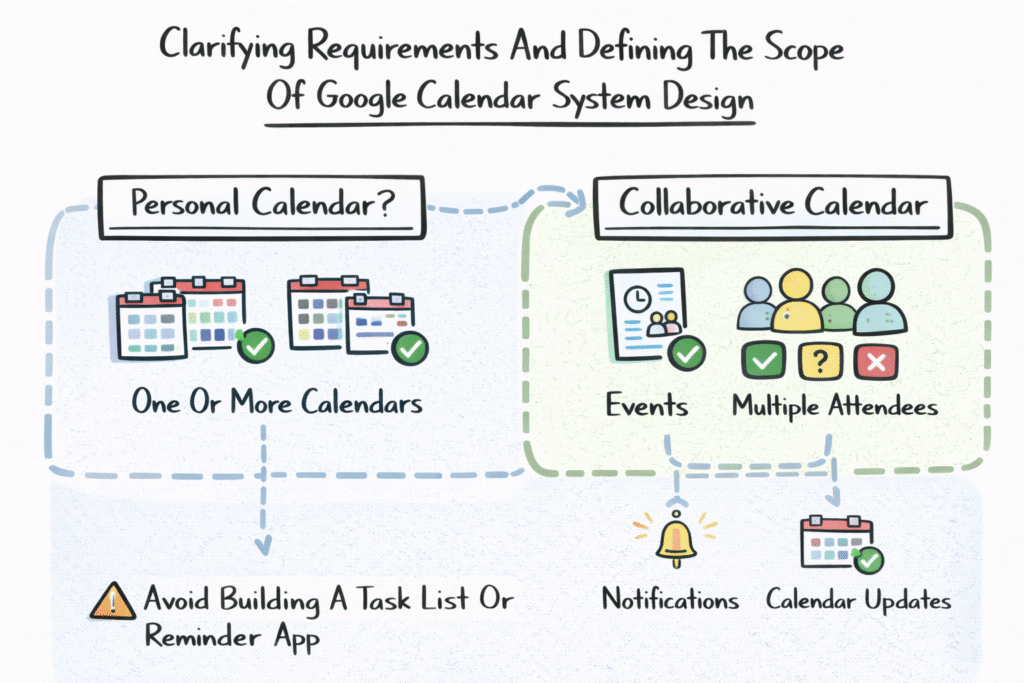
The first thing you should do is define the scope of the calendar. Are you building a personal calendar only, or a collaborative calendar where events can involve many users? In most interviews, the expectation is a collaborative system similar to Google Calendar.
You clarify that users can have one or more calendars, that events live inside calendars, and that calendars can be shared. You also clarify that events can have multiple attendees with different RSVP states.
By defining these boundaries early, you avoid accidentally designing something closer to a task list or reminder app.
Locking In Core Functional Expectations
At a minimum, users should be able to create events, update events, delete events, and view their schedules in different time ranges. They should be able to invite other users, receive invitations, and respond to them.
You also assume support for reminders. A calendar without notifications is not very useful. Even if you do not design the full notification pipeline immediately, stating this expectation shows completeness.
Another important clarification is the search. Users expect to search past and future events by title, location, or attendee. This affects data modeling and indexing later.
Declaring Non-Functional Priorities Clearly
Calendars are read-heavy systems. Users open their calendar views many times a day. These views must load quickly, especially on mobile devices. Low-latency reads are therefore a top priority.
Correctness is equally important. An event should never appear at the wrong time or disappear unexpectedly. Invitations and RSVP states must be accurate. Notifications must be reliable.
Availability matters because calendars are often used in professional contexts. Downtime during work hours is especially damaging.
Scope Alignment Summary
| Dimension | Assumed Behavior |
| Core Objects | Calendars and events |
| Collaboration | Invites and RSVP |
| Time Handling | Time zones and DST |
| Recurrence | Rule-based |
| Notifications | Reliable reminders |
| Scale | Many users and devices |
This explicit scope gives you a stable foundation to build on.
Core User Journeys And Scheduling Workflow Overview
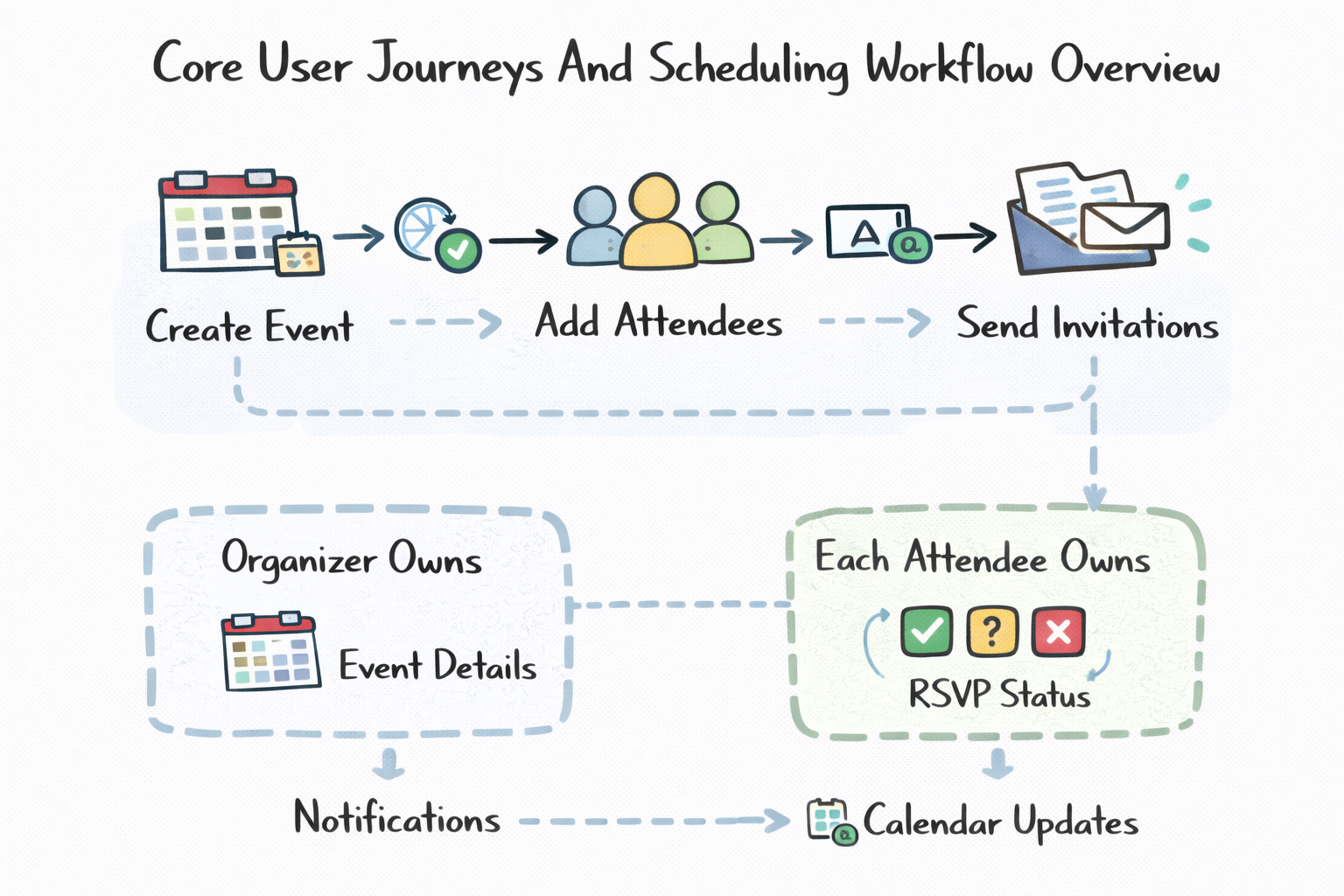
The most common journey begins when a user creates an event. The user selects a calendar, chooses start and end times, picks a time zone, and optionally adds a location and description. The user then adds attendees and sends invitations.
At this point, the event becomes a shared object. The organizer owns the event details, but each attendee owns their response state. This distinction is crucial and should be stated explicitly.
Once invitations are sent, the system schedules notifications and updates attendee calendars.
The RSVP And Update Journey
Attendees receive invitations and respond by accepting, declining, or marking tentative. These responses must be visible to the organizer and sometimes to other attendees.
If the organizer updates the event, the system must propagate those changes. Attendees may need to respond again depending on what changed. If the event is canceled, all attendees must be notified.
This journey demonstrates why calendars are workflow-driven systems rather than simple data stores.
The View Calendar And Search Journey
Viewing the calendar is the most frequent action. Users open day, week, or month views that aggregate events from one or more calendars. These views must load quickly and consistently.
Search allows users to find events across long time ranges. This often relies on indexes and denormalized data rather than scanning raw event records.
Workflow State Overview
| Flow | Typical State |
| Organizer | Created, updated |
| Attendee | Invited, responded |
| Event | Active, canceled |
| Notification | Scheduled, sent |
| Sync | Pending, applied |
Thinking in terms of these journeys helps you design services and data models that align with real usage.
High-Level Architecture Overview For Google Calendar System Design
Once requirements and workflows are clear, you can move into architecture. At this stage, interviewers want to see a logical separation of responsibilities rather than microservice diagrams.
You typically start with a Calendar Service that manages calendars and sharing permissions. An Event Service handles event creation and updates. A Recurrence Service manages repeating rules and instance expansion. An Invitation Service tracks attendees and RSVP states.
A Notification Service handles reminders and emails. A Sync Service ensures that changes propagate reliably across devices.
Supporting Infrastructure That Makes It Work
Caching is critical for fast calendar views. You cache precomputed slices of calendars for common time ranges. Message queues or delayed job systems are used for notifications.
A change-log or event stream records updates so clients can sync incrementally instead of reloading entire calendars.
Storage systems must support range queries by time and efficient lookup by calendar and user.
High-Level Architecture Summary
| Component | Responsibility |
| Client Apps | Web and mobile UI |
| API Gateway | Auth and routing |
| Calendar Service | Calendars and sharing |
| Event Service | Event lifecycle |
| Recurrence Service | Rule expansion |
| Invitation Service | RSVP states |
| Availability Service | Free/busy |
| Notification Service | Reminders |
| Sync Service | Cross-device updates |
| Storage | Events and metadata |
At this point, you have framed the problem clearly, defined the scope, walked through core workflows, and introduced a clean architecture. From here, deeper dives into data modeling, recurrence handling, and availability computation feel natural and well-motivated.
Data Model And Schema Design For Calendars, Events, And Attendees
In Google Calendar, the data model does far more than store information. It encodes ownership, collaboration rules, and time semantics. A weak schema quickly leads to bugs like duplicated events, incorrect RSVP states, or broken recurrence behavior.
Interviewers expect you to think carefully about what is stored directly and what is derived. The goal is to keep the source of truth minimal while allowing fast reads for common views.
Modeling Calendars As Containers
A calendar is a container owned by a user or organization. It holds events and defines sharing rules. This separation matters because users often have multiple calendars, such as personal, work, or shared project calendars.
Permissions live at the calendar level. An event inherits access rules from its calendar unless explicitly overridden. This keeps permission checks simple and consistent.
Modeling Events With Time As A First-Class Concept
An event represents a scheduled intent. It includes a start time, end time, and a time zone. Storing the time zone explicitly is essential because it defines how the event behaves across daylight saving changes.
You typically store start and end as absolute instants along with the original time zone context. This allows correct rendering regardless of where the viewer is located.
Modeling Attendees And RSVP States
Attendees are modeled separately from events. Each attendee record links a user to an event and stores the RSVP state, such as accepted, declined, or tentative.
This design allows each attendee to own their response independently while keeping the organizer as the owner of event details.
Core Data Entities Overview
| Entity | Purpose |
| User | Identity and preferences |
| Calendar | Event container with permissions |
| Event | Scheduled intent |
| Attendee | RSVP state per user |
| Reminder | Notification rules |
| Permission | Access control |
This schema emphasizes clarity of ownership, which is critical in collaborative systems.
Recurring Events And Rule Expansion Strategy
Recurring events are where most calendar designs fail. A weekly meeting for five years should not be stored as hundreds of individual events. Instead, you store a recurrence rule that describes the pattern.
Google Calendar–style systems treat recurrence as intent, not materialized instances. Instances are generated when needed.
Storing Recurrence Rules
A recurring event is stored with a base event and an associated recurrence rule. The rule describes frequency, interval, and termination conditions.
The event itself represents the series, not a specific occurrence. This keeps storage small and updates manageable.
Handling Exceptions And One-Off Changes
Users often edit a single instance of a recurring event. For example, they may move just to next week’s meeting.
You handle this by storing exceptions. An exception record overrides a specific instance generated by the recurrence rule. This allows “edit this event only” without breaking the entire series.
Expansion Strategies And Trade-Offs
You have two main options for expanding recurring events. You can expand them on the fly when rendering calendar views, or you can precompute instances for a rolling time window.
On-the-fly expansion reduces storage but increases computation. Precomputing improves read performance but requires background jobs and cleanup.
Most real systems use a hybrid approach.
Recurrence Strategy Comparison
| Approach | Strength | Trade-Off |
| On-The-Fly | Simple storage | CPU-heavy |
| Precomputed Window | Fast reads | More storage |
| Hybrid | Balanced | More complexity |
Calling out this trade-off explicitly is a strong interview signal.
Invitations, RSVP Handling, And Update Propagation
One of the most important concepts in calendar design is ownership. The organizer owns the event’s core details such as time, title, and location. Attendees own only their RSVP state.
This separation prevents conflicting updates. An attendee cannot silently change the meeting time for everyone else.
Sending Invitations And Tracking Responses
When an event is created with attendees, invitation records are created. Notifications are sent asynchronously. Each attendee’s response updates their own attendee record.
The organizer’s view aggregates RSVP states to show who is attending.
Propagating Updates Safely
If the organizer edits the event, the system must propagate changes to all attendees. Depending on what changed, attendees may need to re-confirm.
Versioning is essential here. Each update increments an event version. Clients use optimistic concurrency, so updates do not overwrite each other silently.
Avoiding Conflicting Edits
Concurrent edits are inevitable, especially on shared calendars. You typically use last-write-wins with version checks or explicit conflict resolution rules.
Even acknowledging this problem and proposing a strategy is enough to demonstrate maturity.
Free/Busy Computation And Availability Design
Free/busy information powers scheduling suggestions and conflict warnings. Users expect it to be instant and reliable.
Availability is derived data. It is computed from events across one or more calendars, filtered by visibility rules.
Computing Availability Efficiently
You compute free/busy by projecting event intervals onto a timeline. To make this fast, you often precompute availability in time buckets such as daily or hourly ranges.
Caching plays a major role here. Popular queries like “this week” or “next week” are cached aggressively.
Respecting Privacy And Permissions
Availability must respect privacy. If a user does not have permission to see event details, they should only see busy blocks, not titles or descriptions.
This means availability computation must be permission-aware, which influences data layout and caching strategy.
Availability Visibility Levels
| Visibility | What Is Exposed |
| Private | Busy only |
| Shared | Busy with title |
| Full Access | Full details |
This section highlights that even “simple” features like availability require careful design when privacy and scale are involved.
At this point, you’ve covered the most technically nuanced parts of the Google Calendar System Design: schemas, recurrence, collaboration, and availability. The remaining sections focus on notifications, sync, scaling, and interview strategy rather than core modeling complexity.
Notifications And Reminder Delivery
A calendar without reliable notifications is effectively broken. Users rely on reminders to show up on time, and missed notifications immediately erode trust. From a System Design perspective, notifications are long-lived workflows that may execute minutes, hours, or days after an event is created.
Interviewers expect you to treat notifications as a first-class concern rather than a simple side effect.
Scheduling Reminders Reliably
When an event is created or updated, reminder jobs are scheduled based on the event’s start time and the user’s reminder preferences. These jobs must survive restarts, deployments, and partial outages.
You typically store reminder schedules durably and process them using delayed jobs or time-based queues. Each reminder delivery must be idempotent so retries do not cause duplicate notifications.
Handling Updates And Cancellations
If an event is updated or canceled, existing reminders must be adjusted or removed. This requires a clear mapping between reminder jobs and event versions.
You often key reminders by event ID and version to ensure outdated reminders are ignored safely.
Multi-Channel Notification Delivery
Modern calendar systems support multiple delivery channels, including push notifications, email, and in-app alerts. Each channel has different latency and reliability characteristics.
Separating notification scheduling from delivery allows you to retry or fall back across channels without blocking core event flows.
Notification Handling Summary
| Aspect | Design Choice |
| Scheduling | Durable delayed jobs |
| Delivery | Idempotent and retriable |
| Channels | Push, email, in-app |
| Failure Handling | Retries and fallback |
Sync, Offline Edits, And Conflict Resolution
Users expect their calendar to stay consistent across web, mobile, and desktop devices. They also expect edits made offline to sync correctly once connectivity is restored.
This makes synchronization a core System Design challenge rather than an implementation detail.
Change Logs And Incremental Sync
Instead of forcing clients to reload entire calendars, you maintain a change log of event updates. Clients track a cursor or version and pull only the changes they have not seen.
This approach scales well and reduces bandwidth usage, especially for large calendars.
Supporting Offline Edits
Offline edits are queued locally and replayed when the device reconnects. Each edit includes a version or base state reference.
If the server state has changed in the meantime, the system must detect conflicts. Simple cases may resolve automatically, while complex ones may require user intervention.
Conflict Resolution Strategies
Calendar systems often favor organizer changes over attendee changes and last-write-wins semantics within clear ownership boundaries. Even if conflict resolution is imperfect, being explicit about the strategy matters in interviews.
Scaling, Reliability, And Multi-Region Strategy
Calendar systems are heavily read-biased. Users view their calendars many times per day, while event creation and updates are relatively infrequent.
You scale reads aggressively using caches and precomputed calendar views. Writes are protected with strong consistency and careful partitioning, often by calendar or user.
Handling Peak Traffic Patterns
Traffic spikes occur during work hours and at common meeting times. Notification delivery can also create a bursty load when many reminders fire simultaneously.
Queues and rate limiting help smooth these spikes without affecting correctness.
Reliability And Failure Recovery
Failures will happen. You design for recovery rather than assuming perfection. Durable storage ensures events are not lost. Change logs allow replay and reconciliation.
Multi-region replication improves durability and read latency, but event updates usually go through a primary region to preserve consistency.
Reliability Strategy Summary
| Risk | Mitigation |
| Missed Notifications | Durable queues |
| Conflicting Edits | Versioning |
| Hot Calendars | Caching and sharding |
| Regional Outage | Replication and failover |
Interview Wrap-Up: Trade-Offs, Extensions, And Follow-Up Questions
The Trade-Off Story Interviewers Want To Hear
A strong interview answer makes trade-offs explicit. You emphasize strong correctness for event times, invitations, and the RSVP state. You explain where you allow eventual consistency, such as cached calendar views or availability hints.
You show that you intentionally separate fast, derived views from the authoritative state.
Natural Extensions To Discuss
Once the core system is solid, extensions fit naturally. These include meeting rooms and shared resources, working hours and scheduling suggestions, organization-wide policies, and multiple calendars per user.
Mentioning these briefly demonstrates that your design can evolve without major rewrites.
Common Follow-Up Questions
Interviewers often ask how you handle recurring edge cases, daylight saving transitions, permission inheritance, or sync conflicts. The best answers build directly on the design you have already presented rather than introducing new abstractions.
Using structured prep resources effectively
Use Grokking the System Design Interview on Educative to learn curated patterns and practice full System Design problems step by step. It’s one of the most effective resources for building repeatable System Design intuition.
You can also choose the best System Design study material based on your experience:
Final Thoughts
Google Calendar System Design is a powerful interview question because it rewards engineers who think carefully about time, ownership, and collaboration. The hardest problems are not databases or services, but the rules that govern how shared objects evolve over time.
You do not need to design every edge case perfectly. You need to show that you recognize where complexity lives and that you approach it deliberately.
If you frame the problem clearly, respect time as a first-class concept, and communicate trade-offs confidently, you demonstrate exactly the kind of System Design maturity interviewers are looking for.
