


Google Analytics System Design appears frequently in System Design interviews because it represents a class of problems every large technology company has to solve, whether they build analytics products directly or rely on them internally. When interviewers choose this problem, they are testing how you think about data at scale rather than how well you know a specific tool.
Analytics systems deal with massive write volumes, loose latency requirements, and complex aggregation logic. Unlike user-facing applications, they prioritize throughput and reliability over immediate consistency. This forces you to reason about trade-offs that are central to real-world distributed systems.
Another reason this problem is popular is that it is deceptively simple at first glance. Tracking page views and clicks sounds straightforward, but once you consider millions of clients, unreliable networks, schema evolution, and long-term storage, the complexity becomes unavoidable. Interviewers use the Google Analytics System Design to see whether you can uncover that complexity naturally.
This problem also scales well with seniority. For junior roles, interviewers focus on event flow and storage. For senior roles, they probe decisions around stream processing, data modeling, fault tolerance, and cost optimization. That makes it an excellent signal across experience levels.
Most importantly, analytics systems sit at the intersection of product and infrastructure. If you can explain how raw events become business insights, you demonstrate that you understand how systems create real value, not just how they move data around.
Defining The Problem And Core Requirements
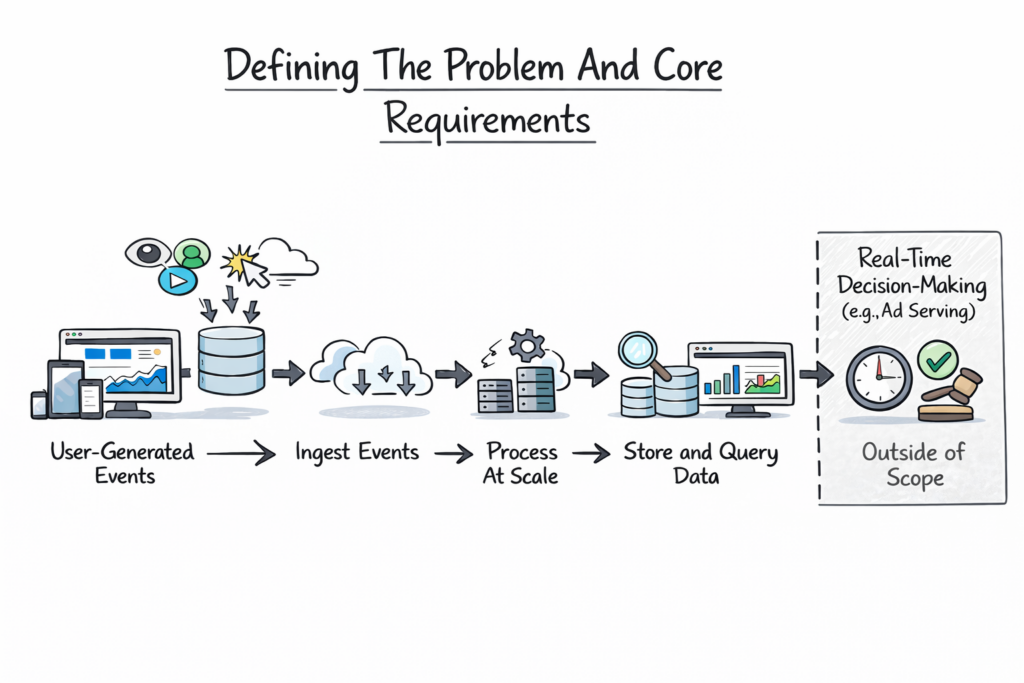
Before diving into architecture, you need to clearly define what you are building. Google Analytics System Design is fundamentally about collecting user-generated events and turning them into meaningful metrics that users can query and visualize.
At a high level, the system must track events such as page views, clicks, sessions, and conversions from websites and applications. These events need to be ingested reliably, processed at scale, stored efficiently, and made available for querying through dashboards and reports.
You should state early that the system is not responsible for real-time decision-making, like ad serving. This distinction matters because it allows higher latency tolerance in exchange for scalability and correctness. Interviewers appreciate it when you explicitly draw this boundary.
Functional Requirements In Google Analytics System Design
The functional requirements focus on what the system must support from a user perspective. Users should be able to define properties, track events, view aggregated metrics, and filter data across dimensions such as time, geography, or device. These features appear simple but require careful backend design to support flexibility without sacrificing performance.
Non-Functional Requirements And System Constraints
Non-functional requirements drive most architectural decisions. The system must handle extremely high write throughput because every user interaction generates data. It must tolerate partial data loss gracefully and provide eventual consistency rather than immediate accuracy.
Cost efficiency also matters. Analytics data grows quickly, and storing raw events indefinitely is expensive. The system must balance retention, aggregation, and compression to remain viable at scale.
The table below summarizes how interviewers usually interpret these requirements.
| Requirement Type | Why It Matters |
|---|---|
| High Write Throughput | Millions of events per second |
| Eventual Consistency | Accuracy improves over time |
| Fault Tolerance | Data loss is unacceptable |
| Cost Efficiency | Long-term storage dominates cost |
| Query Performance | Dashboards must feel responsive |
Explicitly stating these constraints shows that you are designing for reality, not an idealized system.
High-Level Architecture Of Google Analytics System Design
Once the problem is defined, you can introduce a high-level architecture. This is where you demonstrate system-level thinking without overwhelming the interviewer with details.
At a high level, Google Analytics System Design consists of four major layers. There is a client layer that generates events, an ingestion layer that receives and validates data, a processing layer that aggregates and transforms events, and a storage and query layer that serves analytics results.
You should explain this flow in plain language before naming specific technologies. Events originate on client devices, flow through ingestion endpoints, move into processing pipelines, and eventually land in storage systems optimized for querying.
Separation Of Concerns In The Architecture
A key design principle in analytics systems is the separation of concerns. Event ingestion should not depend on processing. Processing should not depend on querying. This decoupling improves reliability and allows each layer to scale independently.
For example, ingestion systems are optimized for availability and throughput, while processing systems focus on correctness and ordering. Query systems prioritize responsiveness and flexibility.
The table below illustrates how responsibilities are typically divided.
| Layer | Primary Responsibility |
|---|---|
| Client Layer | Event generation |
| Ingestion Layer | Validation and buffering |
| Processing Layer | Aggregation and transformation |
| Storage And Query Layer | Reporting and dashboards |
Keeping the architecture modular is a strong signal of senior design thinking.
Event Tracking And Client-Side Data Collection
Every analytics system begins at the client. In Google Analytics System Design, this layer is often overlooked, but it plays a critical role in data quality and system reliability.
Clients include web browsers, mobile apps, and backend services. These clients generate events whenever users interact with an application. Events typically include metadata such as timestamps, user identifiers, session information, and custom properties defined by developers.
Reliability Challenges At The Client Layer
Clients are unreliable by nature. Network connectivity is inconsistent, devices crash, and users close apps abruptly. Because of this, client-side tracking must be designed to tolerate failure.
Batching events locally reduces network overhead and improves performance, but it increases the risk of data loss. Immediate sending improves accuracy but costs more in terms of bandwidth and battery usage. Strong candidates explain how analytics systems balance these concerns rather than choosing one extreme.
Schema And Event Consistency
Another challenge is schema management. Events evolve over time as products change. The client layer must support adding new fields without breaking downstream systems. This usually requires flexible event formats and versioning strategies.
The table below highlights common client-side trade-offs.
| Design Choice | System Impact |
|---|---|
| Event Batching | Better performance, higher loss risk |
| Immediate Sending | Higher accuracy, higher cost |
| Flexible Schemas | Easier evolution, harder validation |
| Strict Schemas | Better quality, less flexibility |
By spending time on client-side design, you demonstrate that you understand analytics systems end to end, not just the backend.
Event Ingestion And Data Validation At Scale
Once events leave the client, they enter the most critical choke point in Google Analytics System Design: the ingestion layer. This layer determines whether the system remains reliable under massive load or collapses during traffic spikes.
Ingestion services are responsible for receiving raw events from millions of clients, validating them, and buffering them for downstream processing. At this stage, speed and availability matter more than deep analysis. If ingestion fails, data is lost permanently.
You should explain that ingestion endpoints are typically stateless and horizontally scalable. Load balancers distribute incoming traffic across multiple instances, allowing the system to absorb sudden surges without manual intervention.
Validation And Normalization Logic
Even though ingestion prioritizes speed, it cannot blindly accept all data. Events must be validated for required fields, basic schema correctness, and reasonable timestamps. However, validation is intentionally lightweight. Complex checks are deferred to downstream systems to keep ingestion fast.
Normalization also happens here. Event fields may be standardized, default values applied, and metadata appended. This ensures that downstream processors receive consistent input even if client implementations vary.
Protecting Downstream Systems
A core responsibility of the ingestion layer is protecting the rest of the system. Rate limiting prevents misbehaving clients from overwhelming pipelines. Backpressure mechanisms ensure that temporary slowdowns do not cascade into full outages.
The table below shows how ingestion design choices affect system behavior.
| Ingestion Concern | Design Impact |
|---|---|
| Stateless Endpoints | Easy horizontal scaling |
| Lightweight Validation | High throughput |
| Buffering Queues | Failure isolation |
| Rate Limiting | System protection |
Strong candidates emphasize that ingestion is optimized for resilience, not perfection.
Stream Processing And Real-Time Aggregation
After ingestion, events flow into stream processing systems. This is where the Google Analytics System Design begins, turning raw data into meaningful metrics.
Stream processors consume events continuously and perform near-real-time aggregations. Common metrics include active users, page views, and event counts over short time windows. These results often power live dashboards.
Windowing And Event Time Challenges
A key concept interviewers look for is event time versus processing time. Events may arrive late due to network delays or client retries. Stream processors must decide how long to wait for late events before finalizing aggregates.
Windowing strategies help manage this complexity. Sliding windows, tumbling windows, and session windows each serve different analytical needs. You do not need to name every type, but you should explain why windows exist and how they affect accuracy.
Balancing Freshness And Accuracy
Real-time analytics trade some accuracy for speed. Early aggregates may be incomplete and refined later as late events arrive. You should explain that users accept slight inconsistencies in live dashboards as long as numbers stabilize over time.
The table below summarizes common stream processing trade-offs.
| Stream Processing Choice | System Effect |
|---|---|
| Short Windows | Faster updates, lower accuracy |
| Longer Windows | Higher accuracy, more latency |
| Late Event Handling | Better correctness, higher complexity |
| Approximate Aggregation | Faster results, less precision |
This discussion shows that you understand why real-time analytics are fundamentally probabilistic.
Batch Processing And Long-Term Data Pipelines
While streaming systems handle immediacy, batch processing is the backbone of correctness in the Google Analytics System Design. Batch pipelines reconcile data, compute historical metrics, and generate reports that users trust.
Batch jobs typically run on scheduled intervals, such as hourly or daily. They process large volumes of raw events, re-aggregate metrics, and correct inaccuracies introduced by late or duplicated events.
Why Batch Processing Still Matters
You should emphasize that batch systems exist because no streaming system is perfect. Data arrives late, clients retry requests, and partial failures occur. Batch processing allows the system to recompute metrics deterministically using complete datasets.
This also enables advanced analytics such as cohort analysis, long-term trends, and retention metrics that are impractical to compute in real time.
Reprocessing And Data Backfills
Another important capability is reprocessing. When schemas change or bugs are discovered, batch pipelines allow the system to reprocess historical data. This flexibility is essential for long-lived analytics platforms.
The table below contrasts streaming and batch roles in the system.
| Pipeline Type | Primary Purpose |
|---|---|
| Stream Processing | Low-latency insights |
| Batch Processing | Accurate historical data |
| Reprocessing Jobs | Data correction |
| Backfills | Schema evolution support |
Highlighting this dual-pipeline approach signals strong real-world experience.
Data Storage And Schema Design
Storage decisions have long-term consequences in Google Analytics System Design. Analytics data grows rapidly, and inefficient storage models become prohibitively expensive at scale.
Most systems store raw events separately from aggregated data. Raw events are kept for flexibility and reprocessing, while aggregated tables power dashboards and reports.
Choosing Storage Formats And Partitioning
Analytics workloads are read-heavy and column-oriented. Columnar storage formats enable efficient scans across large datasets while minimizing disk usage. Partitioning data by time allows queries to target specific ranges instead of scanning entire tables.
Schema design also matters. Flexible schemas allow rapid evolution, but they complicate query performance. Strong designs strike a balance by enforcing structure at aggregation boundaries.
Retention And Cost Management
You should also discuss data retention. Raw events may only be stored for a limited time, while aggregated data is retained longer. This reduces storage costs while preserving analytical value.
The table below highlights common storage strategies.
| Storage Layer | Design Goal |
|---|---|
| Raw Event Storage | Flexibility and replay |
| Aggregated Tables | Fast querying |
| Time Partitioning | Efficient scans |
| Retention Policies | Cost control |
By connecting storage design to both performance and cost, you demonstrate senior-level judgment.
Query Engine And Reporting Layer
The query and reporting layer is where the Google Analytics System Design becomes visible to end users. Everything before this point exists to support fast, flexible, and reliable queries. If this layer is slow or confusing, the value of the entire system collapses.
Users interact with analytics data through dashboards, charts, and reports. These interactions translate into queries that scan aggregated datasets, apply filters, and compute metrics in near real time. While the underlying data may be massive, the user experience must feel instantaneous.
Query Execution And Optimization
Analytics queries are often exploratory. Users change filters, adjust time ranges, and compare segments. The system must support these interactions without reprocessing raw data each time.
Precomputed aggregates play a major role here. Frequently accessed metrics such as daily active users or page views are stored in optimized formats. Caching further reduces latency by serving repeated queries directly from memory.
Balancing Flexibility And Performance
Flexibility and performance are always in tension. Allowing arbitrary queries increases system complexity and cost. Restricting queries improves speed but limits insight.
You should explain that analytics platforms usually expose a constrained query model. Users can slice data along predefined dimensions rather than issuing raw SQL over event logs. This approach preserves responsiveness while still enabling meaningful analysis.
The table below summarizes how the query layer balances competing goals.
| Query Concern | Design Response |
|---|---|
| High Query Volume | Caching and pre-aggregation |
| Flexible Exploration | Dimensional modeling |
| Low Latency | Columnar storage |
| Predictable Performance | Query constraints |
This discussion shows that you understand how analytics systems protect user experience.
Scalability, Reliability, And Fault Tolerance
Scalability is not a feature in the Google Analytics System Design. It is a baseline requirement. Every component must scale horizontally and tolerate failure without human intervention.
Analytics systems grow continuously as more events, users, and properties are added. You should emphasize that scaling is achieved by partitioning workloads rather than increasing machine size.
Failure Handling And Data Durability
Failures are expected. Networks drop packets, machines crash, and entire regions go offline. The system must continue ingesting data and processing events despite these failures.
Durability is especially important. Losing analytics data undermines trust. Replication, acknowledgments, and replay mechanisms ensure that events are not lost even when individual components fail.
Managing Backpressure And Load
When downstream systems slow down, upstream components must adapt. Backpressure mechanisms allow ingestion to buffer or shed load gracefully rather than overwhelming the entire pipeline.
The table below highlights core reliability strategies.
| Reliability Strategy | Purpose |
|---|---|
| Horizontal Scaling | Handles growth |
| Replication | Prevents data loss |
| Backpressure | Avoids cascading failures |
| Replayable Logs | Enables recovery |
Talking about these mechanisms signals that you design systems to survive real-world conditions.
Trade-Offs, Bottlenecks, And Real-World Constraints
Every analytics system represents a series of compromises. Interviewers want to see whether you can identify these trade-offs and explain why they exist.
One major trade-off is accuracy versus latency. Real-time dashboards prioritize freshness over completeness. Historical reports prioritize correctness even if they take longer to compute.
Another trade-off involves storage cost versus flexibility. Retaining raw events indefinitely enables powerful analysis but quickly becomes expensive. Most systems compromise by retaining raw data for a limited time and keeping aggregates longer.
Privacy, Compliance, And Governance
Real-world constraints extend beyond technology. Analytics systems must comply with privacy regulations and data governance policies. This influences data retention, anonymization, and access controls.
Mentioning these constraints demonstrates maturity and awareness beyond pure engineering.
The table below summarizes common trade-offs in Google Analytics System Design.
| Trade-Off | Impact |
|---|---|
| Accuracy Vs Latency | Affects dashboards |
| Cost Vs Retention | Shapes storage strategy |
| Flexibility Vs Performance | Limits query models |
| Compliance Vs Insight | Restricts data usage |
Being explicit about trade-offs shows strong engineering judgment.
How To Approach Google Analytics System Design In Interviews
Knowing the system is not enough. You also need to present it effectively under interview conditions.
You should start by clarifying requirements and constraints. Then outline a high-level architecture before diving into ingestion, processing, and querying. Let the interviewer guide depth rather than covering everything at once.
Narrate your thinking as you go. Explain why you chose one approach over another and acknowledge alternatives. Interviewers care far more about your reasoning than about exact implementations.
Demonstrating Senior-Level Thinking
Senior candidates distinguish themselves by discussing trade-offs, failure modes, and operational concerns. They also adapt quickly when interviewers introduce new constraints, such as stricter latency or data privacy requirements.
The table below shows what interviewers typically evaluate at each stage.
| Interview Phase | Evaluation Focus |
|---|---|
| Problem Framing | Clarity and scope |
| Architecture | System thinking |
| Deep Dives | Technical judgment |
| Trade-Offs | Experience and maturity |
Approaching the interview as a collaborative design session rather than a test improves outcomes significantly.
Using structured prep resources effectively
Use Grokking the System Design Interview on Educative to learn curated patterns and practice full System Design problems step by step. It’s one of the most effective resources for building repeatable System Design intuition.
You can also choose the best System Design study material based on your experience:
Final Thoughts
Google Analytics System Design is a powerful interview problem because it mirrors how real-world data platforms operate at scale. It tests your ability to think about throughput, correctness, cost, and user experience simultaneously.
If you approach this problem with clear structure, thoughtful trade-offs, and honest communication, you demonstrate exactly the qualities interviewers are looking for. Mastering this design also prepares you to reason about any large-scale data system, not just analytics platforms.
