


Google Meet System Design appears frequently in System Design interviews because it represents one of the hardest categories of distributed systems to build correctly: real-time communication. When interviewers choose this problem, they are evaluating how well you understand latency-sensitive systems that must operate reliably under unpredictable network conditions.
Unlike traditional backend systems, Google Meet cannot hide slowness behind retries or background processing. Audio and video must flow continuously, and delays are immediately visible to users. This forces you to think about end-to-end latency, packet loss, jitter, and adaptive quality control rather than just throughput and correctness.
Another reason this question is popular is that it exposes architectural trade-offs very quickly. You must decide whether media flows peer-to-peer or through servers, how to scale group calls, and how to maintain call quality when networks degrade. Interviewers are less interested in the “right” answer and more interested in how you reason through these constraints.
Google Meet System Design also helps interviewers assess seniority. Junior candidates often focus on features like chat or screen sharing. Strong candidates focus on media pipelines, signaling, and failure handling. Senior candidates explicitly discuss trade-offs between latency, cost, and reliability.
Most importantly, real-time communication systems are everywhere. If you can reason clearly about Google Meet, you can reason about gaming platforms, live streaming systems, and collaborative tools as well.
Defining The Problem And Core Requirements
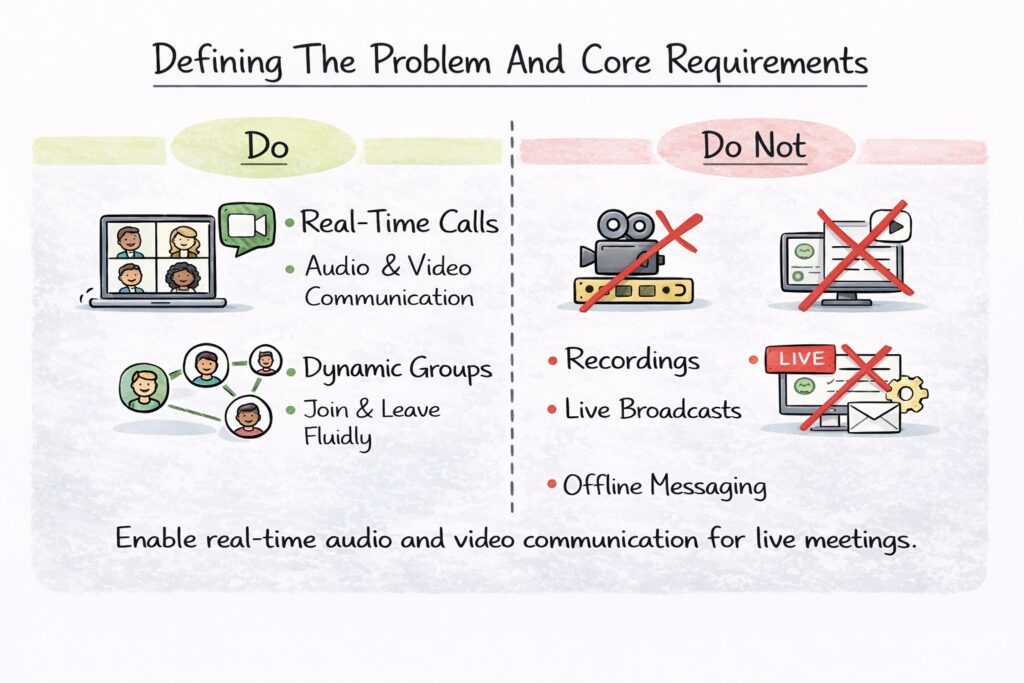
Before discussing architecture, you need to clearly define what you are building. Google Meet System Design is fundamentally about enabling real-time audio and video communication between multiple participants over unreliable networks.
At a basic level, users must be able to join meetings, send audio and video streams, and receive streams from others with minimal delay. The system must handle one-on-one calls as well as group meetings, often with participants joining and leaving dynamically.
You should narrow the scope early in the interview. Focus on live meetings rather than recordings, live streaming, or webinar-style broadcasts unless the interviewer explicitly asks for them. This clarity helps you avoid unnecessary complexity.
Equally important is defining what the system does not do. Google Meet System Design is not responsible for offline video delivery, asynchronous messaging, or post-processing. It is a real-time system first and foremost.
Functional Requirements In Google Meet System Design
The functional requirements describe what users expect the system to do. Users should be able to create or join meetings, establish audio and video connections, and maintain those connections as long as the meeting is active. The system must support screen sharing and basic participant management at a conceptual level.
Even these basic capabilities introduce complexity because they must operate under tight latency constraints and changing network conditions.
Non-Functional Requirements And Constraints
Non-functional requirements drive most architectural decisions. Latency is the most critical factor. Delays above a few hundred milliseconds degrade conversation quality. Availability matters because meetings are often business-critical. Scalability matters because usage patterns can spike unpredictably.
The table below summarizes how interviewers typically view these constraints.
| Requirement Type | Why It Matters |
|---|---|
| Low Latency | Natural conversation flow |
| High Availability | Meetings must not fail |
| Scalability | Millions of concurrent calls |
| Network Adaptability | Users on unstable connections |
| Cost Efficiency | Media infrastructure is expensive |
Explicitly stating these constraints shows that you understand the problem space before jumping into design.
High-Level Architecture Of Google Meet System Design
Once the problem is defined, you can introduce a high-level architecture. This is where you show that you can reason about system components without getting lost in details.
At a high level, Google Meet System Design consists of clients, signaling services, media transport infrastructure, and control services. Each component has a clearly defined role and operates under different constraints.
A typical call begins when clients connect to signaling services. Signaling establishes who is in the meeting and how participants should connect. Once signaling completes, media streams flow either directly between clients or through media servers, depending on the call topology.
This separation between signaling and media is crucial. Signaling traffic is low-volume and tolerant of slight delays. Media traffic is high-volume and extremely latency-sensitive.
Separation Of Signaling And Media Paths
One of the most important architectural ideas to explain is that signaling and media follow different paths. Signaling handles metadata such as session descriptions and participant state. Media paths carry audio and video packets continuously.
Keeping these paths separate improves scalability and reliability. Signaling services can scale independently from media servers, and failures in one path do not necessarily bring down the other.
The table below illustrates this separation.
| Component | Primary Responsibility |
|---|---|
| Client | Capture and render media |
| Signaling Service | Session coordination |
| Media Servers | Stream routing |
| Control Services | Meeting management |
This layered explanation helps interviewers follow your design from the start.
Client-Side Responsibilities And Media Capture
The client plays a much larger role in Google Meet System Design than in many other systems. Clients are responsible not only for sending and receiving data, but also for adapting to network conditions in real time.
Clients capture audio and video from microphones and cameras, encode them into compressed formats, and packetize them for transmission. Encoding choices directly affect bandwidth usage, latency, and quality.
Media Encoding And Adaptation
Clients continuously adjust encoding parameters based on network feedback. When bandwidth drops, video resolution or frame rate is reduced. When conditions improve, quality is increased again. This adaptation is essential for maintaining a usable experience.
You should emphasize that these adjustments happen dynamically during the call, not just at startup.
Client-Side Latency And Jitter Management
Clients also handle jitter buffers and synchronization. Audio and video packets may arrive out of order or with variable delays. The client smooths playback to avoid glitches while keeping latency as low as possible.
The table below highlights key client-side responsibilities.
| Client Responsibility | System Impact |
|---|---|
| Media Capture | Input quality |
| Encoding | Bandwidth efficiency |
| Adaptive Bitrate | Call stability |
| Jitter Buffering | Playback smoothness |
By focusing on client-side logic, you show that you understand the Google Meet System Design as an end-to-end system rather than just a backend problem.
Signaling And Session Management
Signaling is the coordination layer of the Google Meet System Design. While the media carries the actual audio and video, signaling tells participants how to connect, who is present, and when state changes occur. Without reliable signaling, calls cannot even begin.
When a user joins a meeting, the client first connects to a signaling service. This service authenticates the user, assigns them to a meeting, and distributes session metadata to other participants. This metadata includes information about codecs, network addresses, and media capabilities.
Session Establishment And Lifecycle
Session management tracks the lifecycle of a meeting from creation to termination. Participants may join or leave at any time, and the signaling system must propagate these changes quickly and consistently.
You should emphasize that signaling traffic is relatively low-volume compared to media traffic. This allows signaling services to prioritize correctness and reliability over extreme performance optimizations.
Decoupling Signaling From Media
A key design principle is keeping signaling separate from media transport. Signaling failures should not immediately disrupt active media streams, and temporary signaling delays should not freeze ongoing conversations.
The table below highlights signaling responsibilities.
| Signaling Function | Purpose |
|---|---|
| Authentication | Secure meeting access |
| Session Metadata Exchange | Enable connections |
| Participant State | Track joins and leaves |
| Capability Negotiation | Optimize media flow |
Explaining signaling clearly shows you understand the control plane of real-time systems.
Media Transport And Real-Time Streaming Pipeline
Media transport is the most technically demanding part of the Google Meet System Design. Audio and video must move across unreliable networks with minimal delay and acceptable quality.
Once signaling completes, clients begin transmitting media packets. These packets are typically sent using protocols optimized for real-time delivery. Reliability is balanced with latency, as retransmitting lost packets too aggressively can worsen delays.
Packetization And Congestion Control
Media streams are broken into small packets for transmission. Packet size and frequency are carefully chosen to balance overhead and responsiveness. Congestion control algorithms monitor packet loss and delay to adjust sending rates dynamically.
These mechanisms allow the system to adapt in real time when network conditions deteriorate.
Media Path Choices
Media may flow directly between clients or pass through media servers. Direct connections minimize latency but do not scale well for group calls. Server-assisted approaches introduce slightly more latency but simplify routing and scaling.
The table below summarizes media transport decisions.
| Transport Choice | System Impact |
|---|---|
| Peer-To-Peer | Lower latency |
| Server-Assisted | Better scalability |
| Adaptive Bitrate | Network resilience |
| Congestion Control | Stable playback |
Discussing these choices demonstrates your understanding of networking trade-offs.
Multiparty Calls And Media Routing Strategies
Group calls introduce complexity that one-on-one calls do not. Google Meet System Design must support meetings with many participants without overwhelming client bandwidth or server resources.
In multiparty scenarios, sending all streams to all participants directly is inefficient. Instead, the system relies on media routing strategies that balance quality and bandwidth usage.
Selective Forwarding And Server-Side Routing
One common approach is selective forwarding. Clients send their streams to a media server, which forwards selected streams to each participant based on layout and activity. This reduces the number of streams each client must process.
Server-side routing also enables features such as active speaker detection and dynamic layout adjustment.
Trade-Offs In Multiparty Design
Server-side routing introduces additional infrastructure cost and slightly higher latency. However, it significantly improves scalability and consistency across devices.
The table below highlights trade-offs in multiparty routing.
| Routing Strategy | Trade-Off |
|---|---|
| Full Mesh | Low latency, poor scalability |
| Selective Forwarding | Scalable, moderate cost |
| Server Mixing | Simple clients, higher latency |
Explaining why selective forwarding is often preferred signals practical design judgment.
Handling Scale, Concurrency, And Network Variability
Google Meet System Design must operate under extreme variability. Users join from different regions, devices, and network conditions. The system must scale seamlessly while adapting to fluctuating quality.
Concurrency is handled by scaling signaling and media services horizontally. Load balancers distribute traffic, and auto-scaling reacts to spikes such as company-wide meetings or global events.
Adapting To Network Conditions
Clients continuously measure packet loss, jitter, and latency. Based on these signals, they adjust encoding parameters and request different stream qualities from media servers.
This feedback loop is critical. Without it, calls would degrade rapidly on unstable networks.
Regional Deployment And Traffic Locality
Deploying media servers close to users reduces latency and improves quality. Traffic is routed to the nearest healthy region whenever possible. When regional failures occur, traffic is rerouted automatically.
The table below summarizes strategies for handling variability.
| Strategy | Benefit |
|---|---|
| Horizontal Scaling | Handles load spikes |
| Regional Servers | Lower latency |
| Adaptive Quality | Better user experience |
| Dynamic Routing | Resilience |
By covering these mechanisms, you demonstrate that you design systems that remain usable under real-world conditions.
Reliability, Fault Tolerance, And Call Resilience
Reliability is non-negotiable in Google Meet System Design. When users join a meeting, they expect audio and video to work continuously, even as network conditions fluctuate or infrastructure components fail.
Failures in real-time systems are inevitable. Servers crash, networks partition, and devices go offline. The goal is not to prevent all failures, but to ensure that calls survive them with minimal disruption.
Handling Transient And Partial Failures
Transient failures such as brief network drops are handled primarily at the client level. Clients attempt reconnection automatically and reestablish media streams without requiring users to rejoin meetings.
Partial failures are more complex. A media server may fail while signaling services remain healthy. In these cases, the system must reroute media traffic quickly and reestablish streams through alternate paths.
Designing For Call Continuity
Call resilience relies on redundancy and fast failure detection. Media servers are replicated across regions, and health checks continuously monitor their status. When a server becomes unhealthy, traffic is redirected transparently.
The table below summarizes reliability mechanisms.
| Reliability Mechanism | Benefit |
|---|---|
| Automatic Reconnection | Minimal user disruption |
| Media Server Redundancy | High availability |
| Health Monitoring | Fast failover |
| Traffic Rerouting | Call continuity |
Discussing these mechanisms shows that you understand how real-time systems maintain trust.
Security, Privacy, And Access Control
Security and privacy are fundamental to Google Meet System Design. Meetings often contain sensitive conversations, and users must trust that their data is protected.
Security begins with authentication. Users must prove their identity before joining meetings. Access control ensures that only authorized participants can join, share media, or manage the meeting.
Encryption And Media Protection
Media streams are encrypted in transit to prevent eavesdropping. Encryption keys are negotiated securely during session establishment and rotated as needed. This protects audio and video from interception even on untrusted networks.
Privacy considerations also influence logging and monitoring. While telemetry is necessary for debugging, it must avoid capturing sensitive content.
Managing Permissions And Roles
Meetings support different roles, such as hosts and participants. These roles determine permissions like muting others or admitting guests. Role management is enforced through signaling and control services rather than media paths.
The table below highlights key security components.
| Security Aspect | Purpose |
|---|---|
| Authentication | Verify identity |
| Encryption | Protect media |
| Access Control | Limit participation |
| Privacy Controls | Safeguard data |
Addressing security demonstrates holistic system thinking.
Trade-Offs, Bottlenecks, And Real-World Constraints
Google Meet System Design is shaped by trade-offs. Interviewers want to see whether you recognize these tensions and reason through them thoughtfully.
Latency versus quality is a constant balance. Higher video resolution improves clarity but increases bandwidth and delay. Lower resolution reduces latency but may degrade the experience.
Scalability versus cost is another major trade-off. Supporting large meetings requires significant infrastructure investment. Systems must optimize resource usage without compromising reliability.
Bottlenecks In Real-Time Systems
Common bottlenecks include media servers during large meetings, network congestion, and client device limitations. Identifying these bottlenecks helps guide design decisions such as adaptive bitrate and selective forwarding.
The table below summarizes common trade-offs.
| Trade-Off | Impact |
|---|---|
| Latency Vs Quality | User experience |
| Cost Vs Scalability | Infrastructure spend |
| Peer-To-Peer Vs Servers | Performance and control |
| Flexibility Vs Simplicity | Maintenance complexity |
Openly discussing trade-offs signals senior-level judgment.
How To Approach Google Meet System Design In Interviews
Approaching Google Meet System Design in an interview requires structure and discipline. You should start by clarifying requirements and constraints before proposing solutions.
Present a high-level architecture first. Then dive into key areas such as signaling, media transport, and failure handling. Let the interviewer guide which components to explore in depth.
Narrate your reasoning throughout the discussion. Explain why you chose one approach over another and acknowledge alternatives. Interviewers value clarity and adaptability more than exhaustive detail.
Handling Follow-Up Questions
Interviewers often introduce new constraints mid-discussion. They may ask how your design changes for mobile networks or large meetings. Treat these questions as opportunities to demonstrate flexibility rather than as challenges.
The table below shows what interviewers evaluate.
| Interview Stage | Evaluation Focus |
|---|---|
| Problem Framing | Clarity |
| Architecture | System thinking |
| Deep Dives | Technical judgment |
| Trade-Offs | Experience |
This approach positions you as a thoughtful System Designer.
Using structured prep resources effectively
Use Grokking the System Design Interview on Educative to learn curated patterns and practice full System Design problems step by step. It’s one of the most effective resources for building repeatable System Design intuition.
You can also choose the best System Design study material based on your experience:
Final Thoughts
Google Meet System Design is a demanding but rewarding interview problem. It forces you to think about real-time constraints, unreliable networks, and user experience in ways few other problems do.
If you approach this design with clear structure, honest trade-offs, and strong communication, you demonstrate exactly what interviewers look for in senior engineers. Mastering this system prepares you to design any real-time communication platform, from video conferencing to live collaboration tools.
