

Every time you log in to a website and continue browsing without repeatedly entering your username and password, authentication cookies are usually working behind the scenes. They allow web applications to recognize that you have already been authenticated, making it possible to access protected pages, complete transactions, and interact with personalized content without logging in for every request. Although users rarely notice them, authentication cookies are one of the foundational building blocks of modern web applications.
It is important to understand that authentication cookies do not authenticate users by themselves. Instead, they store information that allows the server to associate future requests with an authenticated session. Depending on the application’s architecture, this information may be a session identifier, a signed token, or another secure authentication credential.
Understanding the Purpose of Authentication Cookies
The primary purpose of an authentication cookie is to maintain a user’s authenticated state across multiple HTTP requests. Once a user successfully logs in, the server generates a secure identifier and sends it to the browser as a cookie. On future requests, the browser automatically includes that cookie, allowing the server to recognize the user without requiring another login.
This mechanism creates a seamless user experience while allowing the server to retain full control over authentication decisions. The browser simply stores and forwards the cookie, while the server determines whether the session remains valid.
Authentication Cookies Are Different from Ordinary Cookies
Browsers use cookies for many purposes besides authentication. Some cookies remember language preferences, shopping cart contents, analytics information, or user interface settings. Authentication cookies, however, contain security-sensitive information because they represent an authenticated user session.
For this reason, authentication cookies require much stronger protection than ordinary cookies. Modern applications typically configure additional security attributes such as HttpOnly, Secure, and SameSite to reduce the risk of session theft and unauthorized access.
| Cookie Type | Primary Purpose |
|---|---|
| Authentication Cookie | Maintain authenticated user sessions |
| Preference Cookie | Store user preferences and settings |
| Analytics Cookie | Track usage and visitor behavior |
| Functional Cookie | Improve website functionality |
| Marketing Cookie | Support advertising and personalization |
Why Authentication Cookies Matter
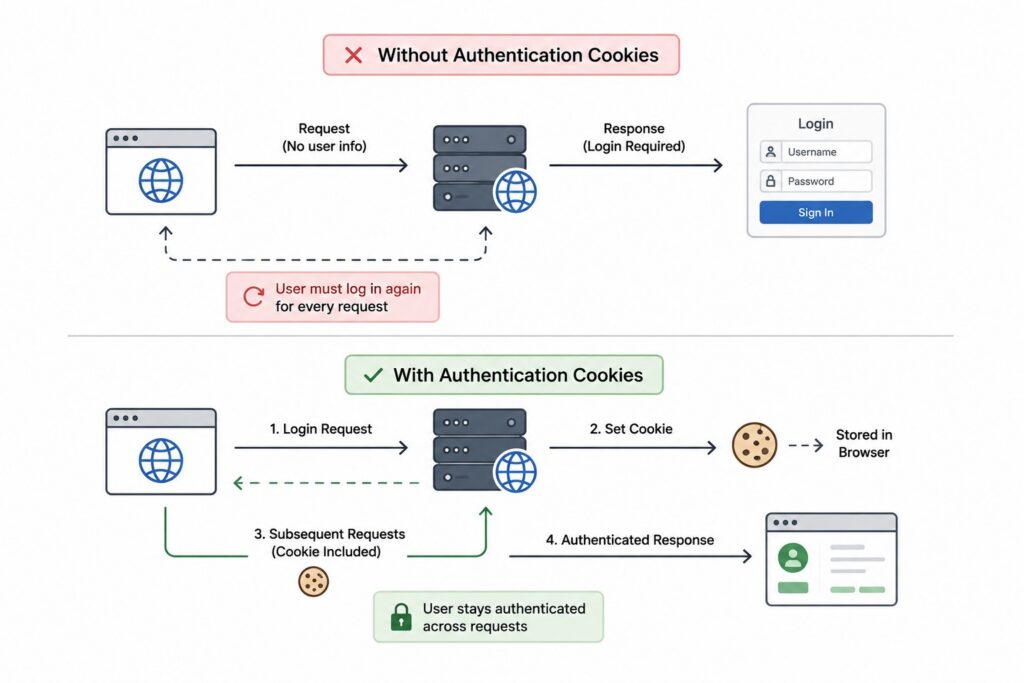
The HTTP protocol was intentionally designed to be stateless. Every request sent to a web server is treated as completely independent from previous requests, meaning the server does not automatically remember whether a user has already logged in. While this design makes HTTP simple and scalable, it creates an obvious challenge for applications that require persistent user authentication.
Authentication cookies solve this problem by allowing applications to remember authenticated users across multiple requests. Without them, users would need to submit their credentials every time they navigated to a new page, clicked a button, or refreshed the browser.
Maintaining User Sessions
After verifying a user’s credentials, the server creates an authenticated session and sends an authentication cookie back to the browser. The browser automatically includes this cookie with every subsequent request, allowing the server to identify the user immediately without asking for credentials again.
This continuous session allows users to browse websites naturally while the server maintains complete control over authentication and authorization decisions throughout the interaction.
Separating Authentication from Session Management
Authentication and session management are closely related but represent different responsibilities within a web application. Authentication answers the question, “Who is this user?” Session management answers the question, “Has this user already been authenticated?”
Separating these concerns simplifies application architecture. The expensive process of verifying passwords or multi-factor authentication only occurs during login, while subsequent requests rely on lightweight session validation using the authentication cookie.
Improving User Experience
Authentication cookies make modern web applications practical to use. Online banking platforms, e-commerce stores, social networks, productivity applications, and streaming services all depend on persistent sessions to provide uninterrupted user experiences. Features such as personalized dashboards, shopping carts, saved preferences, and account management would be far less convenient if users had to repeatedly authenticate throughout each browsing session.
Maintaining secure sessions therefore benefits both users and system performance by reducing unnecessary authentication requests.
| Without Authentication Cookies | With Authentication Cookies |
|---|---|
| Login required for every request | Continuous authenticated session |
| Poor user experience | Seamless navigation |
| Increased authentication workload | Authentication occurs once |
| Higher server overhead | Lightweight session validation |
| Frustrating application usage | Personalized, persistent experience |
How Authentication Cookies Work
Although authentication cookies appear simple from the user’s perspective, several coordinated steps occur before a browser becomes authenticated. The server must verify credentials, establish a session, generate a secure identifier, transmit the cookie safely, and validate it on every future request. This entire process typically completes within milliseconds while remaining invisible to the user.
Understanding this authentication lifecycle makes it easier to appreciate why cookies remain one of the most widely adopted session management mechanisms on the web.
User Authentication
The process begins when a user submits credentials such as a username and password. The authentication service validates these credentials against stored account information, often performing additional security checks such as multi-factor authentication, account status verification, or device validation.
If authentication succeeds, the server establishes that the user’s identity has been verified. At this point, the server must decide how it will remember this authenticated state for future requests.
Session Creation
After successful authentication, the server generates a secure session identifier or authentication token. In traditional session-based systems, this identifier references server-side session data that contains information about the authenticated user. In token-based systems, the cookie may instead contain a signed authentication token such as a JWT.
Regardless of the implementation, the generated value must be cryptographically secure and difficult for attackers to predict or forge.
Cookie Storage
The server returns the authentication cookie in the HTTP response, along with security attributes that define how the browser should handle it. The browser automatically stores the cookie and associates it with the appropriate domain, path, and expiration policy.
Unlike manually managed browser storage, cookies are automatically transmitted whenever requests match the configured domain and path rules.
Automatic Cookie Transmission
On every subsequent request, the browser automatically includes the authentication cookie in the request headers without requiring any action from the user or application code. The server validates the cookie, confirms that the session remains active, and authorizes access to protected resources.
If the cookie is missing, expired, invalid, or revoked, the server treats the request as unauthenticated and may require the user to log in again.
| Authentication Step | What Happens |
|---|---|
| User Login | Credentials are submitted |
| Authentication | Server verifies identity |
| Session Creation | Secure session identifier or token is generated |
| Cookie Storage | Browser stores the authentication cookie |
| Future Requests | Browser automatically sends the cookie |
| Session Validation | Server verifies the cookie before processing the request |
Session Cookies vs Persistent Cookies
Not every authentication cookie behaves the same way. Some exist only while the browser remains open, while others continue functioning for days or even months after the initial login. Choosing the appropriate cookie lifetime affects both user convenience and application security, making it an important architectural decision rather than a simple browser configuration.
Modern applications often support both approaches, allowing users to choose whether they want a temporary session or a longer-lasting authenticated experience.
Session Cookies
Session cookies exist only for the lifetime of the current browser session. Once the browser is completely closed, these cookies are automatically removed, requiring users to authenticate again when they return. Because they disappear automatically, session cookies reduce the amount of time stolen credentials remain usable if a device is left unattended.
Enterprise applications, banking systems, and internal administrative portals frequently prefer session cookies because they prioritize security over long-term convenience.
Persistent Cookies
Persistent cookies include an expiration date that allows them to survive browser restarts. They enable features such as “Remember Me,” allowing users to remain logged in for extended periods without repeatedly entering credentials.
While persistent cookies improve usability, they also increase security considerations because compromised devices may retain authenticated sessions long after the user leaves the application. Production systems combine persistent cookies with expiration policies, session rotation, and device monitoring to reduce long-term risk.
Choosing the Right Approach
The appropriate choice depends on the application’s security requirements. Highly sensitive systems often use short-lived session cookies, while consumer applications frequently combine persistent cookies with additional safeguards such as refresh tokens, device recognition, and periodic reauthentication.
Many modern authentication systems actually use both simultaneously. A short-lived session may handle immediate authentication, while a longer-lived refresh cookie silently renews the session without requiring users to log in repeatedly.
| Session Cookies | Persistent Cookies |
|---|---|
| Removed when browser closes | Survive browser restarts |
| Higher security | Greater convenience |
| Short-lived authentication | Long-term login persistence |
| Common in enterprise systems | Common in consumer applications |
| No expiration date stored | Explicit expiration configured |
Cookie Security Attributes
Authentication cookies contain security-sensitive information, which makes protecting them just as important as protecting user credentials themselves. Modern browsers provide several cookie attributes that restrict how cookies can be accessed, transmitted, and shared across websites. These attributes significantly reduce the risk of session theft and should be considered essential parts of any production authentication system.
Rather than relying on a single security mechanism, production applications combine multiple cookie attributes to provide layered protection against common web attacks.
HttpOnly
The HttpOnly attribute prevents client-side JavaScript from accessing authentication cookies. Even if an attacker successfully injects malicious JavaScript into a vulnerable page through a Cross-Site Scripting (XSS) attack, the script cannot directly read or steal cookies marked as HttpOnly.
Although HttpOnly does not eliminate XSS vulnerabilities entirely, it greatly reduces the likelihood that attackers can compromise authenticated sessions through browser scripting.
Secure
The Secure attribute instructs browsers to transmit cookies only over encrypted HTTPS connections. Without this protection, authentication cookies could potentially be exposed when users access websites over unencrypted HTTP connections, allowing attackers on the network to intercept session information.
Today, virtually every production authentication cookie should use the Secure attribute because HTTPS has become the standard for modern web applications.
SameSite
The SameSite attribute controls whether browsers include cookies when requests originate from other websites. This behavior plays an important role in protecting applications from Cross-Site Request Forgery (CSRF) attacks, where malicious websites attempt to perform actions using another user’s authenticated session.
SameSite offers multiple modes that balance security with application functionality. Strict provides the strongest protection, Lax supports most normal navigation scenarios, and None allows cross-site requests when combined with Secure.
Domain, Path, and Expiration
Additional cookie attributes determine where and how long cookies remain valid. The Domain attribute specifies which hosts receive the cookie, while the Path attribute limits transmission to specific sections of an application. Expiration settings determine when browsers automatically remove cookies, reducing the amount of time compromised credentials remain useful.
Carefully configuring these attributes minimizes unnecessary exposure and limits the scope of authentication information throughout the application.
| Cookie Attribute | Primary Purpose |
|---|---|
| HttpOnly | Prevent JavaScript access |
| Secure | Allow transmission only over HTTPS |
| SameSite | Reduce CSRF risk |
| Domain | Restrict which hosts receive the cookie |
| Path | Limit cookie scope within the application |
| Expires / Max-Age | Control cookie lifetime |
Session-Based Authentication vs JWT Cookies
One of the most common authentication design decisions is whether cookies should store a traditional session identifier or a JSON Web Token (JWT). Both approaches use cookies to maintain authentication across requests, but they differ significantly in where authentication state is stored and how servers validate incoming requests.
Neither architecture is universally superior. The right choice depends on factors such as scalability, infrastructure complexity, session management requirements, and operational tradeoffs.
Traditional Server-Side Sessions
In traditional session-based authentication, the authentication cookie contains only a randomly generated session identifier. The server stores all authentication information in a session database or distributed cache, using the identifier as a reference to retrieve the associated session data.
This approach makes session invalidation straightforward because administrators can simply remove the server-side session. It also avoids exposing authentication state directly to clients, even though the cookie itself contains no sensitive user information.
JWT Stored in Cookies
An alternative approach stores a signed JSON Web Token inside the authentication cookie. Instead of retrieving session information from server storage, the server validates the token’s signature and extracts user information directly from the token itself. This reduces server-side storage requirements and can simplify horizontally scaled architectures.
However, JWT-based authentication introduces additional considerations around token expiration, revocation, refresh workflows, and key management. Once a token has been issued, invalidating it before expiration is generally more complicated than deleting a traditional server-side session.
Choosing the Right Architecture
Session-based authentication is often preferred for applications that require frequent session invalidation, strict security controls, or centralized session management. JWT-based authentication is commonly used in distributed systems where reducing server-side session storage simplifies horizontal scaling.
Many modern systems combine these approaches by using short-lived JWT access tokens together with secure refresh cookies, providing both scalability and centralized session control where needed.
| Feature | Session Cookies | JWT Cookies |
|---|---|---|
| Authentication State | Stored on the server | Stored inside the signed token |
| Server Storage | Required | Minimal or none |
| Session Revocation | Simple | More complex |
| Horizontal Scalability | Requires shared session storage | Naturally stateless |
| Implementation Complexity | Simpler | Higher due to token management |
| Common Use Case | Traditional web applications | Distributed and cloud-native systems |
Authentication Cookies in Modern Web Applications
Modern web applications are rarely built as a single server handling every request. Instead, they often consist of multiple frontend applications, backend services, API gateways, authentication providers, and distributed infrastructure working together. Despite these architectural changes, authentication cookies continue to play an important role because they provide a secure and browser-friendly mechanism for maintaining authenticated user sessions across the entire application.
Rather than being limited to traditional server-rendered websites, authentication cookies are now used in single-page applications, microservices, backend-for-frontend architectures, and cloud-native systems. The underlying concept remains the same, but the way cookies interact with different architectural components has evolved significantly.
Authentication Cookies in Traditional and Modern Architectures
In a traditional monolithic application, the same server typically handles authentication, session management, business logic, and page rendering. Authentication cookies simply travel between the browser and that single application, making session management relatively straightforward.
Modern architectures often separate authentication into dedicated identity services. After a user successfully logs in, the authentication service issues a secure cookie, while API gateways or backend services validate that cookie before processing protected requests. This separation allows authentication to evolve independently while keeping application services focused on business functionality.
Authentication Cookies in Single-Page Applications
Single-page applications (SPAs) communicate with backend APIs through asynchronous HTTP requests rather than full-page reloads. Authentication cookies work particularly well in this environment because browsers automatically include them with every API request that matches the configured domain and security policies.
Using cookies also reduces the amount of authentication logic frontend applications need to manage. Developers do not need to manually attach authorization headers for every request because the browser handles cookie transmission automatically, simplifying client-side implementation while reducing opportunities for security mistakes.
Backend-for-Frontend and Microservices
Large organizations frequently introduce a Backend-for-Frontend (BFF) layer between frontend applications and backend services. Instead of allowing browsers to communicate directly with dozens of microservices, the browser authenticates with the BFF using cookies. The BFF then communicates with internal services using service-to-service authentication mechanisms that are invisible to the client.
This architecture simplifies frontend development, centralizes authentication, and reduces the exposure of internal services to the public internet.
| Architecture | How Authentication Cookies Are Used |
|---|---|
| Monolithic Application | Browser communicates directly with one server |
| Server-Side Rendering | Cookies maintain authenticated page requests |
| Single-Page Application | Browser automatically includes cookies with API calls |
| Backend for Frontend | Browser authenticates with the BFF, which communicates with backend services |
| Microservices | Gateway or authentication service validates cookies before routing requests |
Common Security Threats and Mitigations
Because authentication cookies represent authenticated user sessions, they are valuable targets for attackers. If an attacker successfully steals or abuses an authentication cookie, they may be able to impersonate the legitimate user without ever knowing the user’s password. Protecting authentication cookies requires understanding the common threats that target them and implementing multiple layers of defense rather than relying on a single security feature.
Modern web security is built around the assumption that no individual mechanism provides complete protection. Instead, authentication cookies are secured through a combination of browser protections, server-side validation, secure transport, and careful application design.
Cross-Site Scripting (XSS)
Cross-Site Scripting allows attackers to inject malicious JavaScript into vulnerable web pages. Without proper protection, this script may attempt to steal authentication cookies or perform unauthorized actions on behalf of the user.
Using the HttpOnly cookie attribute prevents JavaScript from directly reading authentication cookies, significantly reducing the impact of many XSS attacks. However, HttpOnly should not be viewed as a substitute for eliminating XSS vulnerabilities themselves. Secure input validation, output encoding, and content security policies remain essential.
Cross-Site Request Forgery (CSRF)
Browsers automatically include authentication cookies with matching requests, which creates the possibility of Cross-Site Request Forgery attacks. In a CSRF attack, a malicious website tricks a user’s browser into sending authenticated requests to another website without the user’s knowledge.
Modern applications mitigate this risk through SameSite cookies, CSRF tokens, origin validation, and careful handling of state-changing operations. Combining these techniques provides significantly stronger protection than relying on any single mechanism.
Session Hijacking and Cookie Theft
Session hijacking occurs when attackers obtain a valid authentication cookie and use it to impersonate another user. This can happen through unsecured network traffic, malware, browser vulnerabilities, or compromised devices.
Using HTTPS together with the Secure cookie attribute protects cookies while they travel across the network. Additional safeguards such as session expiration, session rotation, device monitoring, and anomaly detection further reduce the likelihood that stolen cookies remain useful for long periods.
Session Fixation and Replay Attacks
Session fixation attempts to force users into authenticating with a session identifier already known to an attacker. Replay attacks involve capturing legitimate authentication requests and attempting to reuse them later.
Production systems defend against these attacks by generating entirely new session identifiers immediately after successful authentication, enforcing expiration policies, rotating sessions periodically, and validating additional contextual information such as device characteristics or IP reputation where appropriate.
| Security Threat | Common Mitigation |
|---|---|
| Cross-Site Scripting (XSS) | HttpOnly, Content Security Policy, input validation |
| Cross-Site Request Forgery (CSRF) | SameSite, CSRF tokens, origin validation |
| Session Hijacking | HTTPS, Secure cookies, session expiration |
| Session Fixation | Session ID regeneration after login |
| Replay Attacks | Session rotation, expiration, contextual validation |
Authentication Cookie Best Practices
Secure authentication does not depend on a single configuration option. Instead, production systems combine multiple defensive techniques that work together to protect user sessions throughout their entire lifecycle. These best practices improve both security and reliability while reducing the impact of compromised devices, stolen credentials, or application vulnerabilities.
Rather than implementing only the minimum required protections, mature authentication systems assume that failures may occur and build multiple layers of defense accordingly.
Secure the Entire Session Lifecycle
Authentication security begins before a cookie is created and continues until the session is terminated. Session identifiers should be generated using cryptographically secure random values, transmitted only over HTTPS, and regenerated after successful login to prevent session fixation attacks.
Session expiration is equally important. Long-lived sessions improve convenience but also increase the amount of time attackers can misuse compromised credentials. Most production systems balance usability and security by combining short-lived sessions with secure refresh mechanisms or periodic reauthentication.
Protect Logout and Session Invalidation
Logging out should do more than simply remove the cookie from the browser. The server should invalidate the corresponding session so that copied or intercepted cookies can no longer be used. This becomes especially important when users log out from shared or public devices.
Many applications also allow users to invalidate sessions across all devices simultaneously. This capability helps users recover quickly after losing a laptop, changing passwords, or detecting suspicious account activity.
Monitor Authentication Activity
Authentication systems should continuously monitor session behavior for unusual activity. Unexpected geographic locations, rapid device switching, excessive failed authentication attempts, or abnormal session durations may all indicate compromised accounts.
Monitoring allows organizations to detect attacks that technical controls alone may not prevent. Combined with secure cookie attributes and strong session management, continuous monitoring significantly improves overall application security.
| Best Practice | Why It Matters |
|---|---|
| Use cryptographically secure session IDs | Prevent predictable sessions |
| Enable HttpOnly, Secure, and SameSite | Protect authentication cookies |
| Regenerate sessions after login | Prevent session fixation |
| Invalidate sessions during logout | Prevent reuse of stolen cookies |
| Use HTTPS everywhere | Protect cookies during transmission |
| Monitor active sessions | Detect suspicious authentication activity |
Common Misconceptions About Authentication Cookies
Authentication cookies have existed for decades, yet they remain surrounded by misconceptions. Much of this confusion comes from treating cookies as inherently insecure rather than understanding that security depends on how cookies are configured and managed. Separating myths from actual architectural concerns helps engineers design more secure authentication systems.
Most production security failures occur because authentication cookies are implemented incorrectly, not because cookies themselves are fundamentally flawed.
Cookies Are Not Inherently Insecure
A common misconception is that cookies should never be used for authentication because they can be stolen. In reality, properly configured authentication cookies protected by HTTPS, HttpOnly, Secure, and SameSite attributes remain one of the safest mechanisms for browser-based authentication.
Security problems typically arise when applications transmit cookies over HTTP, expose them to JavaScript unnecessarily, or fail to protect against CSRF and XSS attacks.
JWT Does Not Eliminate Cookies
Another misconception is that adopting JWT-based authentication removes the need for cookies entirely. While JWTs can be stored in browser storage or transmitted through Authorization headers, many production applications deliberately store JWTs inside secure HttpOnly cookies to reduce exposure to client-side JavaScript.
JWTs and cookies solve different problems. JWT defines the token format, while cookies define one mechanism for securely transporting authentication information between browsers and servers.
Cookies Should Never Store Sensitive Information
Authentication cookies should never contain passwords or confidential application data. Their purpose is to maintain authenticated sessions, not to store sensitive user information directly. Traditional session cookies usually contain only random session identifiers, while JWT cookies contain signed authentication claims rather than raw credentials.
Keeping cookies small and limited to authentication-related information reduces both security risks and unnecessary network overhead.
| Misconception | Reality |
|---|---|
| Cookies are inherently insecure | Properly configured cookies are highly secure |
| JWT replaces cookies | JWT and cookies solve different problems |
| HttpOnly alone provides complete security | Multiple security layers are still required |
| Cookies store passwords | Authentication cookies should never contain passwords |
| HTTPS eliminates every cookie risk | Additional protections remain necessary |
Authentication Cookies in System Design Interviews
Authentication is one of the most common topics discussed during System Design interviews because nearly every modern application requires secure user sessions. Interviewers frequently explore how applications authenticate users, maintain sessions, protect cookies, and scale authentication across distributed infrastructure. Authentication cookies often become part of these discussions because they remain one of the most widely deployed browser authentication mechanisms.
Rather than testing memorized terminology, interviewers evaluate whether you understand why cookies are used, how they interact with browsers, and what architectural tradeoffs they introduce.
When Cookie-Based Authentication Is Appropriate
Authentication cookies are generally the preferred choice for browser-based applications where automatic session management improves both security and usability. Enterprise software, SaaS platforms, online banking systems, e-commerce websites, and social networks all commonly rely on secure authentication cookies to maintain user sessions.
During interviews, explaining why cookies fit browser applications while other authentication mechanisms may better suit mobile or machine-to-machine communication demonstrates practical architectural judgment.
What Interviewers Evaluate
Interviewers typically expect candidates to discuss how sessions are created, how cookies are protected, where session information is stored, and how distributed applications validate authenticated requests. They may also explore logout behavior, session invalidation, refresh workflows, or the security implications of different cookie attributes.
These questions assess your understanding of complete authentication systems rather than isolated browser features.
Common Candidate Mistakes
Candidates frequently confuse authentication cookies with JWTs, assume cookies store passwords directly, or overlook browser security attributes such as HttpOnly and SameSite. Others fail to explain how logout invalidates server-side sessions or how authentication scales across multiple application servers.
Discussing these considerations clearly demonstrates a deeper understanding of production authentication architectures rather than simply describing how browsers store cookies.
| Interview Topic | What Interviewers Evaluate |
|---|---|
| Session Management | Understanding authenticated user sessions |
| Cookie Security | Knowledge of browser security attributes |
| Scalability | Distributed session validation |
| Logout Behavior | Proper session invalidation |
| Security Tradeoffs | Ability to justify architectural decisions |
| Communication | Clear explanation of authentication flow |
Frequently Asked Questions About Authentication Cookies
Authentication cookies remain one of the most widely used browser authentication mechanisms despite the emergence of JWTs, OAuth, and modern identity platforms. As a result, developers frequently ask similar questions when deciding how to design secure authentication systems. Understanding the answers to these questions helps clarify where cookies fit within modern web architecture.
Although implementation details vary between applications, the underlying security principles remain remarkably consistent.
Are authentication cookies secure?
Yes, when implemented correctly. Authentication cookies protected with HTTPS, HttpOnly, Secure, and SameSite attributes provide a strong foundation for browser authentication. Their security depends far more on correct configuration and session management than on cookies themselves.
Like every security mechanism, authentication cookies should be combined with secure application development practices, proper session management, and continuous monitoring.
Should JWTs be stored in cookies or local storage?
For browser-based applications, storing JWTs inside secure HttpOnly cookies is generally considered safer than storing them in local storage because JavaScript cannot directly access HttpOnly cookies. This reduces exposure to many Cross-Site Scripting attacks.
The appropriate storage mechanism ultimately depends on the application’s architecture, but many security-focused applications prefer secure cookies for browser authentication.
What is the difference between a session cookie and a JWT cookie?
A session cookie typically contains a random identifier that references server-side session information. A JWT cookie contains a signed token that carries authentication claims directly inside the cookie.
Both approaches use cookies to transport authentication information, but they differ in where authentication state is maintained and how requests are validated.
Can authentication cookies be stolen?
Yes. Attackers may obtain authentication cookies through malware, browser compromise, unsecured networks, Cross-Site Scripting vulnerabilities, or physical access to compromised devices. Proper cookie attributes, HTTPS, session expiration, and anomaly detection significantly reduce these risks.
No authentication mechanism completely eliminates risk, which is why layered security remains essential.
What happens when a user logs out?
A secure logout process invalidates the authenticated session on the server in addition to removing the authentication cookie from the browser. Simply deleting the browser cookie is not sufficient because copied session identifiers could otherwise remain usable.
Many applications also invalidate refresh tokens and active sessions across multiple devices when users explicitly log out.
How long should authentication cookies last?
The appropriate lifetime depends on the application’s security requirements. Banking systems often use short session durations, while consumer applications may support longer-lived sessions using secure refresh mechanisms or “Remember Me” functionality.
Balancing usability and security is one of the most important authentication design decisions.
Do authentication cookies work with APIs?
Yes. Browser-based APIs commonly rely on authentication cookies because browsers automatically include them with requests. API gateways and backend services can validate these cookies before authorizing access to protected resources.
Machine-to-machine APIs, however, often use bearer tokens rather than browser cookies because they do not rely on browser behavior.
When should you use cookies instead of bearer tokens?
Authentication cookies are generally the preferred choice for browser-based applications where automatic session management improves both security and usability. Bearer tokens are often better suited for mobile applications, server-to-server communication, and public APIs where browsers are not involved.
Selecting between them depends primarily on the client architecture rather than the authentication protocol itself.
| Question | Short Answer |
|---|---|
| Are authentication cookies secure? | Yes, when properly configured. |
| JWT in cookies or local storage? | Secure HttpOnly cookies are often preferred for browsers. |
| Session cookie vs JWT cookie? | Server-side sessions versus signed tokens. |
| Can cookies be stolen? | Yes, which is why layered security is essential. |
| Do cookies work with APIs? | Yes, particularly for browser-based APIs. |
| When should cookies be used? | Primarily for browser-based authentication. |
Final Thoughts
Authentication cookies remain one of the most important technologies underlying modern web authentication because they provide a secure, efficient, and browser-native way to maintain authenticated user sessions. Although authentication frameworks and identity platforms continue to evolve, the fundamental role of cookies has remained remarkably consistent. They allow browsers and servers to work together to preserve authenticated state without repeatedly asking users to verify their identity during every interaction.
Building secure authentication systems requires much more than simply setting a cookie after login. Successful implementations combine strong session management, secure cookie attributes, HTTPS, protection against common web attacks, careful session invalidation, and continuous monitoring throughout the session lifecycle. Understanding these principles not only helps you build safer web applications but also prepares you for System Design discussions where authentication architecture remains one of the most frequently evaluated backend engineering topics.