
Push notifications are messages sent from an application’s backend infrastructure to a user’s device without requiring the user to actively open the application or request new information. They allow applications to notify users about events such as incoming messages, order updates, payment confirmations, calendar reminders, breaking news, or system alerts. Because these notifications appear even when an application is running in the background, they have become one of the most important communication mechanisms in modern mobile and web applications.
Although push notifications appear simple from a user’s perspective, delivering them requires coordination between application servers, platform notification services, and operating systems. Understanding this architecture is essential when designing large-scale systems that must reliably notify millions of users.
Event-Driven Communication
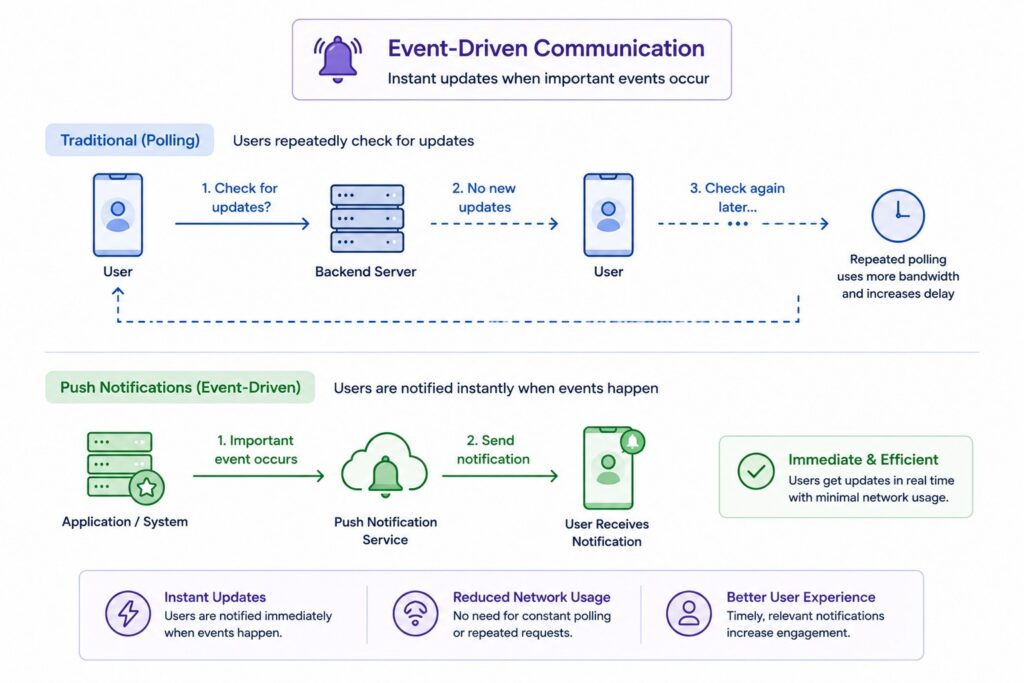
Unlike traditional request-response communication, push notifications are event driven. Instead of waiting for users to check for updates, applications immediately notify them whenever an important event occurs.
This approach improves responsiveness while reducing unnecessary network traffic compared to repeatedly polling backend servers.
More Than Mobile Alerts
Push notifications are commonly associated with smartphones, but they also exist on web browsers, tablets, desktops, wearable devices, smart TVs, and other connected platforms. Modern notification systems support many different device types while providing a consistent communication model.
The underlying delivery process remains similar even though each platform implements notifications differently.
Push Notifications vs In-App Notifications
Push notifications are delivered through operating system notification services and can appear even when the application is not actively running. In-app notifications, on the other hand, are displayed only after users open the application and are managed entirely by the application’s own interface.
Many applications use both approaches together to ensure users remain informed regardless of whether the application is currently open.
| Concept | Purpose |
|---|---|
| Push Notification | Notify users outside the application |
| In-App Notification | Display information inside the application |
| Event-Driven Delivery | Notify users immediately after events |
| Notification Services | Deliver notifications to devices |
Why Push Notifications Exist
Modern applications generate countless events that users expect to learn about immediately. Messaging platforms notify users when new conversations begin, banking applications report completed transactions, delivery services provide shipment updates, and collaboration tools alert teams whenever work changes. Without push notifications, users would need to open applications continuously to check whether anything new had happened.
Push notifications solve this problem by allowing applications to communicate important information proactively while minimizing unnecessary network communication.
User Engagement
One of the primary goals of push notifications is keeping users informed without requiring them to monitor applications constantly. Timely notifications encourage users to return when meaningful activity occurs while helping applications remain responsive to changing situations.
Well-designed notification strategies improve user experience by delivering useful information instead of requiring constant manual checking.
Event-Driven Communication
Applications often need to notify users immediately after important events occur. Incoming messages, completed purchases, fraud alerts, appointment reminders, and ride arrivals all benefit from immediate communication because delayed information may reduce its usefulness.
Push notifications provide an efficient mechanism for responding automatically to these events.
Mobile Device Constraints
A common misconception is that application servers communicate directly with smartphones. In reality, mobile operating systems aggressively manage background applications to preserve battery life, making direct persistent server connections impractical for every application.
Platform notification services solve this challenge by maintaining optimized infrastructure capable of delivering notifications efficiently on behalf of applications.
Platform Notification Services
Rather than building proprietary notification infrastructure for every application, mobile platforms provide centralized delivery services. Apple devices rely on Apple Push Notification Service (APNs), while Android applications commonly use Firebase Cloud Messaging (FCM).
These services maintain secure communication channels with user devices, allowing backend servers to send notifications without directly managing millions of persistent connections.
| Challenge | Push Notification Solution |
|---|---|
| Users constantly checking apps | Event-driven notifications |
| Background application limits | Platform notification services |
| Battery consumption | Centralized delivery infrastructure |
| Multiple device platforms | APNs and FCM |
How Push Notifications Work
Although users experience notifications as nearly instantaneous messages, several coordinated systems participate in every delivery. Devices first register with platform notification services, application servers generate notification requests when events occur, platform providers deliver those requests to the appropriate devices, and the operating system finally presents the notification to the user. Each stage plays an essential role in ensuring notifications reach the correct recipient reliably.
Understanding this lifecycle helps explain why application servers do not communicate directly with user devices.
Device Registration
When an application is installed or launched for the first time, it registers with the platform notification service. The service generates a unique device token that identifies both the application and the specific device receiving future notifications.
This token becomes the destination address that backend systems later use when sending notifications.
Notification Creation
Whenever an important application event occurs, the backend server determines which users should receive notifications. It generates a notification payload containing information such as the message title, body, metadata, and target device tokens.
The backend then forwards this payload to the appropriate notification service instead of contacting devices directly.
Push Notification Service
Platform services such as APNs and FCM receive notification requests from application servers and maintain persistent communication with user devices. Because these services already manage secure connections to millions of devices, applications avoid maintaining their own large-scale communication infrastructure.
The notification service determines whether devices are currently reachable and delivers messages accordingly.
Device Delivery
Once a notification reaches the device, the operating system decides how it should be presented based on application permissions, notification settings, battery optimization policies, and current device state.
Users may view the notification immediately, interact with it later, or open the application directly from the notification.
| Notification Stage | Responsibility |
|---|---|
| Device Registration | Obtain notification token |
| Notification Creation | Generate notification payload |
| Platform Service | Deliver notification |
| Device Delivery | Display notification to user |
Core Components of a Push Notification System
Large-scale push notification systems consist of several specialized components working together rather than a single notification server. Applications generate events, backend services determine recipients, platform providers deliver notifications, and user devices receive and display messages. Separating these responsibilities allows each component to scale independently while supporting millions of concurrent users.
Although implementation details vary across platforms, these core building blocks appear in nearly every push notification architecture.
Client Application
The client application runs on the user’s device and registers with the platform notification service when installed or launched. It stores the device token, requests notification permissions, and determines how notifications should be presented once they arrive.
Applications also report updated device tokens back to backend systems whenever necessary.
Application Server
The application server contains the business logic responsible for generating notifications. When events such as incoming messages, completed payments, or order updates occur, the server determines which users should receive notifications and constructs the appropriate notification payload.
This server acts as the source of all notification events.
Notification Service
Platform notification services such as APNs, Firebase Cloud Messaging, and browser push services receive notification requests from backend systems and handle the complex process of delivering them to devices.
By centralizing notification delivery, these services simplify application development while optimizing battery usage and network efficiency.
User Devices
User devices receive notifications through operating system services rather than direct server connections. The operating system determines when notifications appear, how they are displayed, and whether they launch the associated application after user interaction.
This final stage completes the notification delivery pipeline.
| Component | Responsibility |
|---|---|
| Client Application | Register device and receive notifications |
| Application Server | Generate notification events |
| Notification Service | Deliver notifications |
| User Device | Present notifications to users |
APNs and Firebase Cloud Messaging (FCM)
Modern mobile operating systems do not allow every application to maintain its own persistent communication channel with backend servers. Instead, Apple and Google provide centralized notification infrastructure that efficiently delivers notifications while minimizing battery consumption and network overhead. These services abstract much of the complexity involved in delivering notifications across billions of devices worldwide.
Backend systems integrate with platform notification services rather than communicating directly with individual devices.
Apple Push Notification Service (APNs)
Apple Push Notification Service, commonly known as APNs, manages notification delivery for iPhones, iPads, Apple Watches, and other Apple devices. Applications register with APNs to obtain unique device tokens that backend systems later use when sending notifications.
APNs maintains secure connections to Apple devices and delivers notifications according to platform-specific policies and user permissions.
Firebase Cloud Messaging (FCM)
Firebase Cloud Messaging provides similar functionality for Android applications while also supporting web notifications and cross-platform frameworks. Like APNs, FCM issues registration tokens that uniquely identify application instances.
FCM additionally supports features such as topic-based messaging, device groups, analytics integration, and simplified notification management.
Web Push Notifications
Modern web browsers also support push notifications through standardized browser APIs and service workers. Websites request user permission before registering with browser notification services that continue delivering notifications even when browser tabs are inactive.
This capability allows web applications to implement notification experiences similar to native mobile applications.
Cross-Platform Notification Architecture
Most production backend systems support multiple notification providers simultaneously because users access applications across many device types. Backend services determine the appropriate provider based on the user’s device before forwarding notifications to APNs, FCM, or browser notification services.
This abstraction allows application logic to remain largely independent of individual platform implementations.
| Platform | Notification Service |
|---|---|
| iOS | Apple Push Notification Service (APNs) |
| Android | Firebase Cloud Messaging (FCM) |
| Web Browsers | Web Push APIs |
| Backend | Routes notifications to appropriate provider |
Push Notification Architecture
Large applications rarely send notifications immediately after events occur. Instead, they use distributed architectures that separate event generation, notification processing, queue management, and delivery into independent services. This asynchronous design improves scalability while ensuring notification delivery remains reliable even during periods of extremely high traffic.
Modern push notification systems resemble event-processing pipelines more than traditional request-response applications.
Event Producers
Notification workflows begin when business events occur inside application services. Messaging systems generate events for new conversations, e-commerce platforms detect completed purchases, collaboration tools identify document updates, and monitoring systems trigger alerts after infrastructure failures.
These services produce events rather than delivering notifications directly.
Notification Service
A dedicated notification service receives application events and determines which users should be notified. It formats notification payloads, selects the appropriate notification provider, applies user preferences, and prepares messages for asynchronous delivery.
Centralizing notification logic simplifies maintenance while keeping business services independent of notification infrastructure.
Message Queues
Rather than processing notifications synchronously, large systems commonly place notification requests into message queues such as Kafka, RabbitMQ, or Amazon SQS. Worker processes consume queued notifications independently, allowing the system to absorb sudden traffic spikes without overwhelming downstream services.
Queue-based architectures also improve reliability by preventing temporary failures from immediately losing notifications.
Delivery Pipeline
Notification workers retrieve queued messages, communicate with APNs or FCM, monitor delivery outcomes, retry temporary failures, throttle excessive traffic, and maintain delivery metrics. Many systems also support scheduled notifications, fan-out delivery to multiple recipients, and prioritization for urgent events.
This asynchronous pipeline enables modern platforms to deliver millions of notifications reliably while maintaining responsive application performance.
| Architectural Component | Responsibility |
|---|---|
| Event Producers | Generate notification events |
| Notification Service | Orchestrate notification delivery |
| Message Queue | Buffer notification workload |
| Delivery Workers | Send notifications through APNs and FCM |
Scalability and Reliability
Large consumer applications send millions or even billions of push notifications every day. Messaging platforms, social networks, banking applications, and e-commerce services often experience sudden traffic spikes when major events occur, making scalability and reliability essential architectural concerns. A notification system must continue processing enormous workloads without delaying critical messages or overwhelming downstream delivery services such as APNs and Firebase Cloud Messaging.
Modern notification platforms achieve this through asynchronous processing, distributed workers, intelligent retry mechanisms, and highly available infrastructure.
Asynchronous Processing
Push notifications should rarely be sent synchronously as part of the original user request. Instead, application servers publish notification events to message queues where background workers process them independently.
This separation keeps user-facing APIs responsive while allowing notification throughput to scale independently from the rest of the application.
Horizontal Scaling
Notification workers are typically stateless, making them easy to scale horizontally. During periods of high demand, additional worker instances can be added to consume queued notifications more quickly without changing application logic.
This architecture allows capacity to increase gradually as notification volume grows.
Retry Mechanisms
Temporary failures occur regularly due to network interruptions, provider throttling, or unavailable devices. Rather than immediately discarding failed notifications, workers commonly retry delivery using exponential backoff while avoiding excessive repeated attempts.
Carefully designed retry policies improve reliability without creating unnecessary traffic.
High Availability
Notification infrastructure should remain operational even when individual servers fail. Load balancers, redundant message queues, replicated databases, and multiple worker instances allow notification processing to continue without interruption during hardware or software failures.
High availability is particularly important for applications delivering security alerts, financial notifications, or emergency communications.
| Scalability Technique | Benefit |
|---|---|
| Asynchronous Processing | Decouple notifications from user requests |
| Horizontal Scaling | Increase worker capacity easily |
| Retry Mechanisms | Recover from temporary failures |
| High Availability | Continue operating during outages |
Delivery Challenges and Optimization
Delivering notifications reliably involves more than simply sending a message to a platform provider. Devices may be offline, users may disable notifications, operating systems may restrict background activity, and notification providers may temporarily delay delivery. Modern notification systems include numerous optimization techniques that improve reliability while respecting platform limitations and user experience.
Understanding these challenges helps architects design systems that remain effective under real-world operating conditions.
Offline Devices
Mobile devices frequently lose network connectivity or become temporarily unavailable. When this happens, notification providers attempt delivery once connectivity returns, provided the notification has not expired according to its configured lifetime.
Applications should therefore distinguish between urgent notifications that expire quickly and informational notifications that remain useful after delays.
Notification Priorities
Not every notification requires immediate delivery. Platforms typically support priority levels that allow urgent notifications such as authentication requests or emergency alerts to be processed differently from background synchronization or promotional messages.
Appropriate prioritization improves both user experience and battery efficiency.
Rate Limiting
Notification systems must prevent excessive message generation caused by application bugs, malicious activity, or unexpected traffic spikes. Rate limiting protects both backend infrastructure and notification providers while preventing users from receiving overwhelming numbers of notifications.
Many systems enforce limits at the user, application, or device level.
Battery Optimization
Mobile operating systems aggressively optimize battery usage by limiting background processing and network activity. Notification providers cooperate with these operating systems to deliver messages efficiently while minimizing unnecessary device wake-ups.
Backend systems should respect these platform behaviors instead of assuming notifications are delivered immediately under every circumstance.
| Delivery Challenge | Optimization Strategy |
|---|---|
| Offline Devices | Delayed delivery until reconnection |
| Notification Priority | Prioritize important events |
| Excessive Traffic | Rate limiting and throttling |
| Battery Usage | Platform-managed delivery |
Push Notifications vs Polling vs WebSockets
Applications can notify users in several different ways, and push notifications represent only one communication model. Polling periodically asks the server whether new information is available, WebSockets maintain persistent bidirectional connections, and push notifications rely on platform-managed notification services. Each approach solves different problems and should be selected according to application requirements rather than popularity.
Many large systems combine all three communication methods within the same architecture.
Push Notifications
Push notifications are ideal when applications need to alert users outside the application itself. Since delivery is managed by platform notification services, applications do not need to maintain continuous connections with every device.
This model works particularly well for messaging alerts, order updates, reminders, and event-driven communication.
Polling
Polling periodically sends requests to determine whether new information exists. Although simple to implement, frequent polling generates unnecessary network traffic because most requests return no new data.
Polling is generally suitable only when updates are infrequent or real-time communication is unnecessary.
WebSockets
WebSockets establish persistent bidirectional communication between clients and servers. Unlike push notifications, WebSockets allow continuous real-time data exchange while applications remain open.
They are commonly used for collaborative editing, financial trading platforms, multiplayer games, and live dashboards.
Choosing the Right Approach
Push notifications excel at reaching inactive applications, WebSockets provide continuous communication for active sessions, and polling offers a straightforward solution for simpler workloads. Many applications use WebSockets while users actively interact with the application and fall back to push notifications after the application moves into the background.
Selecting the correct communication model depends entirely on user behavior and application requirements.
| Communication Method | Best Use Case |
|---|---|
| Push Notifications | Background user alerts |
| Polling | Simple periodic updates |
| WebSockets | Continuous real-time communication |
| Hybrid Approach | Active sessions plus background alerts |
Common Misconceptions About Push Notifications
Because push notifications appear almost instantaneous to users, many people assume the underlying delivery process is much simpler than it actually is. In reality, notification systems involve multiple independent services, operating system policies, and distributed infrastructure components. Understanding these misconceptions helps architects design notification systems that remain reliable under realistic operating conditions.
Successful notification delivery depends on platform capabilities as much as application logic.
Servers Send Notifications Directly to Phones
Application servers do not normally communicate directly with mobile devices. Instead, they send notification requests to APNs, Firebase Cloud Messaging, or browser notification services, which maintain optimized communication channels with user devices.
This architecture improves scalability while reducing battery consumption.
Push Notifications Are Guaranteed
Notification providers attempt to deliver messages, but successful delivery cannot always be guaranteed. Devices may be offline, users may disable notifications, applications may be uninstalled, or messages may expire before delivery becomes possible.
Applications should therefore avoid relying on push notifications as the sole mechanism for critical data synchronization.
Notifications Always Wake Applications
Receiving a notification does not necessarily mean the application immediately executes background code. Mobile operating systems apply strict policies governing when applications may run in the background to preserve battery life and system performance.
Application behavior depends on both platform policies and notification type.
Push Notifications Are Real-Time
Although notifications often arrive within seconds, delivery timing depends on network conditions, device availability, operating system behavior, and notification provider infrastructure.
Applications should therefore treat notifications as near real-time rather than assuming instantaneous delivery.
Push Notifications Replace In-App Messaging
Push notifications and in-app notifications solve different problems. Push notifications bring users back into the application, while in-app messaging communicates information once users have already opened the application.
Most successful applications combine both communication methods.
| Misconception | Reality |
|---|---|
| Servers contact devices directly | APNs and FCM manage delivery |
| Delivery is guaranteed | Delivery is best effort |
| Notifications always wake apps | Operating systems apply restrictions |
| Push notifications are instantaneous | Delivery depends on many factors |
| Push replaces in-app messaging | They complement one another |
Push Notifications in System Design Interviews
Push notifications appear frequently in System Design interviews involving messaging applications, ride-sharing platforms, food delivery services, collaboration tools, monitoring systems, and social networks. Interviewers are generally interested in understanding how candidates design reliable event-driven architectures rather than simply describing APNs or Firebase Cloud Messaging. Strong answers explain the complete notification pipeline together with its scalability and failure-handling mechanisms.
Notification architecture is often evaluated as part of larger distributed system discussions.
When to Introduce Push Notifications
Push notifications naturally become part of the design whenever applications must alert users about events occurring while the application is inactive. Messaging systems, payment platforms, logistics applications, monitoring dashboards, and collaboration software all commonly require notification infrastructure.
Candidates should explain why event-driven communication provides a better user experience than periodic polling.
What Interviewers Evaluate
Interviewers typically assess whether candidates understand asynchronous processing, queue-based architectures, notification providers, retry mechanisms, scalability, offline devices, and delivery guarantees. They also expect candidates to distinguish between notification delivery and application synchronization.
Connecting notifications to the broader distributed architecture demonstrates stronger System Design skills.
Common Candidate Mistakes
Many candidates assume backend servers communicate directly with mobile devices or overlook platform services such as APNs and FCM entirely. Others ignore retries, fail to discuss offline devices, or design synchronous notification pipelines that unnecessarily delay user-facing operations.
Successful interview answers treat notifications as asynchronous background workflows supported by reliable distributed infrastructure.
| Interview Topic | What Interviewers Evaluate |
|---|---|
| Notification Architecture | End-to-end delivery pipeline |
| Scalability | Queue-based processing |
| Reliability | Retries and failure handling |
| Platform Integration | APNs, FCM, browser notifications |
| Tradeoff Analysis | Performance versus reliability |
Frequently Asked Questions About Push Notifications
Push notifications have become one of the most important communication mechanisms in modern software because they allow applications to notify users efficiently without requiring continuous polling. Although users experience notifications as simple alerts, the underlying architecture involves platform services, distributed systems, asynchronous processing, and operating system integration working together to provide reliable event delivery.
Understanding these concepts helps explain both the strengths and limitations of push notification systems.
What is a push notification?
A push notification is a message sent from an application’s backend infrastructure to a user’s device through a platform notification service such as APNs or Firebase Cloud Messaging.
It allows applications to notify users even when they are not actively using the application.
How do push notifications work?
Applications generate notification events that are sent to platform notification services using device tokens. The notification provider then delivers the message to the appropriate device, where the operating system decides how it should be presented.
The application server never communicates directly with the device itself.
What is a device token?
A device token is a unique identifier assigned by the notification provider after an application registers with the platform. Backend systems use this token to specify the destination for future notifications.
Tokens may change over time and should therefore be updated periodically.
What is the difference between APNs and FCM?
Apple Push Notification Service delivers notifications to Apple devices, while Firebase Cloud Messaging primarily supports Android devices and also provides additional cross-platform capabilities.
Both services perform similar roles within their respective ecosystems.
Are push notifications guaranteed to be delivered?
No. Notification providers make a best-effort attempt to deliver messages, but delivery depends on device availability, user permissions, network connectivity, notification expiration, and operating system policies.
Applications should therefore avoid assuming every notification reaches its recipient.
Why do notifications sometimes arrive late?
Delayed delivery may occur because devices are offline, battery optimization delays background activity, network conditions are poor, or notification providers temporarily defer delivery.
Most delays result from normal platform behavior rather than application failures.
Can web applications use push notifications?
Yes. Modern browsers support push notifications through standardized Web Push APIs together with service workers that continue receiving notifications even after browser tabs are closed.
This allows web applications to implement notification experiences similar to native mobile applications.
Which companies rely heavily on push notifications?
Messaging platforms, social networks, e-commerce companies, banking applications, ride-sharing services, streaming platforms, collaboration tools, and monitoring systems all rely extensively on push notifications to keep users informed about important events.
Notification infrastructure has therefore become a core component of many large-scale distributed systems.
| Question | Short Answer |
|---|---|
| What is a push notification? | Event-driven message to a device |
| How does it work? | Backend → APNs/FCM → Device |
| What is a device token? | Unique notification identifier |
| APNs vs FCM? | Apple versus Google notification service |
| Guaranteed delivery? | No, best effort |
| Can websites use push notifications? | Yes |
Final Thoughts
Push notifications enable applications to communicate with users efficiently without requiring continuous polling or persistent client-server connections. Behind every notification lies a distributed architecture consisting of event producers, application servers, message queues, notification workers, platform services such as Apple Push Notification Service and Firebase Cloud Messaging, and operating system delivery mechanisms. Together, these components allow billions of notifications to be processed reliably while minimizing battery consumption, reducing network overhead, and maintaining a responsive user experience.
Understanding push notifications requires looking beyond the user interface and examining the distributed systems that power notification delivery at scale. Concepts such as asynchronous processing, queue-based architectures, retry mechanisms, device registration, notification providers, scalability, and platform-specific delivery constraints all play critical roles in building reliable notification infrastructure. Whether designing a messaging application, collaboration platform, e-commerce system, or monitoring service, these architectural principles provide the foundation for delivering notifications that remain scalable, resilient, and effective as both user activity and system complexity continue to grow.