

L1 cache, or Level 1 cache, is the smallest and fastest cache in the CPU memory hierarchy. It is located directly on each processor core and stores the instructions and data that the CPU is most likely to access next. Because accessing main memory is significantly slower than executing CPU instructions, L1 cache allows processors to retrieve frequently used information almost instantly, dramatically improving overall system performance.
Every modern processor relies on L1 cache to bridge the enormous speed gap between the CPU and main memory. Without it, processors would spend much of their time waiting for data instead of performing useful computations.
The Fastest CPU Cache
L1 cache is the first place the processor checks whenever it needs instructions or data. Since it is physically integrated into each CPU core, access latency is extremely low, often requiring only a few processor cycles.
This makes L1 cache the fastest storage available after CPU registers.
Stores Frequently Used Data
Programs rarely access memory randomly. Instead, they tend to reuse recently accessed data and instructions repeatedly. L1 cache takes advantage of this behavior by keeping frequently accessed information close to the processor.
As long as the required data remains in L1 cache, the CPU can continue executing instructions without waiting for slower memory accesses.
Separate from Main Memory
Although both L1 cache and RAM store data, they serve very different purposes. Main memory provides large storage capacity for active programs, while L1 cache provides extremely fast temporary storage for the small subset of data currently being used by the processor.
The processor automatically manages L1 cache without requiring software developers to move data manually.
| Concept | Purpose |
|---|---|
| L1 Cache | Fastest CPU cache |
| CPU Core | Accesses L1 cache directly |
| Cached Data | Frequently accessed information |
| Main Memory | Larger but slower storage |
Why L1 Cache Exists
Modern CPUs can execute billions of instructions every second, but main memory cannot deliver data at the same speed. If processors had to retrieve every instruction directly from RAM, they would spend most of their time waiting instead of computing. L1 cache exists to solve this performance bottleneck by keeping frequently accessed information close to the processor, reducing memory access latency dramatically.
Its design is based on predictable patterns in how programs access memory, allowing the processor to avoid expensive trips to slower levels of the memory hierarchy.
CPU vs Memory Speed Gap
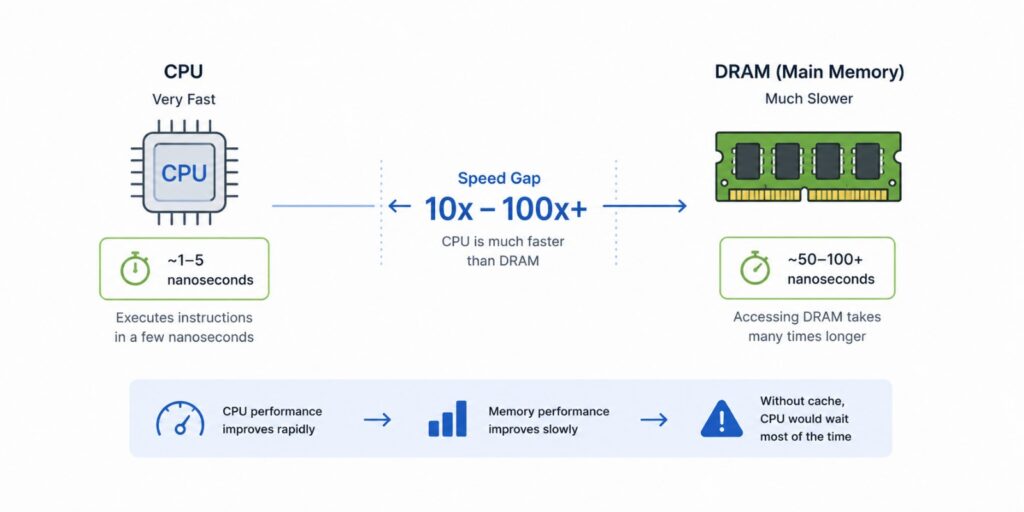
Processor performance has improved much faster than memory performance over the past several decades. While CPUs execute instructions in a few nanoseconds, accessing DRAM typically requires many times longer.
Without cache memory, this performance gap would severely limit processor efficiency regardless of CPU speed.
Reducing Memory Latency
Accessing L1 cache is significantly faster than accessing L2 cache, L3 cache, or RAM. By satisfying most memory requests directly from L1 cache, processors minimize waiting time and maintain a steady flow of instruction execution.
Lower latency directly translates into higher application performance.
Temporal Locality
Programs frequently reuse the same variables, instructions, and data structures within short periods of time. This behavior is known as temporal locality.
L1 cache exploits temporal locality by retaining recently accessed information so subsequent accesses can be completed quickly.
Spatial Locality
Applications also tend to access memory locations that are physically close together. For example, iterating through an array accesses consecutive memory addresses.
L1 cache loads entire cache lines instead of individual bytes, allowing nearby data to become immediately available when needed.
| Performance Challenge | L1 Cache Solution |
|---|---|
| CPU faster than RAM | Fast on-chip storage |
| High memory latency | Serve data locally |
| Repeated data access | Temporal locality |
| Sequential memory access | Spatial locality |
How L1 Cache Works
Whenever a processor executes instructions, it continuously requests data from memory. Rather than accessing RAM immediately, the CPU follows a hierarchical lookup process that begins with L1 cache. If the required information is already present, execution continues almost instantly. If not, the processor gradually searches lower levels of the memory hierarchy until the data is found.
This hierarchical design minimizes expensive memory accesses while keeping frequently used information close to the processor.
CPU Requests Data
Every instruction executed by the processor may require reading data, loading instructions, or writing updated values back to memory. Before accessing slower memory, the CPU first consults its local L1 cache.
This lookup occurs automatically in hardware and is invisible to software.
Cache Lookup
The processor compares the requested memory address with the addresses currently stored inside L1 cache. Specialized hardware determines whether the requested data is already available.
This lookup typically completes within only a few processor cycles.
Cache Hit
If the requested data exists in L1 cache, a cache hit occurs. The processor retrieves the information immediately without communicating with slower memory systems.
High cache hit rates are one of the primary reasons modern processors achieve such high performance.
Cache Miss
If the requested data is not present, a cache miss occurs. The processor then checks L2 cache, followed by L3 cache, and finally main memory if necessary. Once retrieved, the data is usually copied back into L1 cache for future accesses.
This process ensures frequently accessed information gradually migrates toward the fastest storage.
| Memory Access Stage | Responsibility |
|---|---|
| CPU Request | Request instructions or data |
| Cache Lookup | Search L1 cache |
| Cache Hit | Immediate data retrieval |
| Cache Miss | Retrieve from lower memory levels |
Core Components of L1 Cache
Although L1 cache appears as a simple block of fast memory, internally it consists of several architectural components that allow the processor to locate cached data quickly and manage memory efficiently. Cache lines organize stored data, tags identify memory addresses, cache sets improve lookup efficiency, and metadata bits help maintain correctness throughout program execution.
Together, these components allow L1 cache to deliver extremely low-latency memory access.
Cache Lines
L1 cache stores memory in fixed-size units called cache lines rather than individual bytes. A cache line commonly contains 64 bytes of contiguous memory copied from lower levels of the memory hierarchy.
Loading entire cache lines allows processors to take advantage of spatial locality while reducing future memory accesses.
Cache Tags
Each cache line contains a tag that identifies which memory address the cached data represents. When the processor requests information, cache hardware compares address tags to determine whether the required data already exists inside the cache.
Tags enable extremely fast lookup without scanning every stored byte individually.
Cache Sets
Modern caches organize cache lines into sets that simplify address lookup and replacement decisions. Depending on cache associativity, multiple cache lines may exist within the same set, allowing several memory addresses to share a common lookup location.
Set-based organization balances lookup speed with efficient cache utilization.
Valid and Dirty Bits
Each cache line also contains metadata describing its current status. A valid bit indicates whether the cache line contains usable data, while a dirty bit identifies whether cached data has been modified since it was loaded from lower memory.
These metadata fields help maintain consistency between cache and main memory.
| Component | Responsibility |
|---|---|
| Cache Line | Store fixed-size memory blocks |
| Cache Tag | Identify memory addresses |
| Cache Set | Organize cache entries |
| Valid & Dirty Bits | Maintain cache metadata |
L1 Cache Organization
L1 cache is carefully organized to maximize performance while keeping access latency extremely low. Instead of functioning as one large memory block, it is divided into specialized sections optimized for different types of processor activity. Modern CPUs also use various associativity techniques to balance lookup speed against efficient cache utilization.
These design decisions allow processors to retrieve both instructions and application data with minimal delay.
Instruction Cache (L1I)
Most modern processors dedicate part of the L1 cache exclusively to executable instructions. The instruction cache stores recently executed machine code so the processor can fetch upcoming instructions rapidly without repeatedly accessing slower memory.
Separating instructions from data allows instruction fetching and data access to occur simultaneously.
Data Cache (L1D)
The remaining portion of L1 cache stores application data such as variables, arrays, objects, and intermediate computation results. The processor reads from and writes to this cache continuously during program execution.
Keeping frequently accessed data close to the CPU significantly reduces execution latency.
Cache Size
L1 cache is intentionally small to maintain extremely fast access times. Modern processors commonly provide between 32 KB and 64 KB of instruction cache together with a similar amount of data cache for each CPU core.
Although much smaller than L2 or L3 cache, its speed makes it the most valuable level of the cache hierarchy.
Associativity
Processors organize L1 cache using different associativity strategies. Direct-mapped caches place each memory block in one location, set-associative caches allow several possible locations within a set, and fully associative caches allow placement anywhere within the cache.
Most modern processors use set-associative designs because they provide an effective balance between lookup speed and cache efficiency.
| L1 Organization | Purpose |
|---|---|
| L1 Instruction Cache | Store executable instructions |
| L1 Data Cache | Store application data |
| Cache Size | Minimize latency |
| Associativity | Improve cache utilization |
L1 Cache in the CPU Memory Hierarchy
L1 cache is only one layer within a much larger memory hierarchy designed to balance speed, capacity, and cost. As storage moves farther away from the processor, capacity generally increases while access speed decreases. The processor always attempts to satisfy requests from the fastest available storage before consulting slower memory levels.
Understanding this hierarchy explains why L1 cache plays such a critical role in overall CPU performance.
CPU Registers
Registers reside inside the processor and provide the fastest storage available. They hold operands, addresses, and intermediate computation results currently being used by executing instructions.
Registers are extremely limited in capacity but offer virtually instantaneous access.
L1 Cache
Immediately below the registers sits L1 cache. It provides the first level of memory caching and supplies frequently accessed instructions and data with minimal latency.
Every CPU core typically maintains its own private L1 cache.
L2 Cache
If data is not found in L1 cache, the processor checks L2 cache. L2 is larger than L1 but slightly slower because it stores more information while maintaining relatively low latency.
Many processors dedicate one L2 cache to each CPU core.
L3 Cache
L3 cache provides another level of caching shared across multiple processor cores. It is considerably larger than L1 and L2 but also slower to access.
Sharing L3 cache improves communication between cores while reducing expensive accesses to main memory.
Main Memory
If data is absent from every cache level, the processor retrieves it from DRAM. Main memory offers significantly greater capacity but much higher latency than any cache level.
After retrieval, the processor typically loads the data into the cache hierarchy so future accesses become faster.
| Memory Level | Characteristics |
|---|---|
| CPU Registers | Fastest, smallest storage |
| L1 Cache | First-level cache |
| L2 Cache | Larger secondary cache |
| L3 Cache | Shared cache across cores |
| Main Memory | Largest but slowest storage |
Performance and Cache Efficiency
The primary purpose of L1 cache is to keep the processor busy by minimizing the time spent waiting for data. Even the fastest CPU becomes inefficient if it repeatedly pauses while waiting for memory accesses to complete. L1 cache addresses this problem by ensuring that the majority of memory requests can be satisfied using extremely low-latency on-chip storage instead of slower cache levels or main memory.
The effectiveness of L1 cache depends not only on its speed but also on how efficiently applications use memory. Concepts such as cache hit rates, locality, and prefetching all influence overall processor performance.
Cache Hit Rate
A cache hit occurs when the requested instruction or data is already present in L1 cache. High cache hit rates allow the processor to execute instructions continuously without waiting for slower memory accesses.
Modern processors are designed to maximize hit rates because even small improvements can significantly increase application performance.
Cache Miss Penalty
When requested data is not available in L1 cache, the processor must search lower levels of the memory hierarchy. Accessing L2 cache, L3 cache, or DRAM requires progressively more processor cycles, increasing execution latency.
Reducing cache misses is therefore one of the most important goals of performance optimization.
Prefetching
Modern processors attempt to predict future memory accesses before they occur. Hardware prefetchers observe memory access patterns and proactively load likely future data into cache.
Accurate prefetching reduces cache misses while allowing applications to maintain high execution throughput.
Locality Optimization
Software design also influences cache performance. Programs that access memory sequentially and reuse recently accessed data generally achieve much higher cache efficiency than programs with random memory access patterns.
Understanding locality helps developers write cache-friendly code that naturally performs better on modern processors.
| Performance Factor | Benefit |
|---|---|
| Cache Hit Rate | Faster instruction execution |
| Low Cache Miss Rate | Reduced memory latency |
| Prefetching | Anticipate future memory accesses |
| Locality Optimization | Improve cache utilization |
Cache Coherence and Multi-Core Systems
Modern processors contain multiple CPU cores, and nearly every core includes its own private L1 cache. While this design greatly improves performance, it introduces a new challenge: ensuring that all cores observe consistent memory values when multiple caches contain copies of the same data. Cache coherence mechanisms solve this problem by coordinating updates across processor cores automatically.
Without cache coherence, different CPU cores could operate on outdated data, leading to incorrect program behavior despite each core functioning correctly in isolation.
Private L1 Caches
Each processor core typically maintains its own instruction cache and data cache. Keeping L1 caches private eliminates contention between cores while allowing each processor to access frequently used information with minimal latency.
Private caches significantly improve scalability as processors add more cores.
Cache Coherence
When multiple cores cache the same memory location, modifications made by one core must eventually become visible to the others. Cache coherence protocols ensure every processor observes a consistent view of shared memory.
These mechanisms operate entirely in hardware and are transparent to application developers.
MESI Protocol
One of the most widely used cache coherence mechanisms is the MESI protocol. Each cache line exists in one of several states such as Modified, Exclusive, Shared, or Invalid, allowing processors to coordinate ownership and updates efficiently.
The protocol minimizes unnecessary communication while maintaining memory consistency across cores.
Shared Memory
Multi-threaded applications often share data structures across multiple processor cores. Cache coherence ensures these shared variables remain synchronized even though each core maintains its own independent L1 cache.
This capability enables efficient parallel execution without sacrificing correctness.
| Multi-Core Feature | Purpose |
|---|---|
| Private L1 Cache | Fast per-core memory access |
| Cache Coherence | Maintain consistent data |
| MESI Protocol | Coordinate cache updates |
| Shared Memory | Enable parallel execution |
Common L1 Cache Use Cases
Although application developers rarely interact directly with L1 cache, its behavior influences the performance of nearly every workload running on modern processors. Applications that repeatedly access small working datasets often benefit significantly from L1 cache, while workloads with poor memory locality experience more cache misses and higher latency.
Understanding where L1 cache has the greatest impact helps engineers optimize software for modern hardware.
General Computing
Everyday applications such as web browsers, office software, operating systems, and development tools continuously benefit from L1 cache. Frequently executed instructions and recently accessed data remain close to the processor, improving responsiveness during normal application execution.
Most users experience faster applications without realizing cache memory plays a major role.
Database Systems
Database engines repeatedly access indexes, frequently queried records, execution plans, and internal metadata. Keeping these structures in L1 cache reduces query latency while improving transaction throughput.
Cache-efficient database algorithms often outperform theoretically faster algorithms with poor memory access patterns.
Machine Learning
Machine learning workloads involve repeated numerical computations over matrices, tensors, and vectors. Optimized libraries organize computations to maximize cache locality, allowing processors to reuse cached data efficiently during model training and inference.
Efficient cache usage becomes increasingly important as datasets and model sizes grow.
High-Performance Computing
Scientific simulations, numerical modeling, weather forecasting, and engineering applications perform enormous numbers of arithmetic operations. Optimizing algorithms for L1 cache frequently produces substantial performance improvements because processors spend less time waiting for memory.
Many high-performance computing optimizations focus primarily on improving cache efficiency rather than reducing arithmetic operations.
| Use Case | L1 Cache Benefit |
|---|---|
| General Computing | Faster application execution |
| Database Systems | Lower query latency |
| Machine Learning | Faster numerical computation |
| High-Performance Computing | Improved computational efficiency |
Common Misconceptions About L1 Cache
Because cache memory operates automatically inside the processor, many misconceptions exist regarding its behavior. Developers often assume larger caches always improve performance, that cache misses immediately access RAM, or that software directly controls cache contents. In reality, L1 cache behavior is determined by a combination of hardware architecture, workload characteristics, and memory access patterns.
Understanding these misconceptions provides a more accurate view of modern processor architecture.
Bigger Cache Is Always Better
Larger caches can store more data, but increasing cache size also increases lookup complexity and latency. L1 cache intentionally remains small so the processor can access it within only a few cycles.
Processors therefore balance cache size against access speed rather than maximizing capacity.
L1 Cache Stores Everything
L1 cache contains only a tiny fraction of active program data. Since modern applications commonly use gigabytes of memory, the processor continuously replaces older cache lines as new data becomes necessary.
Cache replacement algorithms determine which information remains available.
Cache Misses Always Access RAM
A cache miss in L1 cache does not automatically require accessing main memory. The processor first checks L2 cache, then L3 cache, before finally retrieving data from DRAM if necessary.
Multiple cache levels significantly reduce expensive memory accesses.
Software Controls the Cache Directly
Most applications cannot manually decide which data resides inside L1 cache. Modern processors automatically manage cache allocation, replacement, prefetching, and coherence using dedicated hardware mechanisms.
Developers influence cache performance primarily through memory access patterns rather than explicit cache instructions.
L1 Cache Is Shared Across All Cores
Each processor core normally maintains its own independent L1 instruction cache and data cache. Although higher cache levels may be shared, L1 cache remains private to maximize performance and reduce contention.
This organization allows every core to access frequently used information independently.
| Misconception | Reality |
|---|---|
| Bigger cache is always better | Speed is more important than capacity |
| L1 stores all active data | Capacity is intentionally limited |
| Cache misses go directly to RAM | L2 and L3 are checked first |
| Software manages L1 cache | Hardware performs cache management |
| L1 is shared by every core | Each core has its own L1 cache |
L1 Cache in System Design Interviews
Although System Design interviews often focus on distributed systems and large-scale architectures, interviewers occasionally expect candidates to understand fundamental hardware concepts that influence application performance. L1 cache commonly appears during discussions involving database optimization, high-performance computing, operating systems, memory-intensive algorithms, compiler optimization, and CPU performance analysis.
Strong candidates recognize that hardware architecture ultimately influences software performance, even in large distributed systems.
When to Discuss L1 Cache
L1 cache becomes relevant whenever interview questions involve low-latency computing, memory-intensive workloads, numerical processing, database internals, operating systems, or performance optimization.
Explaining memory hierarchy demonstrates an understanding that software performance depends on more than algorithmic complexity alone.
What Interviewers Evaluate
Interviewers commonly evaluate understanding of memory hierarchy, cache locality, cache hits, cache misses, coherence protocols, latency, and CPU architecture.
Candidates should explain how cache behavior influences real-world application performance rather than simply defining hardware terminology.
Common Candidate Mistakes
A common mistake is confusing CPU cache with application-level caches such as Redis or Memcached. Others assume cache misses always access RAM or overlook the importance of locality when discussing algorithm performance.
Successful answers distinguish clearly between processor caches and distributed caching systems.
| Interview Topic | What Interviewers Evaluate |
|---|---|
| Memory Hierarchy | Understanding cache levels |
| Performance | Cache locality and latency |
| Multi-Core Systems | Cache coherence |
| Optimization | Efficient memory access |
| Architecture Knowledge | CPU cache versus application cache |
Frequently Asked Questions About L1 Cache
L1 cache is one of the most important hardware optimizations in modern processors because it dramatically reduces memory access latency while allowing CPUs to execute billions of instructions efficiently. Although application developers rarely interact with it directly, nearly every software workload benefits from its ability to keep frequently used instructions and data close to the processor.
The following questions address many of the concepts engineers encounter when learning computer architecture.
What is L1 cache?
L1 cache is the smallest and fastest level of CPU cache located directly on each processor core. It stores frequently accessed instructions and data so the processor can retrieve them much faster than from lower cache levels or main memory.
Its primary purpose is reducing memory access latency.
Why is L1 cache so fast?
L1 cache is physically integrated into the processor core and intentionally kept very small. This combination allows the CPU to access cached information within only a few processor cycles.
Keeping the cache small minimizes lookup latency.
What is the difference between L1, L2, and L3 cache?
L1 cache is the fastest but smallest cache and is typically private to each core. L2 cache is larger but slightly slower, while L3 cache provides even greater capacity and is commonly shared among multiple processor cores.
Each level balances speed against storage capacity.
What is a cache hit?
A cache hit occurs when the processor finds the requested instruction or data already stored in L1 cache. The CPU retrieves the information immediately without accessing slower memory levels.
High hit rates significantly improve processor performance.
What happens during a cache miss?
When L1 cache does not contain the requested data, the processor searches L2 cache, then L3 cache, and finally main memory if necessary. Once retrieved, the data is usually copied into L1 cache to accelerate future accesses.
This hierarchical lookup minimizes repeated memory latency.
Is L1 cache shared between CPU cores?
No. Most modern processors provide separate L1 instruction and data caches for every CPU core. This design minimizes contention while maximizing per-core performance.
Higher cache levels may still be shared across cores.
Can software control the L1 cache?
Generally, no. Cache allocation, replacement, coherence, and prefetching are managed automatically by processor hardware. Developers influence cache behavior indirectly through efficient memory access patterns.
Most software interacts with cache only implicitly.
Why is L1 cache so small?
Keeping L1 cache small allows extremely low access latency. Increasing cache capacity would require more complex lookup hardware and increase the number of processor cycles needed for every memory access.
Processor designers prioritize speed over storage capacity at the L1 level.
| Question | Short Answer |
|---|---|
| What is L1 cache? | Fastest CPU cache |
| Why is it fast? | Small on-chip storage |
| L1 vs L2 vs L3? | Speed versus capacity |
| What is a cache hit? | Data found in L1 |
| Cache miss? | Search lower memory levels |
| Shared across cores? | No |
Final Thoughts
L1 cache is the fastest level of the CPU memory hierarchy, providing immediate access to frequently used instructions and data while minimizing expensive memory accesses. By storing recently accessed information close to each processor core, L1 cache allows modern CPUs to execute instructions efficiently despite the significant speed difference between processors and main memory. Concepts such as cache lines, locality, associativity, cache hits, cache misses, and coherence protocols work together to maximize performance across both single-core and multi-core systems.
Understanding L1 cache is fundamental to computer architecture, software optimization, and performance engineering because every application ultimately depends on efficient memory access. Whether optimizing database engines, machine learning workloads, operating systems, scientific computing applications, or high-performance distributed systems, recognizing how the CPU memory hierarchy operates provides valuable insight into why some programs perform dramatically better than others. A solid understanding of L1 cache also strengthens System Design discussions by connecting software behavior with the hardware architecture that executes every instruction.