
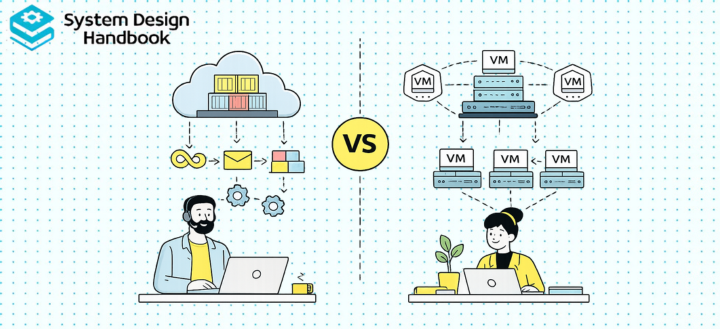
Modern cloud platforms rely heavily on both containerization and virtualization to run applications efficiently. Although these technologies are often compared, they solve different infrastructure problems and operate at different layers of the computing stack. Virtualization allows multiple operating systems to share the same physical hardware, while containerization allows multiple applications to share the same operating system kernel. Both improve hardware utilization, but they achieve that goal using fundamentally different architectures.
Understanding this distinction is important because containers and virtual machines are frequently used together rather than replacing one another. Most modern cloud platforms, Kubernetes clusters, and enterprise environments rely on both technologies to balance flexibility, security, and operational efficiency.
Understanding Virtualization
Virtualization creates multiple virtual machines that run independently on a single physical server. Each virtual machine contains its own operating system, libraries, runtime environment, and applications, making it behave almost like a completely separate physical computer.
Because every virtual machine includes its own operating system, workloads remain strongly isolated from one another. This makes virtualization well-suited for running different operating systems, supporting legacy software, and hosting workloads with strict security or compliance requirements.
Understanding Containerization
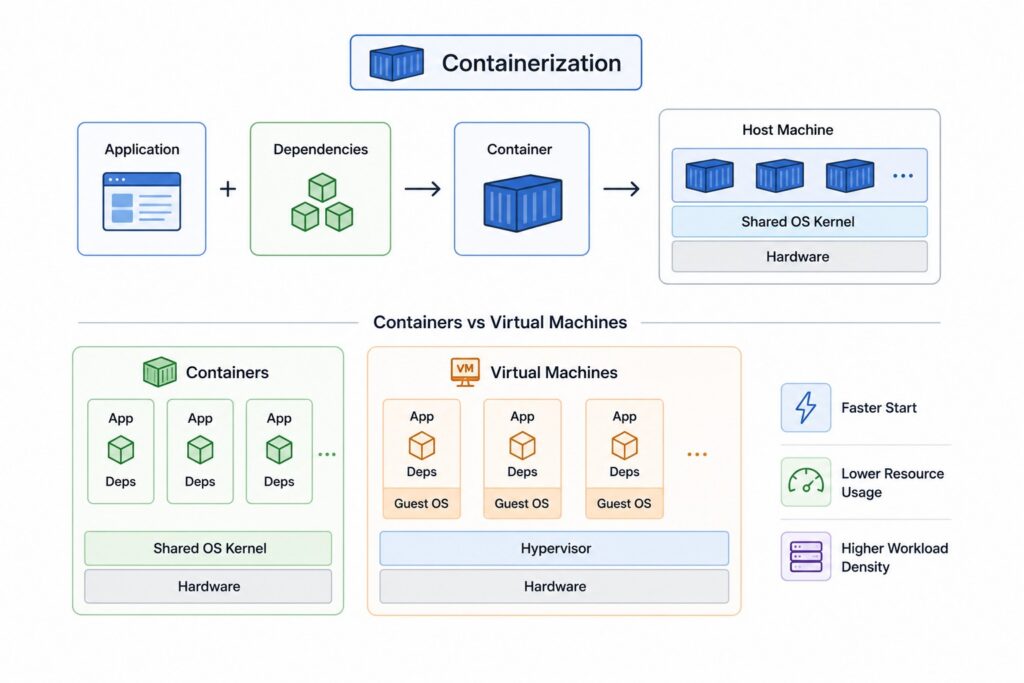
Containerization packages applications together with their dependencies while sharing the operating system kernel provided by the host machine. Instead of virtualizing hardware, containers virtualize the operating system environment, allowing many isolated applications to run efficiently on the same server.
Since containers do not require separate operating systems, they start much faster, consume fewer resources, and allow significantly higher workload density compared to traditional virtual machines.
Different Technologies for Different Problems
Virtualization focuses on creating isolated operating environments, whereas containerization focuses on packaging and deploying applications consistently across different environments. One abstracts hardware while the other abstracts the operating system.
Rather than viewing them as competing technologies, it is more accurate to think of them as complementary infrastructure layers that address different architectural requirements.
| Technology | Primary Focus |
|---|---|
| Virtualization | Hardware abstraction through virtual machines |
| Containerization | Operating system abstraction through containers |
| Virtual Machines | Multiple independent operating systems |
| Containers | Lightweight application isolation |
Why This Comparison Matters
Organizations building modern cloud infrastructure almost always evaluate both virtual machines and containers. While both improve infrastructure utilization, they influence deployment workflows, operational complexity, security models, scalability, and cloud architecture in different ways. Choosing the appropriate technology affects not only application performance but also the long-term maintainability of the entire platform.
The decision is therefore architectural rather than purely technical. Understanding the strengths and limitations of each approach allows engineering teams to build systems that match their operational requirements instead of following industry trends.
The Evolution of Infrastructure
Early enterprise applications typically ran directly on dedicated physical servers. Although simple, this approach often wasted hardware resources because individual applications rarely used the full capacity of a server. Virtualization solved this problem by allowing multiple virtual machines to share the same hardware while remaining isolated.
As cloud-native development became more common, containers emerged as an even lighter deployment model. Instead of virtualizing entire operating systems, containers package only the application and its dependencies, significantly reducing infrastructure overhead.
Different Levels of Isolation
One of the biggest architectural differences lies in workload isolation. Virtual machines isolate workloads at the hardware level through a hypervisor, giving every workload its own operating system. Containers isolate workloads at the operating system level while sharing the host kernel.
This difference affects startup speed, resource consumption, security, portability, and operational management throughout the application lifecycle.
Choosing the Right Technology
There is no universally correct choice. Applications requiring different operating systems, strong isolation, or legacy software often benefit from virtual machines. Cloud-native applications, microservices, and CI/CD pipelines frequently benefit from containers because of their portability and efficiency.
Understanding workload characteristics usually leads to better decisions than simply preferring newer technologies.
| Consideration | Virtualization | Containerization |
|---|---|---|
| Isolation | Hardware-level | Operating system-level |
| Resource Usage | Higher | Lower |
| Startup Speed | Slower | Faster |
| Flexibility | Multiple operating systems | Shared operating system |
| Best Fit | Infrastructure isolation | Cloud-native applications |
How Virtualization Works
Virtualization enables multiple independent operating systems to run simultaneously on the same physical hardware. Instead of applications interacting directly with the underlying server, a virtualization layer called a hypervisor manages hardware resources and allocates them to individual virtual machines. Each virtual machine behaves like a complete computer with its own operating system, memory, storage, networking, and applications.
This architecture allows organizations to consolidate workloads while maintaining strong separation between applications running on the same hardware.
Hypervisors
The hypervisor is the core component responsible for virtualization. It creates virtual machines, allocates hardware resources, schedules workloads, and isolates operating systems from one another. Hypervisors are generally classified as either Type 1, which run directly on physical hardware, or Type 2, which operate on top of an existing operating system.
Enterprise cloud platforms almost exclusively use Type 1 hypervisors because they provide better performance, stronger isolation, and lower overhead.
Virtual Machines
Each virtual machine contains everything required to operate independently, including a complete guest operating system, application binaries, system libraries, and runtime dependencies. From the perspective of the applications running inside it, the virtual machine appears to be a dedicated physical server.
This independence allows organizations to run Windows, Linux, or other operating systems simultaneously on the same physical infrastructure.
Resource Allocation
The hypervisor divides CPU cores, memory, storage, and networking resources among virtual machines. Resource allocation policies ensure workloads remain isolated while allowing administrators to optimize infrastructure utilization across many applications.
Modern virtualization platforms also support dynamic resource allocation, enabling infrastructure to adapt as workload requirements change.
VM Lifecycle Management
Virtual machines follow a complete operational lifecycle including provisioning, cloning, snapshots, migration, backups, and recovery. Enterprise virtualization platforms provide sophisticated management capabilities that simplify infrastructure maintenance while minimizing application downtime.
These features remain one of the reasons virtualization continues to play an important role in enterprise infrastructure.
| Virtualization Component | Responsibility |
|---|---|
| Hypervisor | Manage hardware virtualization |
| Virtual Machine | Execute isolated operating systems |
| Guest OS | Provide application runtime environment |
| Virtual Hardware | CPU, memory, storage, networking |
| Management Platform | Provision, migrate, and maintain VMs |
How Containerization Works
Containerization packages applications together with their required libraries, dependencies, and runtime configuration while sharing the operating system kernel of the host machine. Instead of virtualizing hardware, containers isolate application processes using operating system features that create lightweight execution environments. This approach dramatically reduces overhead while allowing applications to run consistently across different environments.
Because containers include everything an application needs except the operating system kernel, they have become one of the defining technologies behind modern cloud-native software development.
Containers
A container is an isolated application environment that includes application code, runtime libraries, system tools, and configuration files. Unlike virtual machines, containers do not require a separate guest operating system because they share the host kernel.
This lightweight architecture enables applications to start quickly while consuming significantly fewer resources than traditional virtual machines.
Container Runtime
Containers require a runtime responsible for creating, starting, stopping, and managing container execution. Popular runtimes include Docker, containerd, and CRI-O, all of which follow standards established by the Open Container Initiative (OCI).
The runtime acts as the bridge between container images and the underlying operating system, ensuring applications execute consistently regardless of where they are deployed.
Shared Operating System Kernel
Container isolation depends on operating system features such as namespaces and control groups (cgroups). Namespaces isolate resources including processes, networking, and file systems, while cgroups control how much CPU, memory, and storage each container is allowed to consume.
Together, these mechanisms allow multiple containers to operate independently while efficiently sharing the same operating system kernel.
Container Images
Containers are created from immutable container images stored in registries. Images are built in layers, allowing common operating system components and libraries to be reused across many applications. This layered approach reduces storage requirements while accelerating image distribution and deployment.
Image immutability also improves deployment consistency because every environment receives the exact same application package.
| Container Component | Responsibility |
|---|---|
| Container | Execute isolated application |
| Container Runtime | Manage container lifecycle |
| Host Operating System | Provide shared kernel |
| Namespaces | Isolate operating system resources |
| Container Image | Package application and dependencies |
Containerization vs Virtualization Architecture Comparison
Although both technologies enable multiple workloads to share physical infrastructure, they achieve isolation using fundamentally different architectural approaches. Virtualization creates complete virtual computers that each run independent operating systems, while containerization creates isolated application environments that share a common operating system kernel. These architectural differences influence performance, portability, security, and operational complexity.
Understanding these differences helps explain why many organizations continue using both technologies together within the same cloud infrastructure.
Isolation Model
Virtual machines isolate workloads through hardware virtualization. Every application operates inside its own guest operating system, creating strong separation between workloads and reducing the likelihood that problems in one environment affect another.
Containers isolate workloads at the operating system level. Applications remain isolated from one another, but they ultimately depend on the same host kernel, making container isolation lighter but somewhat different from hardware virtualization.
Resource Utilization
Because every virtual machine includes an entire operating system, virtualization consumes more CPU, memory, and storage resources than containerization. Containers avoid this overhead by sharing the operating system kernel, allowing much higher workload density on the same physical hardware.
This efficiency has made containers particularly attractive for microservices and cloud-native workloads where many small applications run simultaneously.
Operating System Management
Virtual machines require administrators to maintain every guest operating system individually. Operating system updates, security patches, and configuration changes must be managed across every virtual machine deployed within the infrastructure.
Containers simplify operating system management because only the host operating system requires maintenance. Applications remain packaged independently while sharing the underlying kernel.
Portability
Container images provide exceptional portability because the same image can execute consistently across development, testing, and production environments as long as a compatible container runtime exists. Virtual machines are also portable, but migrating complete operating systems generally requires significantly larger disk images and longer deployment times.
The lightweight nature of containers has made them particularly well suited for continuous integration and continuous deployment pipelines.
| Architecture Area | Virtualization | Containerization |
|---|---|---|
| Isolation | Hardware virtualization | Operating system virtualization |
| Operating System | Separate guest OS per workload | Shared host kernel |
| Resource Overhead | Higher | Lower |
| Workload Density | Lower | Higher |
| Deployment Unit | Virtual machine | Container image |
Performance and Resource Efficiency Comparison
Performance is one of the primary reasons organizations adopt containers, but comparing performance involves more than simply measuring application speed. Startup time, resource consumption, storage efficiency, workload density, and operational scalability all contribute to overall infrastructure efficiency. Since virtualization and containerization use different architectures, their performance characteristics naturally differ as well.
The most appropriate technology depends on which performance metrics matter most for a particular workload.
Startup Time
Virtual machines require an entire operating system to boot before applications become available. This initialization process often takes several minutes depending on the operating system and infrastructure configuration.
Containers generally start in seconds because they launch application processes directly without booting a separate operating system. This rapid startup enables fast deployments, autoscaling, and efficient recovery from failures.
CPU and Memory Usage
Each virtual machine reserves memory for its guest operating system in addition to the application itself. As more virtual machines are deployed, operating system overhead consumes an increasingly significant portion of available hardware resources.
Containers avoid most of this overhead because applications share the host kernel. More resources remain available for running application workloads instead of supporting multiple operating systems.
Storage Efficiency
Virtual machine images often include complete operating systems together with application software, resulting in relatively large disk images. Containers use layered images that reuse common components across many applications, reducing storage requirements and improving deployment efficiency.
Layered image distribution also decreases network traffic during application deployment because only modified layers need to be transferred.
Density and Scalability
Because containers consume fewer resources, significantly more containers can typically run on the same physical server compared to virtual machines. Higher workload density improves infrastructure utilization while reducing cloud infrastructure costs.
Virtual machines remain appropriate for workloads requiring stronger isolation or multiple operating systems, but containers generally provide greater efficiency for cloud-native application deployments.
| Performance Area | Virtualization | Containerization |
|---|---|---|
| Startup Time | Slower operating system boot | Fast application startup |
| Memory Usage | Higher due to guest operating systems | Lower shared-kernel overhead |
| Storage | Larger VM images | Layered container images |
| Workload Density | Lower | Higher |
| Resource Efficiency | Moderate | High |
Security and Isolation Comparison
Security is one of the most important factors when deciding between virtual machines and containers. Both technologies isolate workloads running on shared infrastructure, but they achieve isolation using different mechanisms that introduce different security tradeoffs. Virtual machines emphasize strong isolation through hardware virtualization, while containers emphasize efficiency through operating system isolation.
Neither approach is inherently more secure in every situation. The appropriate choice depends on workload sensitivity, operational practices, compliance requirements, and the level of isolation required by the organization.
Isolation Boundaries
Virtual machines provide isolation by virtualizing hardware. Each virtual machine runs its own operating system, kernel, and runtime environment, making workloads largely independent of one another. If one virtual machine becomes compromised, the hypervisor helps prevent the attack from spreading to neighboring virtual machines.
Containers isolate applications using operating system features such as namespaces and cgroups. Although applications remain separated, every container ultimately depends on the same host kernel, making kernel security a shared responsibility across all workloads.
Operating System Security
Every virtual machine contains its own operating system that can be patched, configured, and secured independently. This flexibility allows organizations to run different operating system versions or security configurations for different workloads.
Containers simplify operating system management because only the host operating system requires maintenance. However, a vulnerability affecting the shared kernel has the potential to impact multiple containers simultaneously if not properly addressed.
Vulnerability Surface
Security depends not only on architecture but also on operational practices. Containers typically have smaller runtime environments, which can reduce the number of installed packages and therefore decrease the potential attack surface. At the same time, poorly configured container images, excessive privileges, or outdated container runtimes can introduce significant security risks.
Virtual machines generally have larger operating system footprints, requiring more frequent patching and maintenance, but they provide stronger workload separation that benefits highly sensitive applications.
Multi-Tenant Environments
Organizations hosting workloads from multiple customers often require strong tenant isolation. Virtual machines naturally provide this separation because each tenant receives its own operating system environment. Containers can also support multi-tenancy successfully, but they typically require additional security controls such as Kubernetes policies, runtime isolation technologies, and careful privilege management.
Selecting the appropriate model depends on balancing security requirements with infrastructure efficiency.
| Security Area | Virtualization | Containerization |
|---|---|---|
| Isolation | Hardware-level isolation | Operating system-level isolation |
| Operating System | Independent guest OS | Shared host kernel |
| Attack Surface | Larger operating system footprint | Smaller runtime environment |
| Multi-Tenancy | Strong default isolation | Requires additional security controls |
Containerization and Virtualization in Cloud Computing
Modern cloud platforms make extensive use of both virtual machines and containers because each technology addresses different operational requirements. Rather than replacing one another, they frequently operate together within the same infrastructure. Cloud providers commonly use virtualization to isolate customer environments while organizations deploy containerized applications inside those virtual machines.
This layered approach combines the security benefits of virtualization with the efficiency and portability of containers.
Virtual Machines in the Cloud
Infrastructure-as-a-Service platforms such as Amazon EC2, Azure Virtual Machines, and Google Compute Engine are built around virtualization. Customers receive isolated virtual machines that behave like traditional servers while cloud providers manage the underlying physical hardware.
Virtual machines remain popular for enterprise workloads, legacy applications, databases, and systems requiring complete operating system control. They also provide a familiar deployment model for organizations migrating existing applications to the cloud.
Containers in the Cloud
Container platforms such as Kubernetes, Amazon ECS, Azure Kubernetes Service, Google Kubernetes Engine, and Red Hat OpenShift allow organizations to deploy containerized applications at scale. These platforms automate scheduling, scaling, networking, and workload recovery while taking advantage of the lightweight nature of containers.
Containers have become the preferred deployment model for microservices, cloud-native applications, CI/CD pipelines, and highly dynamic workloads.
Serverless Platforms
Although serverless computing hides infrastructure from developers, many serverless platforms internally rely on lightweight container technologies to execute application code. Containers provide isolation, portability, and rapid startup while allowing cloud providers to manage infrastructure transparently.
This illustrates that containers often serve as foundational building blocks even when developers never interact with them directly.
Hybrid Infrastructure
Many organizations intentionally combine virtual machines and containers within the same environment. Virtual machines provide secure infrastructure boundaries, while containers enable efficient application deployment and scaling inside those environments.
This hybrid model demonstrates that choosing between containers and virtual machines is often unnecessary because both technologies complement one another.
| Cloud Deployment | Primary Technology |
|---|---|
| Infrastructure as a Service | Virtual Machines |
| Kubernetes Platforms | Containers |
| Container Platforms | Containers |
| Legacy Enterprise Workloads | Virtual Machines |
| Modern Hybrid Platforms | Virtual Machines and Containers |
When to Choose Containerization vs Virtualization
Choosing between containers and virtual machines depends less on which technology is newer and more on the characteristics of the workload being deployed. Different applications have different requirements for isolation, portability, operational control, and scalability. Understanding these requirements allows architects to select the most appropriate deployment model rather than adopting technology based solely on industry trends.
Many production environments intentionally use both technologies because each solves a different set of infrastructure challenges.
When Containers Are the Better Choice
Containers excel when applications need rapid deployment, consistent environments, and efficient resource utilization. Cloud-native applications, microservices, continuous integration pipelines, APIs, and stateless services benefit significantly from containerization because containers start quickly, consume relatively few resources, and integrate naturally with orchestration platforms such as Kubernetes.
Development teams also benefit from containers because applications behave consistently across local development, testing, and production environments.
When Virtual Machines Are the Better Choice
Virtual machines remain the preferred solution when workloads require complete operating system isolation or different operating systems on the same hardware. Legacy enterprise software, commercial operating systems, security-sensitive workloads, and applications with specialized hardware or kernel requirements often fit naturally into virtual machine environments.
Organizations operating under strict regulatory requirements also frequently choose virtual machines because of their stronger isolation characteristics.
When Organizations Use Both
Many cloud environments deploy containers inside virtual machines. The virtual machine provides an isolated infrastructure boundary while containers efficiently package and scale individual applications. This layered architecture combines the strengths of both technologies without forcing organizations to choose one exclusively.
Understanding how these technologies complement one another is often more valuable than viewing them as competing solutions.
| Scenario | Better Choice |
|---|---|
| Microservices | Containers |
| CI/CD Pipelines | Containers |
| Legacy Enterprise Applications | Virtual Machines |
| Multiple Operating Systems | Virtual Machines |
| Modern Cloud Platforms | Often Both Together |
Common Misconceptions
Containerization has become extremely popular over the past decade, leading to several misconceptions about its relationship with virtualization. These misunderstandings often simplify complex architectural decisions into absolute statements that do not reflect how modern infrastructure actually operates. Understanding the strengths and limitations of each technology provides a more accurate perspective.
Most organizations continue using both virtual machines and containers because they address different operational requirements.
Containers Replace Virtual Machines
One common misconception is that containers have completely replaced virtual machines. In reality, most public cloud providers still rely heavily on virtualization to isolate customer infrastructure, while many Kubernetes clusters themselves run inside virtual machines.
Containers have changed application deployment, but they have not eliminated the need for virtualized infrastructure.
Containers Are Virtual Machines
Containers and virtual machines are fundamentally different technologies. Virtual machines emulate hardware and include independent operating systems, while containers isolate applications by sharing the host operating system kernel.
Although both provide workload isolation, the underlying architecture differs significantly.
Virtual Machines Are Obsolete
Virtual machines continue to play a critical role in enterprise infrastructure, cloud computing, disaster recovery, security-sensitive workloads, and operating system virtualization. Many business applications still require capabilities that containers are not intended to provide.
Their continued adoption demonstrates that virtualization remains highly relevant despite the widespread success of containers.
Containers Are Always More Secure
Containers often have smaller runtime environments, but sharing a host kernel introduces different security considerations. Virtual machines generally provide stronger workload isolation, while container security depends heavily on image quality, runtime configuration, and host operating system protection.
Security depends on architecture, operational practices, and workload requirements rather than the technology alone.
Every Application Should Be Containerized
Not every application benefits from containerization. Small internal tools, legacy software, monolithic enterprise systems, or applications with specialized operating system dependencies may gain little from moving to containers while introducing unnecessary migration effort.
Architectural decisions should always be guided by business and technical requirements rather than assuming containers are appropriate for every workload.
| Misconception | Reality |
|---|---|
| Containers replace virtual machines | Both technologies continue to coexist |
| Containers are virtual machines | They use fundamentally different architectures |
| Virtual machines are obsolete | They remain widely used in enterprise infrastructure |
| Containers are always more secure | Security depends on workload and configuration |
| Every application should use containers | Technology should match workload requirements |
Containerization vs Virtualization in System Design Interviews
Containers and virtual machines appear regularly in cloud architecture, platform engineering, DevOps, and System Design interviews because they influence scalability, deployment, infrastructure management, and operational efficiency. Interviewers generally care less about memorizing technical definitions and more about understanding when each technology should be applied within real production systems.
Strong candidates explain architectural tradeoffs instead of presenting one technology as universally superior.
What Interviewers Evaluate
Interviewers typically assess whether candidates understand workload characteristics, infrastructure efficiency, security implications, deployment workflows, and operational complexity. They want to see how candidates reason about infrastructure choices rather than whether they simply recommend containers for every situation.
Clear explanations of why one technology fits a particular workload often demonstrate stronger engineering judgment than detailed descriptions of implementation internals.
Common Interview Scenarios
Discussions involving Kubernetes adoption, cloud migration, legacy modernization, platform engineering, or hybrid cloud infrastructure frequently require candidates to compare containers and virtual machines. These conversations often extend beyond deployment technology into broader topics such as scalability, CI/CD, security, and operational management.
Understanding both technologies allows candidates to adapt their recommendations to different business requirements.
Common Candidate Mistakes
A frequent mistake is assuming containers automatically replace virtual machines or recommending Kubernetes regardless of workload characteristics. Others focus exclusively on performance while overlooking security, compliance, or operational considerations that may justify virtualization.
Balanced interview answers recognize that infrastructure decisions involve tradeoffs rather than universally correct solutions.
| Interview Topic | What Interviewers Evaluate |
|---|---|
| Workload Selection | Appropriate deployment technology |
| Scalability | Infrastructure efficiency |
| Security | Isolation and operational risk |
| Operations | Deployment and maintenance strategy |
| Tradeoff Analysis | Balanced architectural reasoning |
Frequently Asked Questions About Containerization vs Virtualization
Containerization and virtualization are foundational infrastructure technologies that support modern cloud computing, yet they are often misunderstood because they address similar goals using different architectural approaches. Engineers evaluating deployment platforms frequently ask how these technologies differ, whether one replaces the other, and which is more appropriate for different types of workloads.
Understanding these common questions helps connect infrastructure theory with practical System Design decisions.
What is the main difference between containers and virtual machines?
Virtual machines virtualize hardware and run independent operating systems, while containers virtualize the operating system and share the host kernel. This makes virtual machines heavier but more isolated, whereas containers are lighter and more resource-efficient.
The difference lies primarily in the level of abstraction rather than the purpose of running isolated workloads.
Are containers faster than virtual machines?
In most cases, yes. Containers generally start much faster because they launch application processes directly instead of booting an entire operating system. They also consume fewer system resources, allowing higher workload density on the same hardware.
Application performance itself, however, depends on many factors beyond the deployment technology.
Which technology is more secure?
Virtual machines typically provide stronger isolation because every workload runs within its own operating system. Containers can also be highly secure when configured correctly, but they depend on a shared kernel and therefore require careful runtime security practices.
The appropriate choice depends on workload sensitivity and organizational security requirements.
Can containers run inside virtual machines?
Yes. This is one of the most common deployment models in modern cloud computing. Virtual machines provide infrastructure isolation while containers manage application packaging and deployment inside those virtual machines.
Many managed Kubernetes platforms follow this exact architecture.
Does Kubernetes replace virtualization?
No. Kubernetes orchestrates containers, while virtualization provides isolated computing environments. In fact, Kubernetes clusters frequently run on virtual machines provided by cloud infrastructure.
The two technologies address different layers of the software stack.
Should every application use containers?
No. Containers work extremely well for cloud-native applications and microservices, but some workloads benefit more from virtual machines because of operating system requirements, legacy software, compliance constraints, or stronger isolation needs.
Technology choices should reflect workload characteristics rather than industry popularity.
When should organizations choose virtual machines?
Virtual machines remain appropriate for workloads requiring multiple operating systems, strong isolation, legacy enterprise software, or specialized operating system configurations. They also continue to play an important role in cloud infrastructure and enterprise data centers.
Many organizations maintain large virtualized environments alongside modern container platforms.
Why do cloud providers use both technologies?
Cloud providers combine virtualization and containerization because each technology solves a different problem. Virtualization isolates customer infrastructure, while containers enable efficient deployment and scaling of applications running inside that infrastructure.
Using both technologies together creates flexible, secure, and highly efficient cloud platforms.
| Question | Short Answer |
|---|---|
| Main difference? | Hardware virtualization vs operating system virtualization |
| Are containers faster? | Generally yes, especially during startup |
| Which is more secure? | Virtual machines usually provide stronger isolation |
| Can containers run inside VMs? | Yes, very commonly |
| Does Kubernetes replace virtualization? | No |
| Why use both? | They solve complementary infrastructure problems |
Final Thoughts
Containerization and virtualization are often presented as competing technologies, but modern cloud infrastructure demonstrates that they are highly complementary. Virtualization provides strong hardware-level isolation, operating system flexibility, and mature infrastructure management, while containerization delivers lightweight application packaging, rapid deployment, and efficient resource utilization. Together they form the foundation of many cloud-native platforms, with virtual machines providing secure infrastructure boundaries and containers enabling portable, scalable application deployment.
Understanding the differences between these technologies is essential for cloud architecture, platform engineering, DevOps, and System Design. Rather than asking which approach is universally better, successful architects evaluate workload characteristics, security requirements, operational maturity, and business objectives before selecting the appropriate deployment model. By understanding the strengths, limitations, and tradeoffs of both containerization and virtualization, you can design infrastructure that is efficient, resilient, and well-suited to real-world production environments.